
The fastest way to cut vacancy loss and coordinator hours is to embed vendor coordination directly inside the unit-turn workflow, backed by simple automation and centralized contract tracking. An operator-first workspace like TurnTrack does this by keeping vendor contact, status, and history attached to the turn itself. Teams that make this switch typically see faster vendor acknowledgment, fewer missed contract renewals, and shorter time-to-rent-ready. Start by mapping your current turn timeline before adding any tool.
TL;DR:
- Using a shared turn record with vendor contact info attached reduces delays caused by searching for details and improves communication flow.
- Setting clear SLAs for prompt responses and standardized bid thresholds helps control costs and prevent budget overruns on larger jobs.
- Maintaining centralized contract records and regular reviews prevents unwanted renewals, duplicated contracts, and unauthorized spending.
- Implementing role-based data security minimizes exposure of sensitive resident and vendor information during coordination.
Table of Contents
- What is the best approach to vendor coordination in multifamily?
- Vendor onboarding and compliance checklist you can operationalize today
- How do you manage contract renewals without losing money?
- Where does vendor coordination happen inside a unit turn?
- Which KPIs actually protect NOI?
- What should you look for when evaluating make-ready software?
- How TurnTrack implements these practices in the field
- What communication channels get the fastest vendor response?
- When should you require competitive bids?
- What does coordination inefficiency actually cost you?
- How should you handle a vendor dispute?
- How do you handle safety and compliance during vendor work?
- What data security concerns come up in vendor coordination?
- Operator perspective: when should smaller portfolios adopt these changes?
- Try TurnTrack: put the turn-and-vendor workflow to a real test
- Sources
What is the best approach to vendor coordination in multifamily?
Multifamily operators generally run vendor coordination one of three ways: manual, platform-native, or automated orchestration. Each fits a different portfolio size and level of operational maturity, and picking the wrong one wastes either money or coordinator hours.
Manual coordination means phone calls, texts, and spreadsheets tracking who's doing what. It costs nothing to start and works fine under roughly 100 units, but it depends entirely on one person's memory and availability. When that coordinator is out sick, the whole system stalls.
Platform-native coordination puts vendor records, turn status, and contact info inside a shared system everyone can see. Adoption takes a few weeks, vendors need minimal training, and the labor savings show up almost immediately because nobody's digging through texts to find a phone number.
Automated orchestration adds SMS-based vendor acceptance, timed nudges, and escalation rules on top of a platform. This is where the real time savings live: one documented case in a 350-unit portfolio dropped vendor acknowledgment time from 18 hours to 4.5 hours after adding automation to the workflow.
Here's how to decide where you fall:
- Under 100 units, one coordinator, low turn volume: manual tracking with a shared spreadsheet still works, but write down your process so it survives a staffing change.
- 100 to 400 units, growing turn volume: standardize on a platform-native tool before you add headcount. This is the threshold where manual coordination starts eating full days.
- 400+ units or multiple coordinators: layer automation on top of the platform for routine, non-emergency work orders, which typically represent 60 to 70% of total volume.
Vendor onboarding and compliance checklist you can operationalize today
Every vendor should clear the same gate before they touch a unit. Collect a signed W-9, a current certificate of insurance (COI) naming your entity as additionally insured, and copies of any required trade licenses. Verify COIs on a recurring basis, not just at signup. Insurance lapses are one of the most common and costly gaps in multifamily vendor programs, and standardized onboarding with automated insurance tracking closes that gap before it becomes a liability claim.
Set minimum requirements for your preferred-vendor list: general liability minimums, response time commitments, and at least one reference from a comparable property. HUD-related service coordination guidance recommends building a maintained resource directory with organizational-level partnerships rather than one-off vendor relationships, which holds up well for multifamily maintenance vendors too.
Keep onboarding friction low. A single walkthrough call, a short document checklist, and an SMS fallback for vendors who won't use a portal will get you further than a ten-step registration process nobody finishes. Our contractor onboarding checklist breaks this down field by field if you want a starting template.
How do you manage contract renewals without losing money?
Every vendor contract needs the same fields logged in one place: start date, term length, auto-renew clause, notice period, rate, and the person who signed it. Missing any one of these is how properties end up paying for a contract nobody remembers signing.
Poor contract tracking causes unwanted renewals, duplicate contracts, and unauthorized spend, especially when different site managers sign vendors independently without a central record. That decentralization also creates headaches during property dispositions, when a buyer's diligence team asks for every active vendor agreement and nobody has a clean list.
A workable alert cadence:
- 90 days out: flag the contract for review and decide whether to renew, renegotiate, or rebid.
- 60 days out: if rebidding, collect competing quotes now, not after the auto-renew window closes.
- 30 days out: finalize the decision and document it, even if the decision is "renew as-is."
Assign one person, usually a regional manager or director of operations, to own final sign-off on renewals above a set dollar threshold. Centralizing this in a shared record, rather than in individual site files, is what makes audits and dispositions fast instead of painful.
Where does vendor coordination happen inside a unit turn?
A standard turn moves through Move-Out → Tech Start → Cleaners → Carpet → Inspection → Make-Ready, and vendors touch nearly every stage after move-out. Mapping vendor responsibility to each stage is what keeps a turn from stalling on a missed handoff.
At Tech Start, the maintenance tech identifies what needs outside help, punch-out repairs, appliance service, and flags which vendor to call. At Cleaners and Carpet, the vendor needs the unit's spec (paint color, flooring type) without having to call the office. That's a common failure point: a carpet crew shows up, doesn't know the exact product spec, and either guesses or waits on a callback. At Inspection, whoever walks the unit records condition against the pre-turn state, ideally with photo evidence attached to the specific line item rather than a folder nobody can find later.
Ownership matters more than tooling here. Whoever schedules a vendor should also be the one who confirms the job is done, not a different person relying on a text thread. When a job goes At Risk, meaning a vendor missed a scheduled date, the coordinator needs an alternate vendor ready to call immediately, which is why maintaining more than one qualified vendor per trade reduces exposure on critical services. Our unit turn workflow guide walks through this stage by stage if you're building the process from scratch.
Which KPIs actually protect NOI?
Five numbers tell you whether your vendor program is working or quietly costing you money:
- First-fix rate: the percentage of jobs completed correctly on the first vendor visit. Aim above 85%; anything lower means callbacks are eating your labor budget.
- Average vendor response time: how long between a request and vendor acknowledgment. Critical issues should get a response under 2 hours.
- Time-to-rent-ready: days from move-out to the unit being marketable. This is your single clearest vacancy-loss indicator.
- Cost per turn: total vendor and material spend per unit turned, tracked by unit type so you can spot outliers.
- Contract renewal compliance: percentage of contracts reviewed before their renewal window closes, not after.
Centralized coordination improves response times and supports consistent standards across properties, which shows up directly in these numbers over a few turn cycles. Watch the trend lines, not single data points. If cost per turn is flat but time-to-rent-ready is climbing, the problem is usually scheduling, not vendor pricing. That's your signal to prioritize automation or consolidate to fewer, more reliable vendors on that trade.
What should you look for when evaluating make-ready software?
Skip the feature list in the sales deck and check for five things during a demo. First, does the turn record show a live timeline (Move-Out through Make-Ready) with status at a glance, or does it require clicking through multiple screens to find where a unit actually stands?
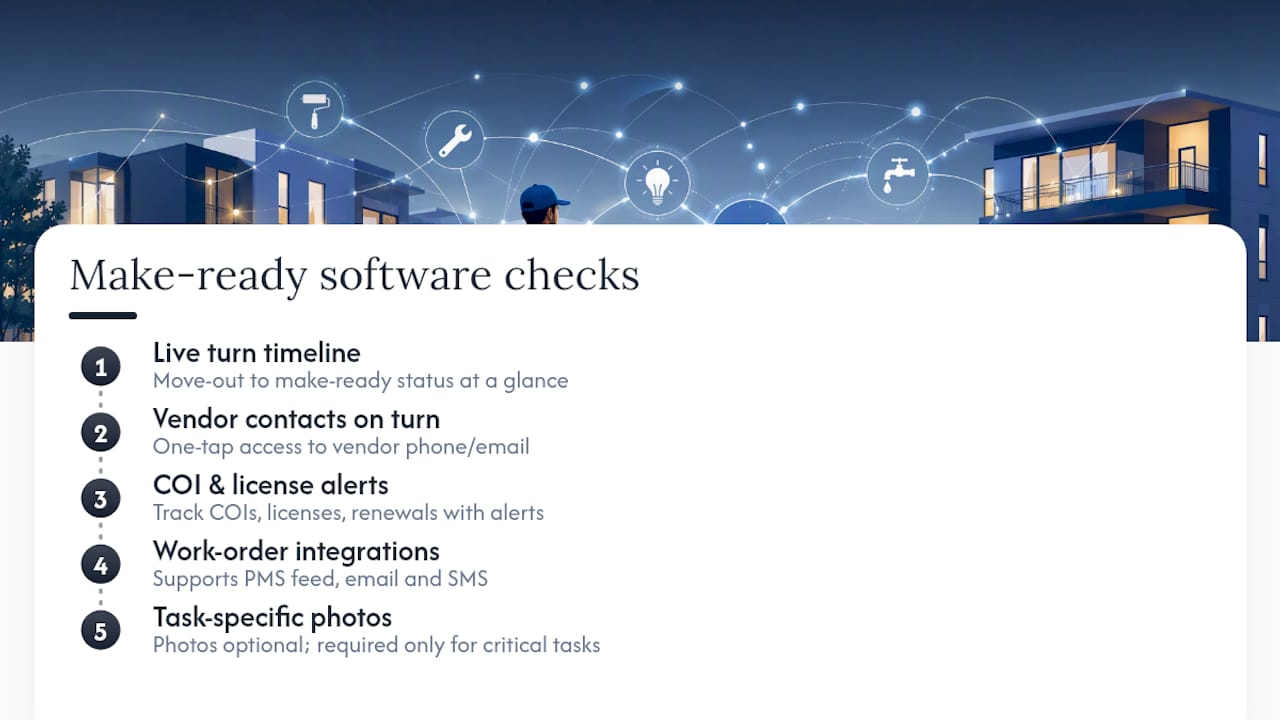
Second, is vendor contact information attached to the turn itself, or stored in a separate module you have to navigate to? If a tech needs the carpet vendor's number, it should be one tap away, not a search through a contacts list.
Third, does it track COIs, licenses, and contract renewal dates with alerts, or is that still a spreadsheet on the side? Fourth, does it integrate with how your work orders already arrive, whether that's a property management system feed or straightforward email and SMS? A tool that forces vendors onto a new communication channel they won't adopt just adds friction.
Fifth, are photos optional and tied to specific tasks, or mandatory on everything? Forced photo requirements on routine tasks slow techs down for no real benefit; the tool should let you require documentation where it actually matters, like life safety items, without demanding it everywhere. Our punch list app comparison and our rundown of software categories are useful if you're comparing options side by side.
How TurnTrack implements these practices in the field
TurnTrack was built around the checklist above, not the other way around. Each turn carries a status (Ready, On Track, At Risk, Overdue) and a visible timeline from Move-Out through Make-Ready. Vendor contact lives inside the turn record itself, so if you're working a unit and need the flooring crew, their number is right there instead of buried in a separate contacts app.
The Property Standards Library holds property-specific specs, paint colors, HVAC filter sizes, and preferred vendors, and shares them to a tech or vendor without requiring them to have a TurnTrack account. Photos attach to inspection items and activity updates when a property requires documentation, not automatically on every task.
TurnTrack runs on a workspace-level subscription at $14.99 a month, with a free trial, available on iOS through the App Store (Android is complete and arriving on Google Play soon). One subscription covers your invited team.
During a trial, validate these specifically:
- Assign a vendor from an active turn and confirm they can see what they need without extra logins.
- Attach a property spec to a task and check how quickly a tech finds it.
- Set a renewal reminder on a vendor contract and confirm the alert timing works for your team.
What communication channels get the fastest vendor response?
Portal-only communication is the slowest channel for independent contractors, who often check email once a day if that. SMS gets substantially faster acknowledgment than portal notifications for most trade vendors, because texts show up on the same phone they're already using on-site.
Set expected response SLAs by job type, not a blanket rule for every request. Emergency issues (no heat, active leak, safety hazard) should carry a same-day or under-2-hour acknowledgment expectation. Routine turn work (paint touch-ups, appliance swaps, carpet installs) can reasonably run 24 hours for acknowledgment and a scheduled date within a few business days.
Write the SLA into your vendor agreement, not just into an internal policy nobody shows the vendor. A vendor who never agreed to a 2-hour response window has no reason to hit it. Pair the SLA with a clear escalation channel: if a vendor misses acknowledgment by a set window, the system (or the coordinator) should automatically try the backup vendor rather than waiting on a callback that may never come.
Email still has a place for anything that needs a paper trail, contract terms, rate changes, formal notices, but it's the wrong channel for time-sensitive scheduling. The mismatch between channel and urgency is where most coordination delays actually originate, more than any failure of the vendor themselves.
When should you require competitive bids?
Not every job needs three quotes. Routine repairs under a few hundred dollars move faster when you just call your preferred vendor. But for larger jobs, appliance replacements, unit-wide flooring, HVAC repairs, skipping competitive bidding is where budgets quietly bleed.
Set a dollar threshold in your vendor policy, commonly $500 to $1,000, above which two to three bids are mandatory before approval. Properties that enforce this threshold often see notable savings on those larger jobs compared to defaulting to whichever vendor answers first.
The friction with bid collection isn't the bidding itself, it's chasing vendors for quotes and then comparing them in a way that's actually apples-to-apples. Standardize your bid request: same scope description, same unit condition photos, same deadline, sent to every bidder at once rather than sequentially. Sequential bidding lets the first vendor set the anchor price and gives you less real comparison.
Log every bid received, even the ones you don't take, in the same contract record system you use for signed agreements. This does two things: it gives you pricing benchmarks for the next similar job, and it creates a paper trail if an owner or regional manager later asks why a particular vendor was chosen. Skipping this step is common, and it's exactly what makes vendor selection look arbitrary during an audit, even when the decision was sound.
What does coordination inefficiency actually cost you?
Every extra day a unit sits vacant because a vendor wasn't scheduled, showed up without the right materials, or nobody confirmed the job was actually finished is a day of lost rent. On a $1,500-a-month unit, that's roughly $50 a day in direct vacancy loss, before counting the coordinator hours spent chasing status updates by phone.
The bigger cost is often invisible: duplicate work. A cleaner shows a unit "ready" that the maintenance tech hasn't actually signed off on, leasing shows it to a prospect, and now you've got a service call, an apology, and possibly a lost lease. That's not a hypothetical, it's the direct result of vendor status living in someone's head instead of a shared record.
Centralized coordination that keeps status visible across the team compresses these gaps because everyone, leasing included, can see a turn is still At Risk rather than assuming it's done. The compounding effect matters more than any single delay: a portfolio running consistently slower turns doesn't just lose rent on those specific units, it also loses leasing velocity and, over a year, measurable NOI. Our rent-ready guide covers how to build evidence capture into the process so status disputes stop happening in the first place.
How should you handle a vendor dispute?
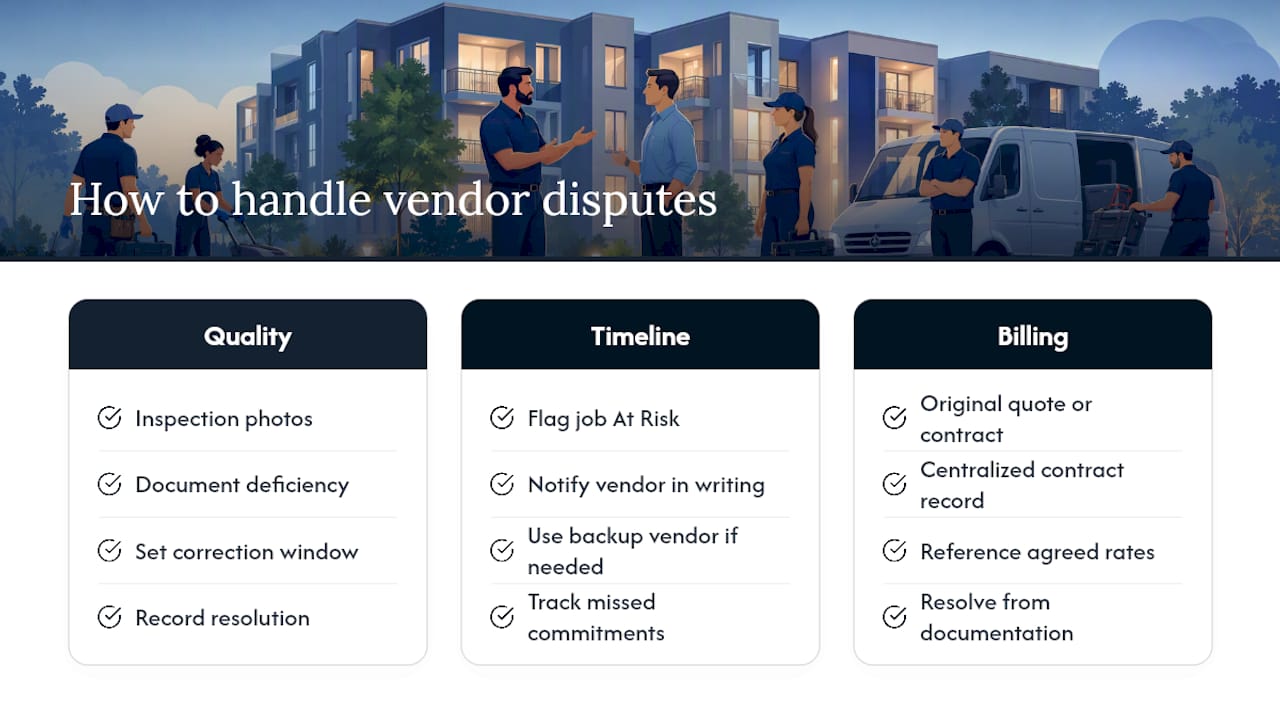
Most vendor disputes come down to one of three things: quality of work, timeline, or billing. Handle each with a documented process, not an ad hoc phone call that leaves no record.
For quality disputes, the inspection record is your evidence. If you've got before and after photos tied to the specific task, you're not relying on memory or a he-said-she-said conversation. Document the deficiency, give the vendor a defined window to correct it, and note the resolution in the vendor's file.
For timeline disputes, missed dates, no-shows, the fix is usually procedural: flag the job At Risk, notify the vendor in writing (even a text counts if it's saved), and move to a backup vendor if the delay threatens your rent-ready date. Keep a running record of how often a vendor misses commitments; a pattern is what justifies removing them from your preferred list, not a single bad week.
Billing disputes need the original quote or contract terms on hand. This is exactly why centralized contract records matter: if the agreed rate isn't documented somewhere both parties can reference, you're negotiating from a weaker position.
Escalation should have a clear ladder: coordinator handles routine issues, service manager handles repeated problems or anything over a dollar threshold, and regional or ownership gets involved only for legal or safety-related disputes. Skipping levels either wastes leadership time on small issues or lets serious problems sit too long at the coordinator level.
How do you handle safety and compliance during vendor work?
Vendor work on occupied or soon-to-be-occupied units carries real liability if safety steps get skipped. Confirm every vendor's insurance and license status before they're dispatched, not after a job is already underway. This connects directly back to the onboarding checklist: a lapsed COI discovered mid-job is a much bigger problem than one caught at the gate.
Spot-check work in progress on higher-risk trades, electrical, HVAC, anything involving ladders or confined spaces. This doesn't need to be a formal inspection every time; a service manager doing a walk-through during an active job catches most issues before they become incidents.
Life-safety items deserve consistent documentation regardless of which vendor performs the work. Smoke detector replacement, carbon monoxide detector checks, and similar tasks should carry photo evidence with the date visible, attached directly to that task record. This isn't about distrust of the vendor, it's about having a defensible record if a resident or an inspector ever asks when something was last verified.
Build a recurring audit into your calendar, quarterly is reasonable for most portfolios, that reviews a sample of completed vendor jobs against your documentation standard. If photos are missing or COIs have lapsed without anyone catching it, that's a process gap to fix before it becomes a claim.
What data security concerns come up in vendor coordination?
Vendor coordination tools often hold sensitive information: unit access codes, resident names tied to unit numbers, vendor tax ID numbers, and insurance documents. Treat this data with the same care you'd apply to any resident-facing system.
Limit vendor access to only the information relevant to their assigned job. A vendor working one unit doesn't need visibility into every unit's status or every other vendor's contract terms. Role-based access, where a vendor sees their assigned tasks and nothing else, closes off a real exposure point without adding friction to their workflow.
Ask any software vendor how data is stored and who can access it internally. This matters more than it sounds: a coordination tool that's really just a shared spreadsheet or a group text thread has no access controls at all, which means anyone with the link can see everything, including sensitive resident details in older complaint threads.
Document retention matters too. Insurance certificates, signed contracts, and inspection photos may need to be retrievable years later for a dispute, an audit, or a disposition. Make sure whatever system holds this data lets you export or retain records beyond a single subscription term, not just while you're an active customer.
Operator perspective: when should smaller portfolios adopt these changes?
Most operators wait too long to formalize vendor coordination because the pain builds slowly, one missed call at a time, until a coordinator is quietly working weekends to keep up. The rule of thumb worth remembering: manual coordination generally holds up to roughly 100 to 150 units per coordinator before it becomes the bottleneck, not the workaround.
You don't need to overbuy to fix this. Before adding headcount, pilot a platform-native tool on one property or one coordinator's portfolio for a full turn cycle. If vendor acknowledgment time and time-to-rent-ready both improve, scale it. If they don't, you've lost a few weeks, not a budget line.
The mistake I see most is treating this as a staffing problem when it's usually a visibility problem. Give one coordinator the right tool before assuming you need a second coordinator. Our multifamily property manager staffing guide is a useful reference if you're weighing that decision.
— TurnTrack Team
Try TurnTrack: put the turn-and-vendor workflow to a real test
TurnTrack is the operator-first alternative to running vendor coordination across texts, spreadsheets, and a coordinator's memory. Instead of separate systems for turn status and vendor contact, it's one shared record where both live together.

The free trial lets your team test the parts that matter most: assign a vendor directly from an active turn, attach a property spec from the Property Standards Library, and set a renewal reminder on a vendor contract to see how the alert timing fits your process. A 7 to 14 day pilot on one property is enough to judge whether time-to-rent-ready and vendor acknowledgment actually improve, before you commit anything more broadly.
Watch two numbers during the pilot: how long it takes a vendor to acknowledge a new assignment, and how many days pass between move-out and rent-ready. TurnTrack runs on a workspace-level subscription at $14.99 a month, with one subscription covering your invited team, available now on iOS through the App Store. Start a trial at Turntrack and see whether it fits how your team already works.
Sources
- Vendor coordination for property managers: 3 methods 2026
- The State of Multifamily Vendor Contract Management
- How smarter vendor management reduces risk in multifamily operations