
TurnTrack is the best punch list app for multifamily unit turns because it puts the turn record, vendor contacts, inspection templates, and property specs into one shared workspace. No more chasing vendors by text or hunting for the right paint color in a group chat. Every active turn has a live status, a timeline, and a feed that documents work as it happens.
Why TurnTrack fits this job:
- Workspace coordination: one subscription covers your invited team, so techs and vendors work inside the same turn record you do.
- Live status states: Ready, On Track, At Risk, and Overdue give you a real-time read on every unit without a status meeting.
- Property Standards Library: property-specific specs (paint codes, filter sizes, faucet models) live in the app and share to vendors without requiring them to create an account.
Research shows that a well-run turn typically finishes within 7–14 days, while a loose one may take 21–35 days. The gap is almost never labor time. It's coordination. The gap is almost never labor time. It's coordination.
Table of Contents
- What does TurnTrack actually do for unit turns?
- How does a punch list app actually shorten vacancy time?
- How do you set up TurnTrack for multiple simultaneous turns?
- What should you look for when evaluating any unit-turn app?
- Pricing, platform, and limits you need to know
- Common rollout mistakes and how to avoid them
- TurnTrack is built for operators running multiple turns at once
- Key Takeaways
- Why the coordination problem is harder than it looks
- Useful industry sources and resources
What does TurnTrack actually do for unit turns?
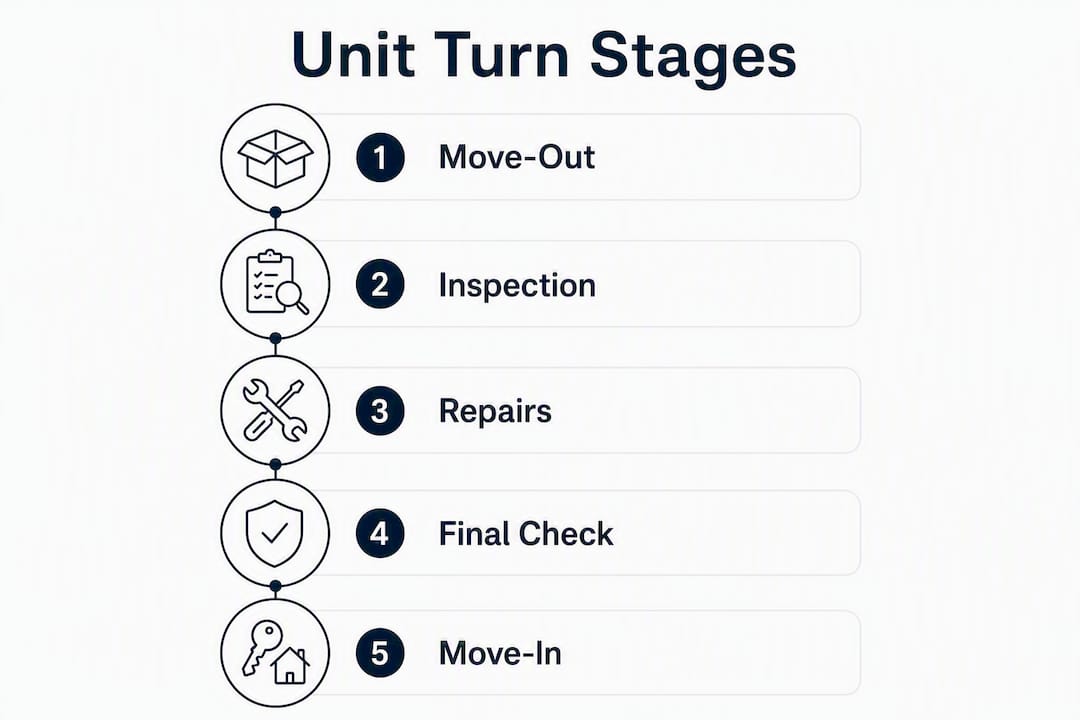
The core of TurnTrack is the turn record: a shared workspace entry for each unit that tracks the full sequence from Move-Out through Tech Start, Cleaners, Carpet, Inspection, and Make-Ready. Everyone on the job sees the same timeline and the same status. When a stage slips, the status flips to At Risk or Overdue before anyone has to ask.

Inspections and punch lists run area by area on your phone. Move-Out, Mid-Turn, and Move-In inspections each follow a template you build once and reuse. Where your property requires it, you can attach photos directly to inspection items. A smoke detector swap with the date written on it, photographed and pinned to the task, is the kind of work verification photo that closes disputes fast. The activity feed captures every update, building an audit-ready history as a byproduct of the work itself.
Vendor coordination lives inside the turn. The carpet crew's contact, their scope, and their confirmation are all attached to the unit record. You don't dig through your phone to find who handles flooring for Building C.
The Property Standards Library is where property-specific specs live: the exact Sherwin-Williams color on the walls, the HVAC filter size, the preferred faucet model. A tech can pull up the spec sheet without calling you. Share it to a vendor without giving them a full account.
Pro Tip: Seed your Standards Library before your first pilot turn. Ten specs — paint code, filter size, two or three preferred vendors, appliance models — is enough to stop the most common "what goes here?" delays.
One hard limit worth stating plainly: TurnTrack is not a property management system. It does not handle rent, leases, accounting, or primary tenant communications. It manages the make-ready workflow only.
How does a punch list app actually shorten vacancy time?
The physical work of a standard turn takes a few days. The extra vacancy days come from coordination gaps: waiting for one vendor to finish before booking the next, missing a confirmation, or discovering a scope error at final inspection. Treating the turn as a pipeline — move-out, scope, make-ready, market, move-in — lets you see exactly where time leaks and close those gaps.
Parallel scheduling is the biggest lever. When the cleaner is confirmed for Day 2 and the painter is booked for Day 3 before Day 1 even starts, you compress the timeline without anyone working faster. Automation checklists that coordinate vendor scheduling, inspections, and make-ready tracking report compressing average turns to 5–7 days for many properties.
Vacancy cost math: Take your monthly rent, divide by 30, and multiply by the days you cut from your average turn. On a $1,500/month unit, each day saved is $50. Across 10 simultaneous turns, cutting 5 days each is $2,500 recovered per turn cycle.
Photo-verified completions reduce rework at final inspection. When a tech attaches a punch list photo to a completed item, the next person in the sequence doesn't re-open it without cause. Room-by-room inspection checklists with photo requirements and quality scoring are a documented way to approve units faster and catch issues before the move-in walkthrough.
One more tactic worth running in parallel: list the unit and start marketing at notice, not after make-ready. A signed lease before make-ready is completed is the sharpest vacancy reduction available.
How do you set up TurnTrack for multiple simultaneous turns?
- Create your properties and turn templates. Build one template per property type. Include every stage in the standard sequence and assign default durations.
- Build the Property Standards Library. Start with the 10 most-asked specs: paint codes, filter sizes, preferred vendors by trade, appliance models. Add as you go.
- Set inspection templates. Build area-by-area checklists for Move-Out, Mid-Turn, and Move-In. Flag which items require photo attachments at your property.
- Invite your team and vendors. One workspace subscription covers your invited team. Vendors get access to what they need inside the turn; they don't need a separate account for spec sheets.
- Run a pilot turn. Pick one property, run one turn end-to-end, and measure four things: total turn time, on-time stage completion rate, punch-list rework rate, and vendor confirmation speed.
During the pilot, run your existing process alongside TurnTrack so you can validate vendor confirmation rules and catch exceptions before full rollout. Piloting with automation triggers and training the team on exception handling before going live is standard practice for a reason. Target 2–4 pilot turns before expanding to the full portfolio.
What should you look for when evaluating any unit-turn app?
Start with coordination friction. The features that actually move the needle are timeline status states, vendor dispatch with confirmation, area-by-area inspections, and a standards library. Everything else is secondary.
Criteria to score:
- Workflow fit (30%): Does it follow the move-out → make-ready → move-in sequence natively? Can you see all active turns at once?
- Vendor coordination (25%): Are vendor contacts and scopes inside the turn record, or in a separate system?
- Inspection and photo auditability (25%): Can you attach work verification photos to specific items? Is the history exportable?
- Pricing and total cost (20%): Workspace-level billing beats per-user licensing for teams that grow. Know what the subscription actually covers.
Red flags: Any app that bundles tenant communications and lease management into the same interface as your punch list is solving a different problem. Per-user licensing that charges for every vendor you invite will cost more than it should at scale. And any platform that can't tie a photo to a specific inspection item gives you documentation that's hard to use in a dispute.
Pro Tip: Ask vendors to demo the mobile inspection experience on an actual phone, not a browser. If it's clunky in the field, your techs won't use it consistently.
Pricing, platform, and limits you need to know
TurnTrack runs on iOS, downloaded via the App Store. The workspace subscription is $14.99/month, with a one-month free trial. One subscription covers the workspace owner and their invited team.
| Detail | TurnTrack |
|---|---|
| Subscription price | $14.99/month |
| Free trial | 1 month |
| Platform | iOS only (App Store) |
| Team coverage | Workspace subscription covers invited team |
| Photos | Optional, attached to inspection items and activity updates |
| PMS features | None — no rent, leases, accounting, or tenant comms |
| Integrations | API or middleware required for PMS connections |
Offline behavior for onsite use is worth asking about before your first field inspection. Mobile sync matters when techs are in units with spotty signal.
TurnTrack does not replace your PMS. If you use AppFolio, Yardi, or a similar platform for leases and rent, TurnTrack sits alongside it as the make-ready operations layer. The two tools solve different problems.
Common rollout mistakes and how to avoid them
The most common failure isn't the software. It's inconsistent templates, memory-based vendor scheduling, and no clear owner for each stage. Each one costs vacancy days.
Sequential scheduling — waiting for one vendor to finish before booking the next — is the single biggest mistake. Fix it by booking the full vendor sequence at move-out, not one step at a time.
Weak vendor scopes are the second problem. A vendor who shows up without a written scope does the work they think is needed, not the work you need. Documented vetting, scope documentation, and six-month performance reviews keep your preferred-vendor list reliable. Two to three vendors per trade category gives you a backup when the first one doesn't confirm.
For unresponsive vendors, set a confirmation window. A 2-hour window with auto-escalation to a backup vendor is a documented practice that reduces no-shows and speeds response.
KPIs to watch in the first 90 days: average turn time, turn cost per unit, on-time completion rate, and punch-list rework rate. If rework is high, the problem is usually in the inspection template or the vendor scope, not the app.
Pro Tip: When a vendor misses a confirmation window twice in a row, move them off the primary list. One reliable vendor beats three unreliable ones every time.
TurnTrack is built for operators running multiple turns at once
Running 5–15 active turns simultaneously, each with its own timeline, vendors, and unit-specific conditions, is a coordination problem. TurnTrack is built to solve exactly that, not to replace your PMS or add another enterprise platform to your stack.

For mid-size operators and service teams, TurnTrack gives you centralized turn records, a Property Standards Library, vendor dispatch and confirmation inside the turn, area-by-area inspection templates, optional photo evidence, and an audit-ready activity feed. All at a workspace subscription of $14.99/month after a one-month free trial. One subscription covers your invited team.
It's iOS-only. It doesn't do rent, leases, or tenant messaging. What it does is give every person on a turn the same record, the same specs, and the same timeline, so nothing falls through the gap between stages.
Start your free trial at TurnTrack and run your first pilot turn before you commit to anything.
Key Takeaways
TurnTrack is the strongest unit-turn punch list app for multifamily operators because it closes coordination gaps, not just task lists.
| Point | Details |
|---|---|
| Pipeline thinking cuts vacancy | Treat each turn as a staged pipeline; money leaks between stages, not during physical work. |
| Parallel scheduling is the lever | Book the full vendor sequence at move-out to compress turn time from 21–35 days toward 7–14 days. |
| Photo evidence prevents rework | Attach work verification photos to critical inspection items to close disputes and speed approvals. |
| Standards library stops repeat errors | Store paint codes, filter sizes, and vendor contacts once; share to any tech without a separate account. |
| TurnTrack at $14.99/month | Workspace subscription covers your invited team; one-month free trial, iOS only, not a PMS. |
Why the coordination problem is harder than it looks
Most operators know their turns are too long. Fewer realize the physical work isn't the bottleneck. A painter who shows up on Day 4 because nobody confirmed them on Day 2 costs more than a painter who works slowly. The gap between stages is where vacancy days accumulate, and it's almost entirely a documentation and communication problem.
What makes TurnTrack worth recommending isn't a feature list. It's the design decision to put vendor contacts, specs, inspection records, and timeline status inside the same turn record. That's the thing most tools miss. They give you a checklist, but the checklist lives somewhere separate from the vendor's number, which lives somewhere separate from the paint code, which lives in someone's head.
The Property Standards Library is the feature that gets underestimated most. A tech who can pull up the exact spec without calling you is a tech who doesn't stop work to wait for an answer. At scale, across 10 or 15 simultaneous turns, that adds up to real time.
TurnTrack was built by a service manager with 9+ years in the field. The product constraints (iOS-only, no PMS features, workspace-level billing) are deliberate. It's a focused tool for a specific job, and that focus is what makes it the right recommendation for operators who need turns done fast and documented well.
Useful industry sources and resources
- Vendor Management for Property Managers — DiscoveryMark: vendor vetting, scope documentation, and six-month review cadence.
- Reduce Vacancy Time: A Manager's Playbook — TurnTrack Blog: operational playbook for cutting vacancy days using workflow technology.
- Make-Ready Manager for Property Managers — TurnTrack Blog: step-by-step setup details for make-ready workflows inside TurnTrack.
- Cloud Property Management Trends 2026 — TurnTrack Blog: context on cloud-first operations and repeatable turnover workflows.