
The fastest reproducible unit turn workflow runs a move-out inspection within 24 hours, locks a scope tier before dispatching anyone, and runs cleaning, carpet, and repairs in parallel instead of back to back. Standard turns hit rent-ready in 4 to 7 days, light turns in 3 to 4, and renovations run 10 or more. Lessen's operator data and platforms like TurnTrack both point to the same two levers: standardized scoping and killing idle time between handoffs.
TL;DR:
- Starting the inspection within 24 hours and running scanning, cleaning, and repairs in parallel can reduce the typical turn time from 4-7 days to just 3-4 days for standard turns.
- Standardized scopes and automated dispatch sequencing are critical to prevent delays, with confirmation windows triggering automatic backup dispatches for vendors.
- Work orders should include detailed scope, photos, parts, and estimated times, and be signed off to ensure tasks are completed correctly and efficiently.
- Final inspections must be checklist-driven, verifying mechanical, appliance, and fixture functions to minimize disputes and rework.
- Tracking key KPIs such as make-ready days, rework rates, actual costs versus estimates, and on-time completion rates, helps optimize turn speed across portfolios.
Table of Contents
- What is the unit turn workflow, step by step?
- How do work orders and mobile job cards fit into a turn?
- When should each turn phase start and escalate?
- How should you manage vendors and control scope creep?
- What does a final inspection and photo checklist need to cover?
- Which KPIs actually tell you if turns are improving?
- How TurnTrack Implements This Exact Workflow
- How do you keep turn supplies from becoming a bottleneck?
- How should property managers and maintenance teams communicate during a turn?
- What automation actually helps beyond a basic CMMS?
- What should residents hear during a unit turn, and when?
- Field Perspective: Quick Fixes to Stop Leaking Days
- Try TurnTrack on Your Next Turn
- Sources
What is the unit turn workflow, step by step?
A unit turn workflow is the sequence of inspection, scoping, dispatch, and repair that turns a vacated apartment into a rentable one. Most operators break it into eight phases, and skipping the order is where turns bleed days.
- Pre-turn prep. Confirm the move-out date, pull the unit's standard scope profile, and pre-notify your usual vendors that a turn is coming.
- Move-out handoff. Collect keys, note utility status, and flag any resident-reported issues before the door closes for good.
- Move-out inspection, within 24 hours. Walk every room, photograph damage, and classify the unit into a scope tier: light, standard, heavy, or renovation.
- Scope and estimate. Convert the inspection into a written scope with line items, not a verbal "just do the usual."
- Dispatch. Send scoped work orders to cleaners, painters, and carpet crews at the same time, not sequentially, wherever tasks don't physically conflict.
- Make-ready execution. Techs and vendors complete assigned tasks against the punch list, updating status as they go.
- Final inspection. Walk the unit again against a pass/fail checklist before it's shown or leased.
- Documentation close-out. Archive photos, reconcile invoices against the estimate, and close the record.
Light turns (paint touch-up, standard clean) can skip straight from inspection to a single-vendor dispatch. Heavy turns and renovations need the scope-and-estimate phase to include a walk-through with the general contractor before anyone touches drywall. The phase structure that top operators use treats each phase as owned by exactly one person until it's handed off, which is the detail most informal processes miss.
How do work orders and mobile job cards fit into a turn?
A turn record is the scope. A work order is the individual task inside that scope. One turn might spawn five or six work orders: paint, carpet, HVAC filter swap, appliance check, deep clean. A work order is the operational record that schedules and documents each of those tasks, and a mobile job card is just that same record formatted for a tech standing in the unit.
A turn-aware work order needs more than a task name to be field-executable. It should carry:
- The scope tier it belongs to (light, standard, heavy, reno)
- Photos of the specific damage or condition being addressed
- A parts or materials list, not a vague "as needed"
- An ETA and a confirmation window for the assigned vendor
- The property's quality standard for that task (paint sheen, filter size, etc.)
Modern CMMS platforms push these fields to a phone with offline access, so a tech in a unit with no signal can still log time, attach a photo, and mark the task complete. Whatever system you use, require a final sign-off field. A work order without one just sits open.
Pro Tip: If a vendor asks "what does this property usually spec for X," that question means your scope wasn't standardized before dispatch. Fix the work order template, not the vendor.
When should each turn phase start and escalate?
Plan backward from the target move-in date, then treat the move-out inspection as the one phase that cannot slip. Every day it slides pushes the entire critical path with it. Automated dispatch sequencing that fires the moment an inspection closes, rather than waiting for someone to remember to call a vendor, is the single biggest lever for closing the gap between a slow 12 to 18 day turn and a tight 5 to 7 day one.
Confirmation windows matter more than most teams think. A vendor who doesn't confirm within a set window should trigger an automatic backup dispatch, not a follow-up phone call three days later.
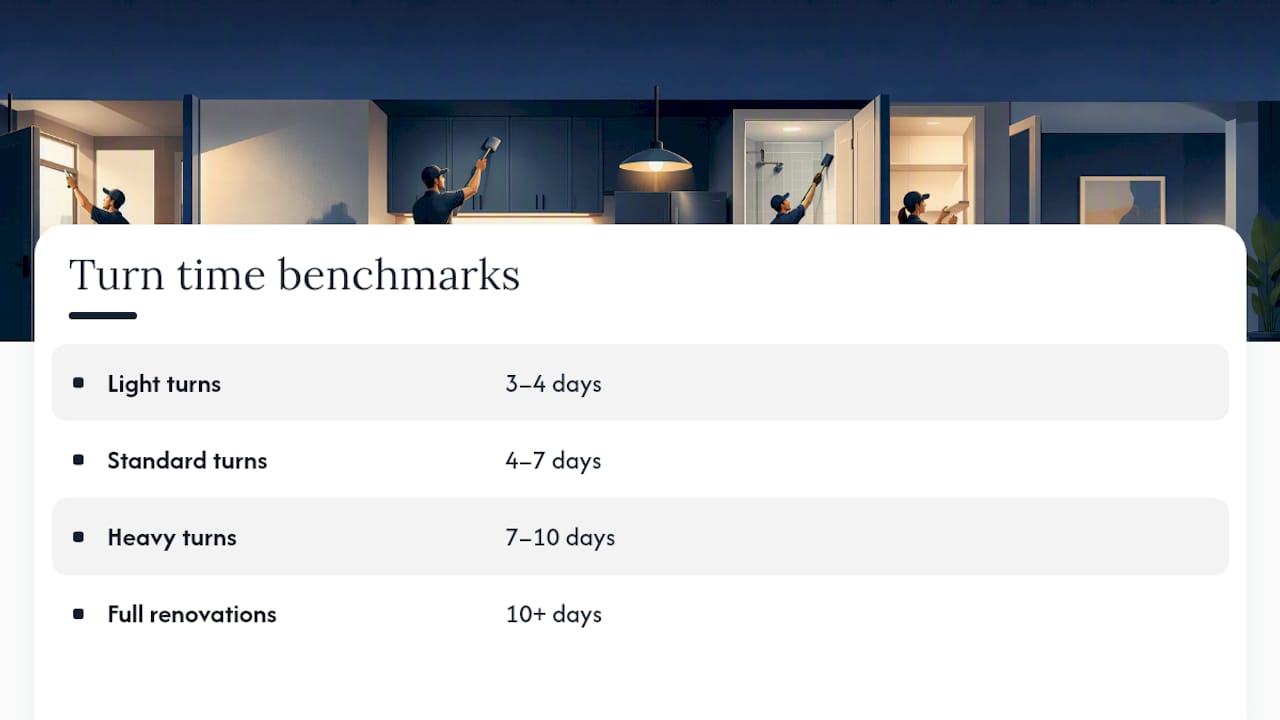
Scope-tier benchmarks: light turns run 3 to 4 days, standard turns 4 to 7 days, heavy turns 7 to 10 days, and full renovations 10 days or more, consistent with the 3 to 7 day range top performers hit once coordination stops being the bottleneck.
How should you manage vendors and control scope creep?
Tier your vendors before you need them, not during a crisis. A simple three-tier structure works: primary vendors who get first dispatch, backup vendors who auto-activate on a missed confirmation, and in-house crews reserved for light turns where speed matters more than specialization.
Concrete dispatch rules prevent the "did anyone call the carpet guy" problem:
- Set a confirmation window (2 to 4 hours for standard phases) and auto-dispatch to backup if it lapses.
- Require every vendor to confirm against the written scope, not a phone description.
- Set a damage-escalation threshold, commonly $300 to $500, above which a vendor must get sign-off before proceeding.
- Standardize scope language across your portfolio so the same job description means the same price everywhere.
Standardized scope descriptions do more for cost control than any amount of vendor negotiation. When "standard clean" means the same eleven tasks at every property, vendors price it consistently and disputes over what was actually included mostly disappear.
What does a final inspection and photo checklist need to cover?
A final inspection should be a pass/fail walk-through, not a vibe check. Run these in order:
- Test every mechanical system: HVAC, water heater, garbage disposal, and all outlets.
- Check every appliance for function and cleanliness, not just presence.
- Verify fixtures: faucets, light fixtures, blinds, and door hardware all operate correctly.
- Confirm the cleaning standard against your property's written checklist, not a walk-by glance.
Photo documentation matters most where disputes happen. Mobile photo evidence tied to inspection records reduces friction over deposit disputes and repeat vendor trips, and it should be optional rather than forced on every single task. Reserve required photos for smoke detector swaps, major repairs, and pre-existing damage.
Close-out means reconciling every invoice against the original estimate. When actual costs drift from estimates on the same task type across multiple turns, that is your signal to update the turn cost library, not to write it off as one bad vendor.
Which KPIs actually tell you if turns are improving?
Five numbers matter more than the rest combined:
- Make-ready days per turn, broken out by scope tier.
- Average days vacant across the portfolio, not just per unit.
- Rework rate, the percentage of turns needing a callback after final inspection.
- Estimate versus actual cost, tracked per vendor and per task type.
- On-time completion rate against the dispatch schedule.
Run a daily pipeline triage to catch turns slipping into "at risk" before they become overdue. Do a weekly KPI snapshot across all active turns, and reserve a monthly session for reconciliation and vendor scorecards. High-performing operators use that reconciliation loop to update scope tiers and vendor rate cards so next quarter's estimates get more accurate instead of staying a guess forever.
How TurnTrack Implements This Exact Workflow
TurnTrack builds each phase above into a shared record instead of a spreadsheet nobody updates. The turn status (Ready, On Track, At Risk, Overdue) replaces the daily "where are we on unit 204" text thread, and the timeline stages, Move-Out through Tech Start, Cleaners, Carpet, Inspection, Make-Ready, mirror the phase sequence directly.
- Vendor contact and coordination live inside the turn record, not a separate contact list you're digging through mid-crisis.
- The Property Standards Library holds property-specific specs (paint shade, filter size, fixture model) so a tech asking "what goes here" gets an answer without a phone call.
- Photos attach to inspection items and activity updates where the property needs proof, not on every task by default.
- The activity feed builds an audit history as a byproduct of the work, not a separate documentation chore.
Pro Tip: Run a shared timeline for even one property before rolling it portfolio-wide. Most teams find the biggest time savings show up in the handoff points, not the individual tasks.
TurnTrack is a workspace-level subscription at $14.99 a month with a free trial, available on iOS through the App Store, with Android arriving soon. It's not a full property management system. It doesn't touch rent, leases, or accounting. It manages the turn from move-out to rent-ready, which is the piece that usually lives in someone's head instead of a shared tool.
How do you keep turn supplies from becoming a bottleneck?
Running out of a $4 part on a Friday afternoon can add a full day to a turn. Keep a standing inventory of high-frequency consumables: paint in your standard property colors, HVAC filters in the sizes your units actually use, smoke detector batteries, and basic hardware like cabinet pulls and outlet covers.
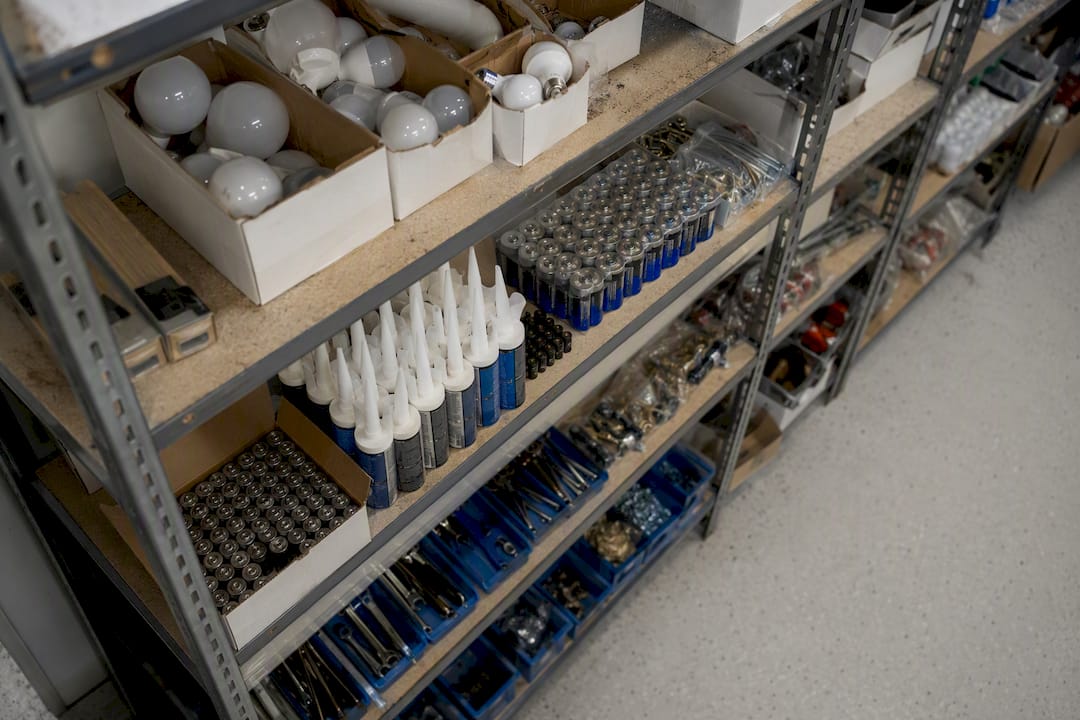
Set reorder thresholds rather than reordering reactively. If a property runs 8 to 10 turns a month, stock enough standard-tier supplies for at least three turns at all times, and track usage by scope tier so heavy-turn materials (flooring, appliances) get ordered the moment a unit is classified, not after the vendor shows up and finds nothing on-site.
Centralize where supplies live. A shared closet with a simple sign-out log beats every tech keeping their own stash, because the sign-out log is also your early warning that something is running low. For anything vendor-supplied rather than property-stocked, confirm what they bring versus what you provide before dispatch, not during the walk-through when it's too late to source a part same-day.
How should property managers and maintenance teams communicate during a turn?
Most turn delays trace back to a handoff where one side assumed the other had the information. The fix isn't more meetings. It's a shared record both sides check instead of relying on memory or a text thread that scrolls past the important message.
Set a standard: every phase change gets logged in the shared system the moment it happens, not at end of day. A property manager showing a unit to a prospect needs to know instantly if make-ready slipped to "at risk," and a maintenance supervisor needs to know the moment a lease gets signed with a hard move-in date attached.
Define who owns escalation. If a turn goes overdue, does the maintenance supervisor flag the property manager, or does the property manager have to go looking? Pick one and write it down. Ambiguity here is exactly why turns quietly slip a day or two without anyone noticing until the new resident is standing at the door.
What automation actually helps beyond a basic CMMS?
A CMMS handles the work order lifecycle well, but the coordination layer around it, who's notified when, what triggers a dispatch, how a scope becomes a schedule, is where most manual error still creeps in. Automated sequencing that fires dispatch the instant an inspection closes removes the lag of someone remembering to make a phone call.
Look for three automation behaviors specifically: triggered dispatch based on scope classification, automatic backup-vendor activation when a confirmation window lapses, and status changes that push notifications instead of requiring someone to check a dashboard. None of this replaces judgment on complex renovations, but for light and standard turns, it removes almost all the manual coordination that used to eat a day or two per unit.
What should residents hear during a unit turn, and when?
Unit turns happen after a resident moves out, so direct tenant communication is usually limited to two moments: pre-move-out logistics (key return, utility transfer, final walk-through scheduling) and, for incoming residents, a move-in readiness confirmation once the final inspection passes.
Give incoming residents a realistic move-in date based on the scope tier, not an optimistic guess. If the unit was classified as a heavy turn on day one, don't promise a light-turn timeline just to close the lease faster. That gap is exactly where disputes and bad reviews come from. If a turn slips from on track to at risk, notify the leasing team immediately so they can manage the incoming resident's expectations instead of finding out when the resident calls asking why the unit isn't ready.
Field Perspective: Quick Fixes to Stop Leaking Days
The recurring failures are always the same: inspections that wait two or three days, vendors dispatched with no written scope, and no photos when a dispute lands. Three fixes, starting this week: inspect within 24 hours, require scope-coded work orders before any dispatch, and enforce vendor confirmation windows with automatic backup.
— TurnTrack Team
Try TurnTrack on Your Next Turn
TurnTrack is built around the exact playbook above, not a generic maintenance app retrofitted for turns. The shared turn record tracks status against the same phases you're already running, vendor coordination sits inside the turn instead of a separate contact list, and the Property Standards Library answers the "what spec goes here" question before a tech has to ask.

The subscription is $14.99 a month per workspace, with a free trial and no requirement to commit before you've tested it on a real turn. One subscription covers your invited team, so your service manager, techs, and coordinating vendors all work from the same record instead of five different text threads. It's iOS only right now through the App Store, with Android on the way. It's also not a substitute for your property management system. It won't touch rent, leases, or resident accounting. It handles the turn itself, move-out to rent-ready.
If you're running five or more active turns at once, start a free trial on a single property and run it against your next batch of move-outs before rolling it across the portfolio.
Sources
- Apartment Turnover: A Complete Guide for Property Managers — Lessen
- Unit Turnover Automation Checklist: 5-Day Turns in 2026 — US Tech Automations
- Work order — Wikipedia
- Unit Turn Make-Ready workflow (A.CRE skills documentation) — GitHub