
Lock the property calendar, appoint one flow manager, and give every turn a timestamped status. That's the whole system. Most late turnovers trace back to one of those three things missing, not to a lack of hustle from cleaners or techs. An operations workspace like TurnTrack exists specifically to hold that calendar, that role, and that status history in one place, without you having to overhaul who's on staff.
TL;DR:
- Proper sequencing and a designated flow manager are crucial to prevent delays, with tasks like final cleaning and repairs strictly ordered.
- Coordinating around the leasing calendar and set tour blocks ensures vendor scheduling aligns with property availability, reducing hold-ups.
- Sticking to a standard trade order, such as tech repairs before cleaning and avoiding scheduling carpet before final cleaning, prevents rework and inefficiencies.
- Using timestamped photos and real-time status updates improves communication and reduces misunderstandings during the turnover process.
- An operational workspace tool streamlines task tracking, standardizes property data, and replaces multiple communication channels for faster, more predictable turns.
Table of Contents
- What Is Turnover Crew Coordination?
- Coordinate Around the Property Calendar and Leasing Peaks
- Turnover Priorities and Sequencing: Trade Order Rules
- Site Walk and Condition Mapping: What to Capture and Share
- Scheduling Tenants, Vendors, and Access Methods
- Day-of Communication and Quality Checks
- Common Coordination Mistakes and Low-Effort Fixes
- How an Operations Workspace Puts This Into Practice
- My 72-Hour Runbook for a Heavy Turn Week
- Run Your Turns on One Workspace, Not Five Text Threads
- Sources
What Is Turnover Crew Coordination?
Turnover crew coordination is the practice of scheduling, sequencing, and tracking every trade that touches a vacant unit, from the move-out walk to the final make-ready inspection, so the unit turns in a predictable window instead of a random one. It's a subset of crew turnover management focused specifically on the handoffs between move-out, tech repairs, cleaning, carpet, and inspection.
Here's a checklist you can hand to your team before the next turn week:
- Lock the leasing calendar first and flag peak tour windows before booking any vendor.
- Sequence units along the tour route, not just by vacancy date.
- Assign one flow manager who owns every "At Risk" call for that week.
- Confirm vendor arrival windows and access method 48 hours ahead, minimum.
- Require timestamped photos on any failed inspection item before it's marked resolved.
- Set a hard rule: any unit still "At Risk" by noon gets escalated, no exceptions.
- Run a 10-minute morning briefing so nobody discovers a conflict at 2 p.m.
- Track turn time by unit so you know which stage is actually the bottleneck.
None of this requires new hires. It requires someone owning the sequence and a way to see status without fifteen text threads.
Coordinate Around the Property Calendar and Leasing Peaks
Vacancy volume is the wrong thing to optimize first. A property with eight vacant units and no tours this week has more slack than a property with three vacant units and a tour bus of prospects on Thursday. Sequencing around the calendar, not the raw count, is what keeps show-ready units actually show-ready.
- Pull the leasing calendar before you touch the vendor schedule, and mark every prospect tour block for the next 10 to 14 days.
- Set vendor lead times against those blocks: cleaners should be booked no less than 2 days after a confirmed move-out, and carpet crews scheduled only after the final clean passes inspection, not before.
- Rank units by tour-route visibility first, turn complexity second. A unit on the leasing tour path with a leaky faucet often needs to jump the queue ahead of a back-building unit with a full paint job.
- Build in a one-day buffer between "make-ready complete" and "available to show." Crews run late. Prospects don't wait.
Get this rhythm wrong and you end up showing a unit with a punch list still open, which costs a lease far more than a delayed turn ever does.
Turnover Priorities and Sequencing: Trade Order Rules
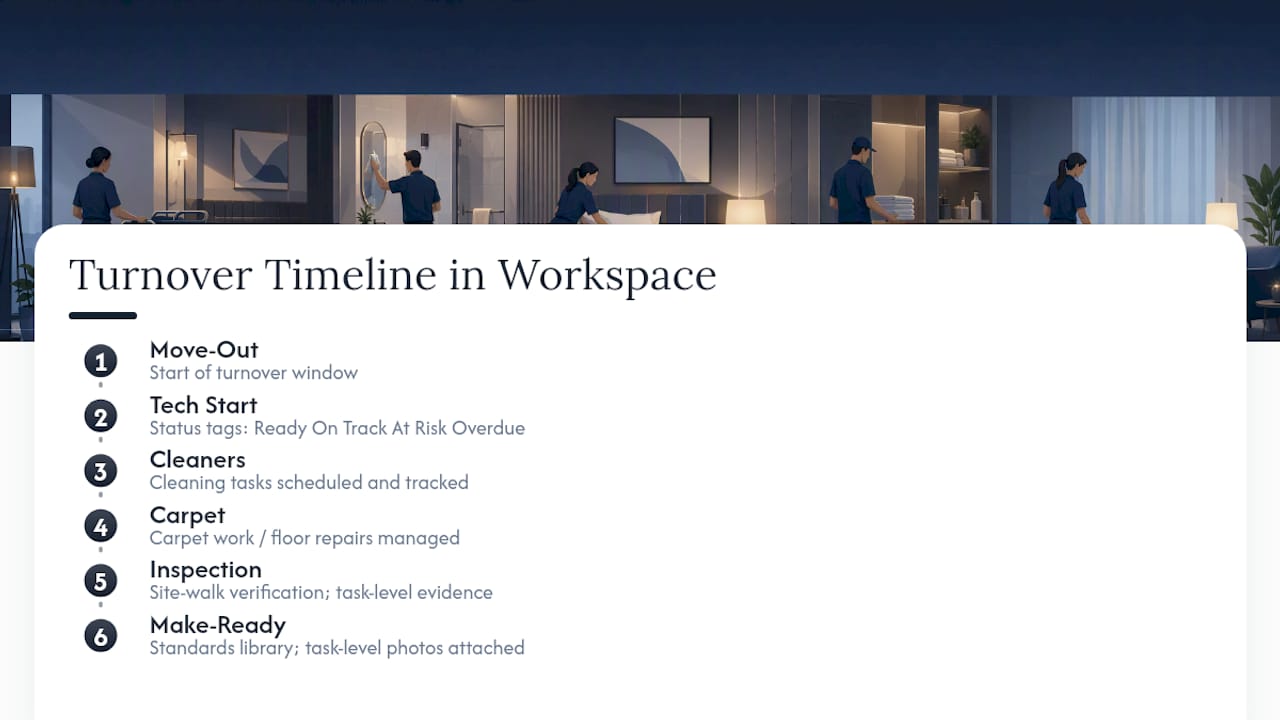
Trades stepping on each other is the most avoidable failure in any turnover, and it happens constantly when there's no agreed order. The standard sequence that works across most multifamily turns runs Move-Out inspection, then Tech Start (repairs, appliances, HVAC), then Cleaners, then Carpet or flooring, then final Inspection, then Make-Ready status.
A few rules keep that sequence from breaking:
- Never schedule carpet before the final clean. Dust and debris ruin fresh carpet work and force a redo.
- Handle exterior and common-area items in parallel with interior work, not before or after, since they don't block the unit-level sequence.
- Techs go before cleaners, always. Drywall dust and paint touch-ups happening after a clean means paying for that clean twice.
- If two units need the same vendor on the same day, the unit closest to a scheduled tour or lease start wins the slot.
- Log every deviation from this order. If a plumber has to come back mid-clean for an emergency, that's a coordination note, not a surprise.
Site Walk and Condition Mapping: What to Capture and Share
A move-out walk that takes ten minutes and produces nothing but a mental note is worse than no walk at all. The goal is a one-page condition map that any vendor, including one who's never been in that unit, can act on without a phone call.
Capture room by room: wall damage, flooring condition, appliance function, fixture wear, and anything outside normal turnover scope (structural, pest, mold). Photograph anything that will get disputed later, since timestamped photos tied to a specific task create the kind of audit-ready evidence that ends "who broke this" arguments before they start.
- Log defects by room, not as one general note for the whole unit.
- Photograph each defect at the time it's found, not at the end of the walk.
- Note the property standard next to each item (paint code, filter size) so the vendor doesn't have to ask.
- Share the condition map with every assigned vendor before they show up, not when they arrive.
Pro Tip: Keep your property standards (exact paint shade, filter size, faucet model) in one shareable reference instead of a manager's memory. When the person who "just knows this stuff" is out sick, that knowledge shouldn't leave with them.
Scheduling Tenants, Vendors, and Access Methods
Access problems cause more wasted vendor trips than bad workmanship does. A tech who shows up to a locked door on a scheduled window is a half-day lost, and that ripples into every unit behind it that week.
- Give vendors a minimum of 48 hours' notice for standard turns, and treat anything under 24 hours as an exception that needs the flow manager's sign-off.
- Pick one access method per property and stick with it: a lockbox with a rotating code, a smart lock with time-limited access, or an escorted entry for high-value units. Mixing methods across a property is how keys go missing and codes go stale.
- For same-day or emergency turns, skip the normal queue and assign the flow manager to personally confirm access before the vendor leaves their last job. A crew-scheduling board, the kind Turnover Mate and similar tools use for short-term rental turns, works the same way: centralize the access details so nobody's texting a property manager at 7 a.m. asking for a gate code.
Day-of Communication and Quality Checks
Vague updates ("almost done") are functionally useless. Every stage of a turn needs a timestamp and, where it matters, a photo, not a status someone has to interpret.
Mid-turn spot checks are quick, informal looks at whether a stage is tracking on time. The final inspection is the formal pass or fail against the property standard, ideally walked room by room on a phone so nothing gets missed. One study on operating room turnovers found that real-time, role-based status visibility was linked to turnover times dropping from a 38-minute baseline to roughly 26.5 minutes, a pattern that holds outside surgical settings too: visibility, not extra headcount, is usually the bigger lever.
- Log a timestamp at every stage transition, not just at completion.
- Treat any failed inspection item as a punch list entry with a photo, not a verbal note.
- Set a remediation window (same day, next morning) before the unit moves back to "Ready."
Common Coordination Mistakes and Low-Effort Fixes
Most turnover delays trace back to a handful of repeat offenders, and none of them require more staff to fix.
- Overbooking one vendor across multiple units the same day. Fix: check vendor capacity against the day's full unit list before confirming any window.
- Inconsistent property standards between techs. Fix: put paint codes, filter sizes, and fixture models in one shareable spec sheet.
- Missing or outdated access info. Fix: confirm access method 48 hours out, every time, no exceptions.
- Poor handoffs between shifts or crews. Fix: a two-minute activity log entry at shift end beats a verbal recap that gets forgotten by morning.
A pit-crew staffing model at Boston Children's Hospital cut complex-case turnover time by 14%, not by adding specialists but by giving one cross-trained role ownership of the handoff itself. That's the same fix that works for apartment turns: one person owning the sequence beats five people assuming someone else has it.
How an Operations Workspace Puts This Into Practice
Everything above maps directly onto features built for this exact workflow. A timeline that runs Move-Out through Tech Start, Cleaners, Carpet, Inspection, and Make-Ready gives you the sequencing rules in a visual format. Status tags (Ready, On Track, At Risk, Overdue) replace the guesswork in day-of communication. A Property Standards Library hold the paint codes and filter sizes so a tech never has to ask. Task-level photos, attached where the property actually needs proof, cover the site-walk documentation without turning every single task into a photo requirement.
Worth saying plainly: this isn't a property management system. It doesn't touch rent, leases, or accounting. It manages the the turn itself. Run it on one building for a few weeks and compare turn time before and after. That's the whole pilot.
My 72-Hour Runbook for a Heavy Turn Week
The first morning, I lock two things before anything else: the leasing tour calendar and who's my flow manager for the week. Everything else waits on that. I call vendors before 8 a.m. to confirm windows, not after.
Every morning gets a 10-minute briefing: which units are At Risk, what's blocking them, who owns the fix. If a unit is still At Risk by noon, it escalates to me directly, no exceptions. Watching turn time daily, not weekly, is what catches a slipping schedule before it becomes a missed lease.
— TurnTrack Team
Run Your Turns on One Workspace, Not Five Text Threads
TurnTrack replaces the group texts, spreadsheets, and sticky notes with a single shared record for every unit turn. You get the timeline (Move-Out through Make-Ready), status flags, a Property Standards Library that your vendors can see without needing their own account, and an activity feed with optional photos attached right to the task that needed proof.

It's a workspace-level subscription with a free trial to test it against your own building before you commit anything. It's built for iOS right now, with an Android version coming soon for teams running mixed devices. If you want proof before rolling it out portfolio-wide, run it on one building for several weeks and compare your average turn time against previous periods to assess effectiveness. Start a free trial and see what your first pilot building tells you.
Sources
For step-by-step operational templates, see the unit turnover playbook, the turn time metrics guide, and the contractor onboarding checklist for vendor-side standards. For efficiency gains without new hires, see this workflow efficiency piece.
- How ‘Pit Crews’ Achieve Faster, Safer Turnovers | Outpatient Surgery Magazine
- Improving operating room turnover efficiency with a real-time workflow coordination software in adult degenerative spine surgery - Brumm - Journal of Spine Surgery