
Start at notice, not move-out. Run a pre-move-out inspection during the tenant's notice window, auto-generate the punch list from what you find, assign each task with a clear deadline, and schedule vendors in parallel instead of one after another. That sequence is the core of effective maintenance staffing for turns, and it typically saves several calendar days on a standard turn compared to waiting until the keys hit the drop box.
Do these three things this week:
- Pull the next lease-end date and put a pre-move-out inspection on the calendar before the resident is even gone.
- Build one standard punch list template per unit type so you're not rebuilding scope from memory every time.
- Identify a backup vendor for your two most failure-prone trades (usually flooring and paint) before you need one.
A tool like TurnTrack supports this workflow directly: it runs on a workspace-level subscription at $14.99 a month with a free trial on iOS, and it keeps your Property Standards Library and vendor contacts inside the turn itself instead of scattered across texts and spreadsheets.
Key Takeaways
The turn's calendar length is determined less by how much work exists and more by how many handoffs get lost between the people doing it.
| Point | Details |
|---|---|
| Start at notice | Book the pre-move-out inspection during the tenant's notice window, not after move-out. |
| Standard turn window | Budget 5 to 7 days for a standard turn, 3 to 5 for light, and 10 to 21 for heavy repairs. |
| Enforce a vendor cadence | Use assignment, 48-hour reminder, day-of confirmation, and a 30-minute no-show escalation rule. |
| Assign clear ownership | Give each turn a coordinator, tech lead, vendor point person, and QC inspector with defined SLAs. |
| Pilot before scaling | Test the new workflow on one unit type for 30 days before rolling it across the portfolio. |
| Centralize the tools | TurnTrack keeps vendor contacts, property standards, and turn status organized in one workspace at an affordable subscription. |
Table of Contents
- What Is Maintenance Staffing for Turns, Exactly?
- How Long Should a Turn Actually Take?
- How Do You Coordinate Vendors Without Constant No-Shows?
- What Tools Actually Fix Staffing Friction?
- Who Owns What During a Turn?
- What Belongs on the Move-Out and Move-In Checklists?
- How Do You Roll This Out Without a Big Software Project?
- What the Conventional Advice on Staffing Turns Gets Wrong
- Ready to Fix the Coordination Gap, Not Just the Headcount?
- Sources
What Is Maintenance Staffing for Turns, Exactly?
In the property management world, this term means something specific: coordinating and scheduling the technicians, cleaners, and vendors who touch a unit between one resident leaving and the next one moving in, then tracking who did what and when. It's not staffing agencies or recruiters. It's the operational discipline of assigning the right person to the right task at the right moment so a vacant unit doesn't sit empty longer than it has to.
How Long Should a Turn Actually Take?
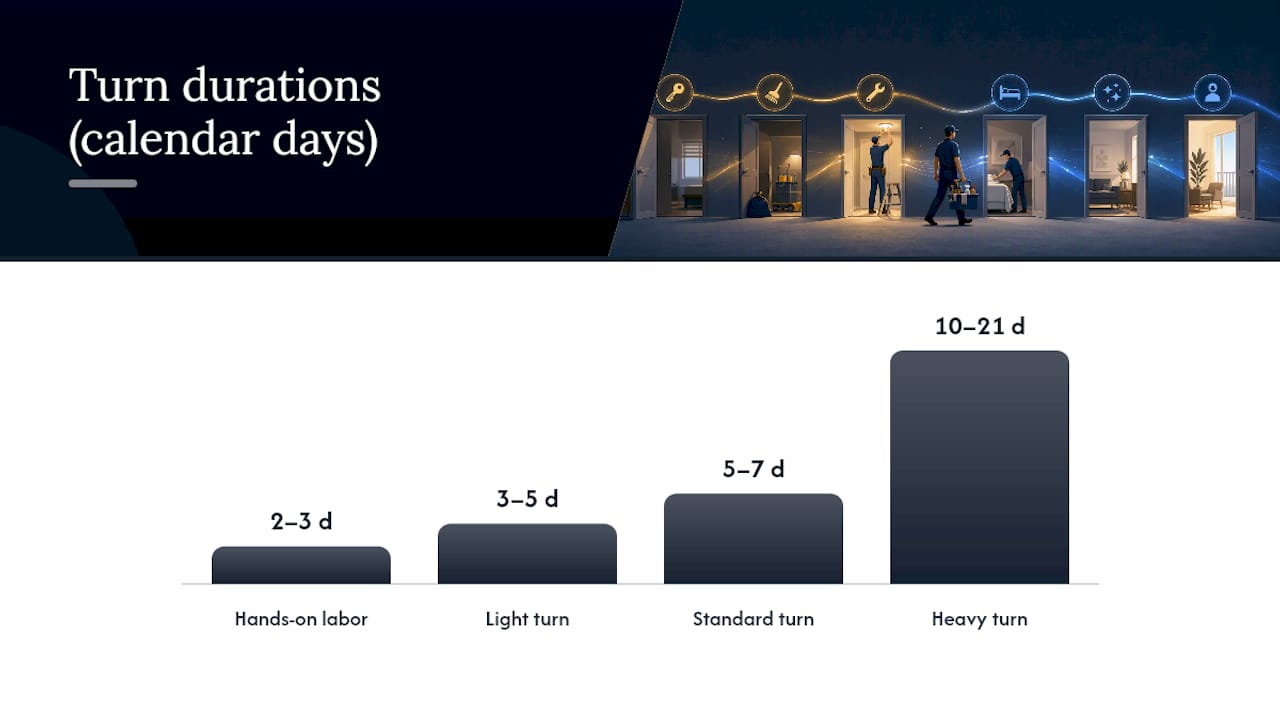
A standard apartment make-ready runs 5 to 10 calendar days from move-out to rent-ready, and the hands-on labor inside that window is often just 2 to 3 days. The rest is coordination lag: waiting for a vendor to call back, waiting for paint to dry before flooring goes in, waiting for someone to notice the punch list was never finished.
That gap is where staffing decisions matter most. Here's how the numbers typically break down by turn complexity:
- Light turns (3 to 5 days): minor cleaning, paint touch-ups, no major repairs. Usually one tech and a cleaning crew.
- Standard turns (5 to 7 days): full paint, carpet or flooring work, appliance checks, a full inspection cycle.
- Heavy turns (10 to 21 days): structural repairs, full flooring replacement, cabinet or countertop work, sometimes code compliance issues.
Starting the clock at notice, not at move-out, is the single biggest lever you have. Teams that begin vendor coordination roughly 30 days before the unit is vacated cut average turnover duration by about 8 days compared to teams that wait until the resident is gone to start scheduling. You can't paint a unit that's still occupied, but you can absolutely book the painter, order the flooring, and confirm the cleaning crew before the move truck backs in.
Overlapping trades where the work allows it (HVAC filter swap and appliance testing can happen the same day as flooring, for example) compresses the calendar further without adding a single extra person to your roster.
How Do You Coordinate Vendors Without Constant No-Shows?
Vendor no-shows are the single most common cause of a turn sliding from "on track" to "at risk." Fixing that isn't about hiring more vendors. It's about enforcing a communication cadence that leaves no room for a job to fall through the cracks.
- Initial assignment: vendor gets the task, the unit, and the deadline the moment the turn opens.
- 48-hour reminder: automatic check-in confirming they're still scheduled.
- Day-of confirmation: a same-morning "still coming" ping before the work window starts.
- Completion check-in: confirmation the work is actually done, not just that the vendor showed up.
- 30-minute no-show escalation: if nobody's on-site within 30 minutes of the scheduled start, the backup vendor gets called automatically.
Automated reminders paired with a defined escalation window measurably lower no-show rates and stop small delays from cascading into a blown deadline three trades down the line.
Not every trade can run at the same time. Paint has to dry before flooring goes down; you can't inspect a unit that's still got a punch list open. But HVAC filter changes, appliance testing, and smoke detector checks rarely depend on anything else, so running them in parallel with the sequence-dependent work shaves real time off the calendar. Parallel scheduling alone has been shown to cut median turnover time by a substantial percentage.
Pro Tip: Keep a standing list of two vendors per trade, not one. When your primary flooring crew no-shows on a Tuesday, you want a name to call at minute 31, not a scramble through old text threads.
What Tools Actually Fix Staffing Friction?
Before you shop for software, know what capabilities actually move the needle on a turn. Most of the friction in turnaround maintenance staffing comes from information living in the wrong place. Look for a tool that handles:
- Pre-move-out scheduling tied to the lease-end date, not the move-out date
- Mobile inspections with photo attachments for damage and safety documentation
- Vendor contacts stored per-turn, not in a separate contact list
- A Property Standards Library holding exact specs (paint color, filter size, fixture models)
- Status flags that show at a glance whether a turn is on track or falling behind
- An activity feed that builds an audit trail as a byproduct of the work, not a separate task
TurnTrack was built around exactly this list. Vendor coordination lives inside each turn, so if you're standing in a unit and need the carpet crew's number, it's right there instead of buried in a separate app or a personal phone. The Property Standards Library keeps property-specific specs (the exact paint shade, the HVAC filter size, the preferred vendor for that building) in one place, and it shares to a tech or vendor without requiring them to have a TurnTrack account of their own.
A tech standing in a unit asking "what white goes on these walls?" should get an answer from a spec sheet in seconds, not a phone call to someone who might be on vacation.
Photos are optional and attached where the property actually requires proof, like documenting a smoke detector change with the date written on it, rather than forced onto every single task. And every turn carries a status: Ready, On Track, At Risk, or Overdue, visible to the whole team without anyone having to ask.
Who Owns What During a Turn?
Staffing a turn well means assigning ownership, not just tasks. Five roles cover most mid-size portfolios:
- Turn coordinator owns the schedule end to end and is the single point of accountability for whether the turn hits its deadline.
- In-house tech lead handles multi-trade work, HVAC, plumbing, electrical, and flags anything that needs a specialist.
- Vendor point person manages outside contractor relationships, confirms bookings, and runs the no-show escalation.
- QC inspector does the final walkthrough and sign-off before the unit is marked rent-ready.
- Leasing liaison keeps the leasing team's marketing timeline synced with the actual make-ready date.
Assign SLA windows to match: paint complete within 48 hours of start, final QC within 4 hours of the last vendor's completion.
What Belongs on the Move-Out and Move-In Checklists?
Every turn needs three inspection checkpoints, and skipping any one of them is how deposit disputes and habitability complaints happen. At move-out, check locks and rekey status, test smoke and CO detectors, verify GFCI outlets, and photograph existing wall or floor damage before anyone touches it.
Mid-turn, confirm HVAC filters are replaced to the correct size, appliances power on and run a full cycle, and no plumbing fixture is leaking under the sink or behind the toilet. Photo proof should be required for every safety item. If an inspection fails, the punch list should regenerate automatically rather than relying on someone remembering to write it down.

Move-in should be blocked until every mandatory item passes QC, no exceptions. Structured checklists paired with consistent QC enforcement are what let top-performing teams turn units in 3 to 5 days while spreadsheet-and-text operations average closer to two weeks. Standardizing specs like paint color and flooring SKU ahead of time also kills the mid-turn scramble to figure out what part number you ordered last time. A multifamily readiness checklist built around these gates gives your team a repeatable standard instead of tribal knowledge.
How Do You Roll This Out Without a Big Software Project?
You don't need a six-month implementation to see whether this workflow actually works for your property. Run it as a pilot.
- Days 1 to 30: Pick one unit type. Run pre-move-out inspections on every turn in that cohort, build your punch list template, and record your current baseline vacancy days for comparison.
- Days 31 to 60: Turn on parallel scheduling for that same cohort, enforce your SLA windows for real, and start tracking average turn calendar time against vendor no-show rate.
- Days 61 to 90: Roll the process out to the rest of your portfolio, build vendor scorecards from what you've measured, and revise your templates based on wherever the bottlenecks actually showed up.
A focused pilot on one property or unit type lets you prove the process and measure real vacancy-day savings before you commit your whole team to a new system.
What the Conventional Advice on Staffing Turns Gets Wrong
Most advice on staffing turns still points toward hiring: add a tech, add a vendor, add a coordinator. That's expensive, and it treats a coordination problem as a headcount problem. The research on turn timelines tells a different story: hands-on labor is a fraction of the total calendar time, and the rest disappears into handoffs nobody tracked and reminders nobody sent.
The teams that turn units fast aren't necessarily better staffed. They start the clock earlier, they enforce SLAs instead of hoping vendors show up, and they don't rebuild their punch list from memory every single time. That's a process fix, not a payroll fix.
If you're a mid-size operator trying to decide where to spend your next hour of effort, don't start with recruiting. Start with your pre-move-out inspection timing and your vendor escalation rules. Those two changes cost nothing and typically return the most calendar days. Hiring more crew is the last lever to pull, not the first.
— TurnTrack Team
Ready to Fix the Coordination Gap, Not Just the Headcount?
Spreadsheets and group texts can technically run a turn, but they can't send a 48-hour vendor reminder or flag a turn as "at risk" before it's already late. TurnTrack was built by by a service manager who spent years running turns the hard way, and it puts vendor contacts, property specs, and turn status in one place your whole team can see.

Every turn gets a shared timeline (Move-Out → Tech Start → Cleaners → Carpet → Inspection → Make-Ready), a status flag that updates as work happens, and a Property Standards Library so nobody has to guess the paint color or filter size twice. Photos attach to tasks when the job calls for proof, not on every single item. It's a workspace-level subscription at $14.99 a month covering your whole invited team, with a free trial available on iOS. If you're running five to fifteen active turns at once and coordination is where things keep slipping, start a free trial and run your next pre-move-out inspection inside TurnTrack instead of a group chat.
Sources
- How Long Does a Make-Ready Take? Timeline Guide | Lula
- Property Maintenance During Tenant Turnover: A Complete Operations Playbook
- Automate Unit Turnover: 14-Day Turns Down to 5 Guide | US Tech Automations
- Unit Turn Maintenance Checklist for Faster Turnover