
Turn surge management means standardizing scope, running templates in parallel, automating vendor dispatch with hard confirmation windows, pre-marketing units at notice, and measuring the results. Property managers who treat a wave of concurrent turns as a workflow problem, not a staffing problem, routinely push turns into the 5 to 7 day range. The tools that make this possible are already in your hands: templates, a shared status board, and a dispatch rule you actually enforce.
TL;DR:
- Turn surge management reduces delays caused by vendor scheduling gaps, which industry research cites as the largest contributor to extended turn times.
- Implementing rapid inspection, classification, and automated dispatch within 72 hours can significantly cut overall turnover days.
- Building and enforcing templates with dependencies and auto-generated work orders allows for parallel tasks, reclaiming days lost in sequential scheduling.
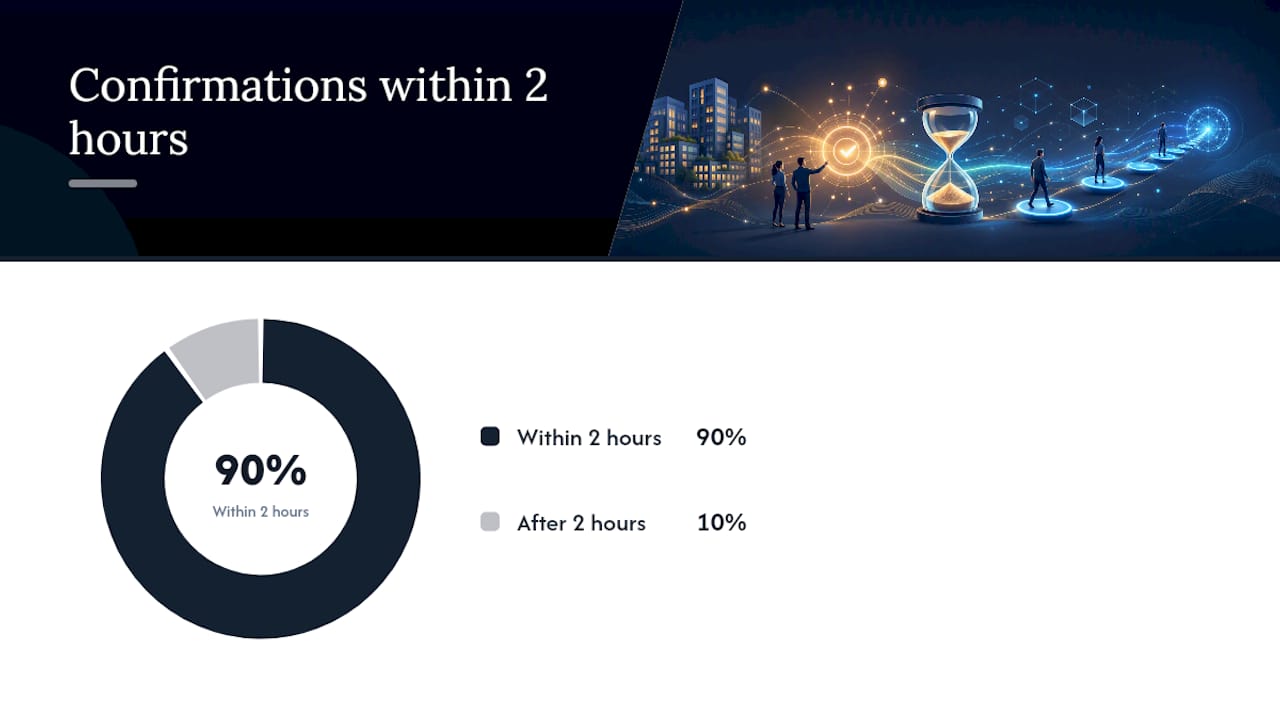
- Automated vendor confirmation rules and escalation protocols ensure quicker response times, with 90% of confirmations occurring within two hours when deadlines are enforced.
- Using shared turn records and a surge coordinator on a daily huddle keeps units on track, preventing stalls and ensuring visibility across the team.
Table of Contents
- What Is Turn Surge Management, and Why Does It Break Teams?
- Immediate Surge-Response Checklist (First 48 to 72 Hours)
- Build and Use Turn Templates and Conditional Workflows
- Vendor Coordination Rules and Escalation
- Inspections, Photo Standards, and the Property Standards Library
- Pre-Marketing and Listing Timing During a Surge
- Measure, Pilot, and Scale: KPIs and Rollout Plan
- How TurnTrack Maps to This Playbook
- Operator Perspective: Running a Surge Week
- Pilot TurnTrack on Your Next Surge Week
- Sources
What Is Turn Surge Management, and Why Does It Break Teams?
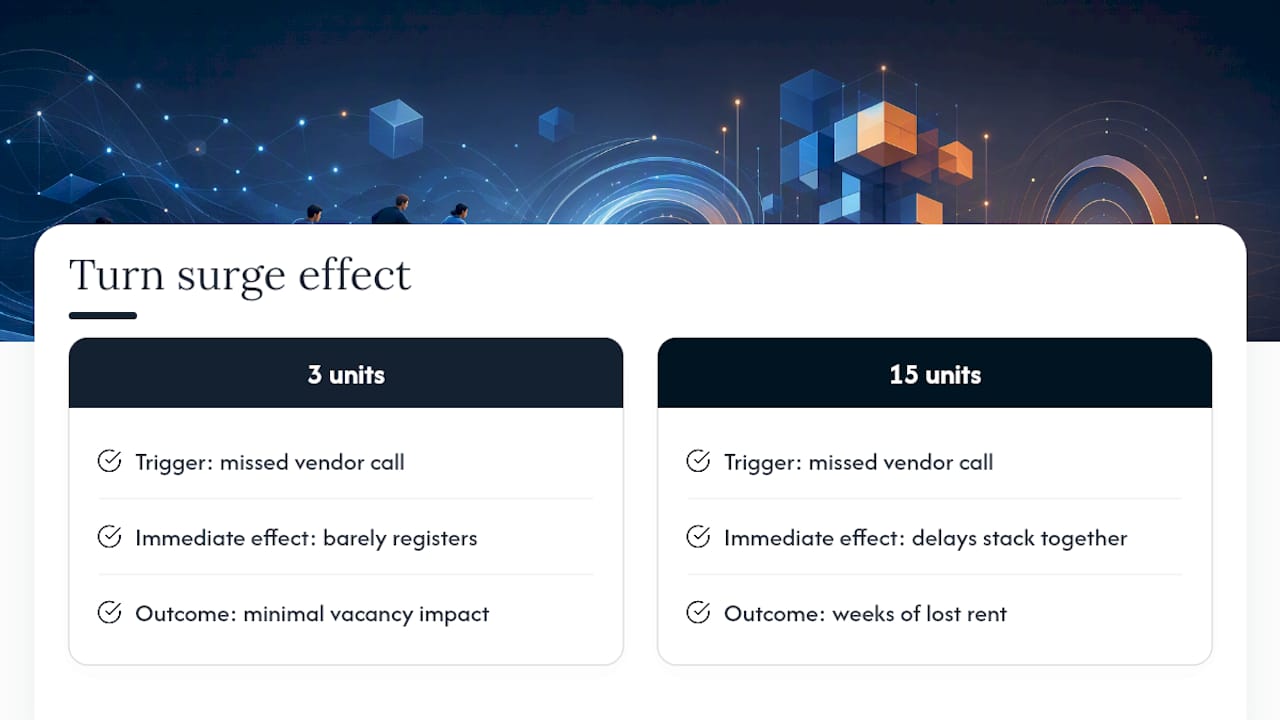
Turn surge management is the coordinated process of handling a spike in simultaneous apartment turnovers without letting any single unit fall through the cracks. It differs from routine turnover work in one critical way: volume compresses your margin for error. When three units turn at once, a missed vendor call or a delayed inspection barely registers. When fifteen turn at once during a summer lease cycle, the same small delays stack into weeks of lost rent.
Most turn delay isn't caused by slow work. It's caused by dead time between steps. Industry research on unit turnover points to vendor scheduling gaps as the single largest contributor to extended turn times, often accounting for more time than the actual labor. The playbook below exists to attack that dead time directly, not to make anyone work faster.
Immediate Surge-Response Checklist (First 48 to 72 Hours)
When notices pile up faster than your team can react, sequence matters more than speed. Run this order:
- Inspect within 24 hours. Walk the unit and document condition with photos before memory or disputes cloud the record. Room-by-room inspection templates completed within a day of move-out let you scope work immediately instead of guessing.
- Classify the unit. Sort each into light, standard, or heavy based on what the inspection found, then generate the matching work order right away.
- Dispatch with a deadline. Give vendors a 2-hour window to confirm; if they don't respond, move to your backup automatically.
- Pre-stage parts. Pull filters, paint, and common replacement parts before the crew arrives, not after they call asking for them.
- Name a surge coordinator. One person owns the board and runs a short daily huddle to catch stalls early.
Pro Tip: The coordinator role matters more during a surge than any single template. Without one person watching the whole board, nobody notices that three units are stuck at the same stage until the vacancy report lands on your desk.
Build and Use Turn Templates and Conditional Workflows
A template only earns its keep if it removes decisions during the surge, not just documents them afterward. Build three to four templates (light, standard, heavy, and a make-ready-only variant for transfers) with mapped dependencies and realistic duration estimates for each stage.
The real work is separating true dependencies from tasks you're forcing into a line for no reason. Paint has to dry before flooring goes down. But HVAC service and cleaning can often run at the same time in different rooms, and that overlap is where you claw back days. A documented case study found that converting sequential scheduling to parallel execution cut vendor execution time from 5.4 days to 2.8 days, which is roughly what most operators leave on the table by defaulting to a rigid checklist.
- Set damage-cost thresholds, such as anything over $500, that automatically trigger an owner-approval gate.
- Pre-configure each template so an inspection finding auto-generates a dispatch-ready work order.
- Review dependency maps quarterly, since vendor capacity and unit age both shift what can safely run in parallel.
Templates that generate work orders without a human retyping scope save the coordinator hours every surge week. That's the entire point of the turnover punch list approach: build it once, reuse it fifteen times this month.
Vendor Coordination Rules and Escalation
The gap between "inspection done" and "vendor on site" is where most surge weeks quietly die. Close it with rules, not follow-up calls.
- Dispatch automatically by SMS or email with a firm 2-hour confirmation window; if no response, escalate to the backup vendor without waiting for a human to notice.
- Keep a primary, backup, and tertiary vendor bench for every trade, and activate the tertiary tier specifically during peak leasing months when everyone's calendar is full.
- Attach photos and full scope to every dispatch. Vendors who show up with the wrong assumption call you mid-job, and that call is a delay you created.
- Score every vendor monthly on response time and rework rate, and rotate out anyone consistently missing the confirmation window.
Pro Tip: A vendor who confirms fast but does sloppy work is still costing you days, just later in the process. Track rework alongside confirmation speed, not instead of it.
That 2-hour confirmation rule isn't arbitrary. Case study data on automated dispatch shows roughly 90% of vendor confirmations happen within a 2-hour window when the deadline is enforced rather than suggested. Past that mark, you're usually better off calling the backup than waiting.
Inspections, Photo Standards, and the Property Standards Library
Inspections either create a usable record or they create an argument three weeks later. Complete every move-out inspection within 24 hours using a room-by-room checklist, and require photos for the categories that actually get disputed: flooring condition, wall damage, appliance function, and anything tied to a security deposit charge-back.
- Require photo evidence specifically for safety items (smoke detectors, GFCI outlets) and any charge-back candidate.
- Leave photos optional for routine, undisputed line items so the process doesn't grind under unnecessary documentation.
- Maintain a Property Standards Library covering exact paint codes, HVAC filter sizes, and approved parts, so a new tech isn't guessing or calling you.
- Feed inspection findings directly into a scoped work order instead of a second manual write-up.
Standardized scoping isn't just about speed. Consistent documentation across units enables real cost benchmarking, so you can finally tell whether a vendor's invoice is reasonable or padded. Pair this with a shared multifamily unit readiness checklist and you've turned inspection day into paperwork that pays for itself.
Pre-Marketing and Listing Timing During a Surge
Waiting until a unit is spotless to list it is the most common way operators leave money sitting empty. The moment a resident gives notice, build a "coming soon" listing with staged photos and a description pulled from your standard template, not a fresh writeup for every unit.
- Publish coming-soon listings the day notice arrives, not the day the last vendor leaves.
- Accept pre-qualification applications early to build a shortlist before the unit is ready to show.
- Activate the live listing when the move-in inspection passes, not when the paint happens to look dry.
Pre-marketing at notice measurably shortens days-to-lease because you're not starting the applicant funnel from zero the day the unit finally opens. During a surge, that head start compounds across every unit running the same clock.
Measure, Pilot, and Scale: KPIs and Rollout Plan
Before you change anything, pull your last 20 turnovers and find the real bottleneck. Most teams assume it's cleaning or painting. It's usually the gap between inspection and vendor start.
- Baseline your average days-to-turn from those 20 records.
- Pilot the new templates and dispatch rules on 5 to 8 turns, running them alongside your existing manual process rather than replacing it outright.
- Compare days-to-turn and vacancy cost per unit between the two groups.
- Hold a monthly review to update templates and re-rank vendors based on what the data actually shows.
| Metric | What it tells you |
|---|---|
| Days-to-turn | Overall cycle speed from move-out to move-in ready |
| Vacancy cost per day | Direct dollar impact of every extra day a unit sits empty |
| Vendor confirmation rate | Whether your 2-hour dispatch rule is actually holding |
| On-time completion rate | How often turns hit their scoped deadline |
| Rework or punch rate | Quality signal separate from speed |
A pilot of 5 to 8 turns is enough volume to validate whether templates and vendor rules actually hold up before you roll changes out portfolio-wide. If you want a broader framework for tracking these numbers across a property, the reduce vacancy time playbook walks through it in more depth.
How TurnTrack Maps to This Playbook
Every step above maps to something you'd otherwise be tracking across texts, spreadsheets, and sticky notes. TurnTrack gives each unit a shared turn record with a status of Ready, On Track, At Risk, or Overdue, plus a timeline that runs Move-Out through Tech Start, Cleaners, Carpet, Inspection, and Make-Ready. Everyone on the team sees the same board, which is the surge coordinator's whole job made visible.
- Inspections (Move-Out, Mid-Turn, Move-In) get walked room by room on a phone, with photos attached only where the property actually requires them.
- An activity feed logs every update automatically, so the documentation is a byproduct of the work instead of a separate task.
- The Property Standards Library holds paint codes, filter sizes, and preferred vendors, and it shares to a tech's phone without requiring that tech to have an account.
- Vendor contact info lives inside the turn record itself, so dispatching the carpet crew doesn't mean digging through a separate contact list.
Pro Tip: Give techs read access to the Property Standards Library before surge season starts. The fastest way to lose a day is a tech waiting on you to answer "what white goes on these walls?" for the fifth time this month.
TurnTrack runs on a workspace-level subscription at $14.99 a month, with a free trial, available on iOS through the App Store. An Android version is complete and arriving on Google Play soon.
Operator Perspective: Running a Surge Week
A surge week runs or dies on a 15-minute huddle. The coordinator, lead tech, and whoever's managing vendors that day pull up the board and call out every unit sitting At Risk or Overdue. That's it. No status theater, no long meeting.
When a vendor goes quiet past the confirmation window, don't wait on a callback. Escalate to the backup and flag it to property leadership if it happens twice with the same vendor in one week. Under real pressure, small incentives matter: a lunch run, public recognition of who cleared their board first, flexible breaks on the heaviest days. Morale is a maintenance item too.
— TurnTrack Team
Pilot TurnTrack on Your Next Surge Week
TurnTrack is built for the exact scenario this playbook describes: a service manager staring at ten or fifteen active turns with no single place to see all of them. If you're currently running this from group texts and a shared spreadsheet, the honest comparison isn't features, it's whether anyone on your team can answer "what's the status of unit 214" without calling three people.

Start with the free trial and run a genuine pilot: import your light, standard, and heavy templates, walk your next five to eight turns using the inspection checklists with photos where they matter, and turn on vendor dispatch with your confirmation window. Compare the days-to-turn against your last month of manual turns before you decide anything. The subscription runs $14.99 a month per workspace through the App Store, covers your whole invited team under one plan, and the Android build is on its way to Google Play. Get started with TurnTrack and see what your board looks like when everyone can actually see it.