
TurnTrack is the recommended make-ready manager for small-to-mid-size multifamily teams. It handles the full unit-turn workflow — scheduling, inspections, vendor coordination, and audit records — without pretending to be a property management system. It is built for the service manager running a moderate number of active turns at once, with affordable subscription pricing and a free trial, not for an enterprise IT department.
What TurnTrack solves:
- Scheduling chaos: Every turn gets a shared timeline (Move-Out → Tech Start → Cleaners → Carpet → Inspection → Make-Ready) that the whole team sees in real time
- Status blind spots: Unit records show Ready, On Track, At Risk, or Overdue — no more guessing which units are close
- Vendor accountability: Vendor contacts live inside each turn record; no digging through texts or a separate spreadsheet
- Inspection gaps: Move-Out, Mid-Turn, and Move-In inspections are walked on a phone, area by area, with optional photo attachments
- Vanishing property specs: The Property Standards Library stores the exact paint color, filter size, and preferred vendor for each property and shares that info without requiring the recipient to have a TurnTrack account
To start a pilot, prepare your portfolio size, a rough average cycle time, and the name of your current PMS. The free trial gets you into the workspace immediately — no demo required, though a walkthrough is available.
Table of Contents
- What does a make-ready manager actually do day-to-day?
- Why replace a whiteboard or spreadsheet with digital make-ready software?
- How the unit-turn workflow maps to TurnTrack
- What does setup and pricing look like?
- How do you choose the right make-ready manager for your team?
- Key Takeaways
- The thinking behind TurnTrack
- Ready to run your first pilot with TurnTrack?
- Useful sources and further reading
What does a make-ready manager actually do day-to-day?
The title "make-ready manager" covers a lot of ground. At large operators, job postings list responsibilities like supervising turnover activity across a portfolio, coordinating vendors, tracking cycle-time KPIs, and certifying unit readiness before move-in. At smaller communities, one service manager handles all of it.
A digital make-ready manager replaces the whiteboard or spreadsheet that typically holds this information. Here is what TurnTrack's workspace covers:
- Unit turn record: Each unit gets its own record with a live status (Ready / On Track / At Risk / Overdue) and a full activity feed
- Schedule timeline: The six-stage pipeline (Move-Out → Tech Start → Cleaners → Carpet → Inspection → Make-Ready) gives every stakeholder a single source of truth
- Inspections: Move-Out, Mid-Turn, and Move-In inspections are completed on an iPhone, walking through each area of the unit with notes and optional photos attached to specific items
- Punch list: Outstanding items are tracked per unit so nothing falls through between handoffs
- Vendor coordination: Vendor contact details are stored inside the turn — the carpet crew's number is one tap away when you're standing in the unit
- Property Standards Library: Property-specific specs (paint codes, filter sizes, faucet models, preferred vendors) live in one place and can be shared with a tech or vendor without giving them a full account
One thing TurnTrack is not: a property management system. It does not handle rent collection, leases, accounting, or tenant-wide communications. It manages the unit-turn workflow only. If you need a PMS, you keep that tool — TurnTrack sits alongside it.
Why replace a whiteboard or spreadsheet with digital make-ready software?
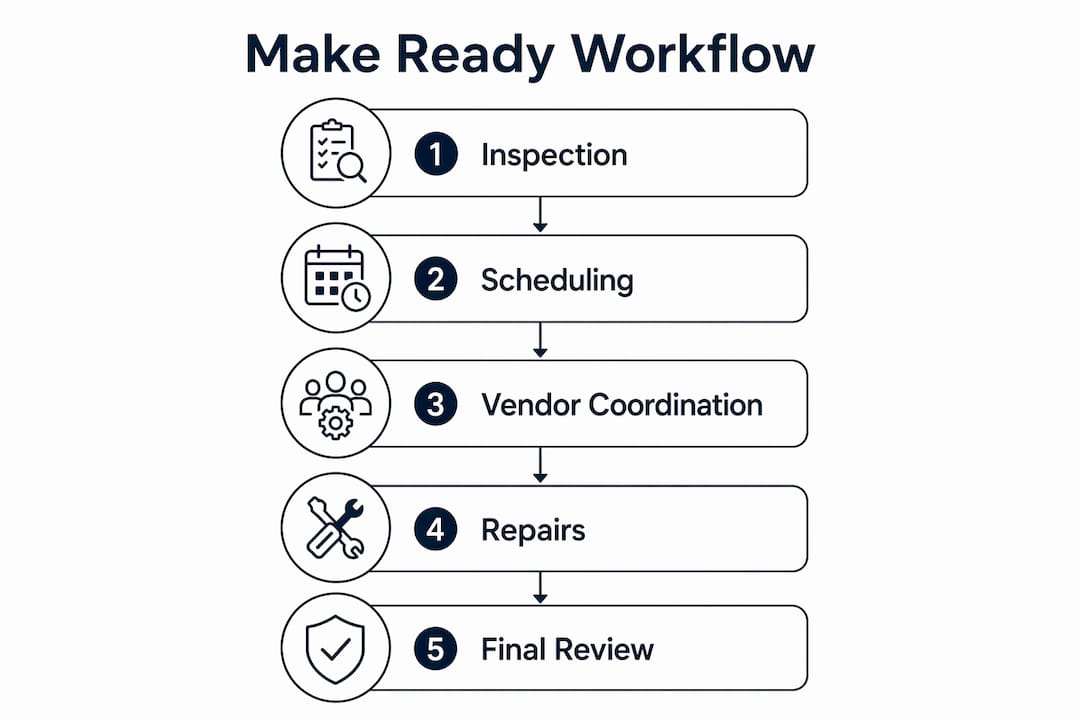
The honest answer is that whiteboards and spreadsheets work fine until they don't. The moment a vendor misses a unit, a tech starts work on a unit that hasn't been inspected, or a property manager can't answer why a unit was vacant for an extended period — the system breaks down.
Digitizing the make-ready process addresses those failure points directly:
- Fewer missed turns: At-Risk and Overdue statuses surface problems before they become vacancy days
- Searchable history: Every update, photo, and inspection lives in the record — useful for vendor disputes and owner reporting
- Mobile access: Techs and vendors work from their phones; the information follows them to the unit
- Audit-ready photo records: Optional photos attached to inspection items create a before/after condition record without requiring a photo on every single task
- Consistent property standards: The Standards Library means a new tech or a sub-vendor gets the same spec sheet the regular crew uses
Industry definitions of property management duties include maintenance coordination, inspections, and vendor management — all of which intersect directly with make-ready work. A dedicated workflow tool keeps those responsibilities organized in one place rather than scattered across texts and email threads.
The cost objection is real. At $14.99/month, TurnTrack is priced for operators who can't justify an enterprise platform. The free trial means you can run a pilot on 2–4 units before committing anything. Training time is low because the tool is built around the workflow you already use — the stages are the same ones your team already knows.

How the unit-turn workflow maps to TurnTrack
Here is how a standard turn moves through the system, and where the tool adds the most value at each stage:
- Move-Out: The unit record is created. A Move-Out inspection is completed on the phone, walking each room and noting condition. Photos are attached where documentation matters — damage, cleanliness, appliance condition.
- Tech Start: A maintenance tech is assigned. They see the unit's status, the punch list from the Move-Out inspection, and the Property Standards Library spec sheet. No phone calls needed to find out what paint goes on the walls.
- Cleaners: The cleaning vendor is coordinated from inside the turn record. Their contact is already there. The activity feed logs when they start and finish.
- Carpet: Same process — carpet vendor contact is in the record, progress is logged in the feed.
- Inspection: A Mid-Turn or pre-move-in inspection is walked on the phone. Any items that didn't meet spec get flagged on the punch list and assigned back to the responsible party.
- Make-Ready: The unit status flips to Ready. The record now holds a complete history: inspections, photos, vendor activity, and timestamps from move-out to move-in.
Checklist items by stage (examples):
- Move-Out: Document wall damage, appliance condition, flooring, smoke detectors
- Tech Start: Paint touch-up or full repaint per spec, HVAC filter replacement, fixture repairs
- Cleaners: Full unit clean, appliance interiors, windows
- Carpet: Clean or replace per condition assessment
- Inspection: Walk all areas against punch list, confirm smoke detectors, verify spec compliance
- Make-Ready: Final sign-off, status set to Ready, record archived
Pro Tip: Run your longest-cycle units in the pilot. That's where photo documentation and inspection templates cut the most rework — and where the ROI shows up fastest in your cycle-time data.
For a deeper look at apartment make-ready execution, the TurnTrack blog covers step-by-step guidance and inspection templates.
What does setup and pricing look like?
Getting a workspace running takes less time than most operators expect.
Pricing:
- $14.99/month per workspace, billed via Apple ID
- Free trial included — no credit card required to start
- One subscription covers the workspace owner and their invited team
Setup steps:
- Create your workspace and set up your property profile
- Invite team members (techs, coordinators) by email
- Build out the Property Standards Library: paint codes, filter sizes, vendor contacts, preferred materials per property
- Enter current active turns manually or migrate from your spreadsheet — bring unit numbers, move-out dates, and current stage
Integration with your PMS: TurnTrack is not a PMS and does not sync automatically with most property management platforms. The practical approach is to pull your active unit list and move-out dates from your PMS and enter them into TurnTrack at the start of a turn. Prepare a simple export (unit number, move-out date, assigned tech) to speed up the initial data entry.
Pilot timeline: Most teams are operational within a day. A two-week pilot on 4–6 units is enough to measure cycle-time changes and adoption. Success metrics to track: days from move-out to make-ready, rework items per unit, and vendor response time.
For broader context on how specialized operations tools fit into a cloud property management stack, the TurnTrack blog covers current trends and integration patterns.
How do you choose the right make-ready manager for your team?
The selection criteria that matter most for a property or service manager evaluating make-ready software:
- Portfolio fit: Does it work for your scale — 50 units or 500? Enterprise tools often overserve small operators with features (and price tags) they don't need
- Mobile-first inspections: Can a tech walk an inspection entirely on a phone, area by area, with photo attachments?
- Vendor coordination: Are vendor contacts stored inside the turn, or do you still need a separate contact list?
- Audit trail: Does the tool create a searchable history of updates, photos, and inspection results automatically?
- Standards library: Can you store property-specific specs and share them with vendors who don't have an account?
- Pricing model: Is it per-seat (expensive at scale) or per-workspace (predictable)?
- Support and training: Are video tutorials and walkthrough guides available during the pilot?
Questions to ask during a demo:
- Show me a unit turn from move-out to make-ready — what does the timeline look like?
- Walk an inspection on a phone. How do you attach a photo to a specific item?
- How do vendors get access to a unit's information without a full account?
- What does the activity feed show, and who can see it?
- How are user roles and permissions managed — can you limit what a vendor sees?
Red flags to watch for:
- The tool claims to replace your PMS (a make-ready tool should complement it, not replace it)
- No free trial or pilot option
- Pricing is opaque or requires a sales call to get a number
- No audit history or photo attachment capability
- Roles and permissions are all-or-nothing with no granular control
On roles and permissions: a solid make-ready manager lets you control what each user sees. Vendors should access only the units they're working — not your full portfolio. Techs need their assigned turns and the Standards Library. Managers need the full view. If a tool can't draw those lines, it creates both security and operational problems.
For a practical look at common make-ready concerns and how to address them before a vendor demo, the TurnTrack blog is a useful reference.
Key Takeaways
A digital make-ready manager like TurnTrack gives property and service managers a shared, mobile-first workspace that replaces scattered texts and spreadsheets with a single turn record every stakeholder can see and act on.
| Point | Details |
|---|---|
| Dedicated workflow tool | A make-ready manager handles scheduling, inspections, and vendor coordination — separate from your PMS. |
| Six-stage timeline | Move-Out through Make-Ready gives every team member a live status without a phone call. |
| Optional photo documentation | Attach photos to inspection items where it matters; not required on every task. |
| Pilot before committing | Run 4–6 units over two weeks; measure cycle time and rework items to validate ROI. |
| TurnTrack pricing | $14.99/month per workspace, free trial, iOS — one subscription covers your invited team. |
The thinking behind TurnTrack
Most make-ready tools were built by software teams who added turnover features to a broader platform. TurnTrack was built differently — by a service manager with 9+ years running turns in the field, which means the design decisions reflect what actually happens on a property, not what looks good in a product demo.
The timeline-first layout exists because that's how a service manager thinks about a turn: what stage is this unit in, and what's blocking it? The Property Standards Library exists because property specs used to live in one person's head — and when that person was out, the whole team was guessing. The optional photo workflow exists because not every task needs a photo, but some absolutely do, and the tool should make it easy to attach one when it matters without forcing it everywhere.
The result is a tool that fits the way field teams actually work rather than asking them to adapt to software logic. That's a harder thing to build than it sounds, and it's the reason operator-built tools tend to earn adoption faster than enterprise platforms that get pushed down from above.
For deeper operational context, the make-ready experience guide on the TurnTrack blog covers the field realities that shaped the product.
Ready to run your first pilot with TurnTrack?
Running 5–15 active turns at once without a shared system means something gets missed. TurnTrack gives your team one workspace where every turn has a status, a timeline, and a record — for $14.99/month with a free trial to start.


Your pilot checklist:
- Pick 4–6 units currently in progress or approaching move-out
- Pull move-out dates and assigned techs from your PMS
- Set up your Property Standards Library (paint codes, filter sizes, vendor contacts)
- Invite your team by email and walk one inspection together on the first day
TurnTrack is iOS-based, available via the App Store, and the workspace subscription covers your invited team. Video tutorials and walkthrough guides are available to get your team up to speed during the trial period. Email support is available throughout the pilot.
Start your free trial or visit the TurnTrack website to book a walkthrough with the team. Bring your portfolio size, current cycle time, and PMS name — the conversation will be more useful with those numbers in hand.
Useful sources and further reading
These references back the claims in this article and provide deeper reading on make-ready roles, workflows, and operational context:
- Make Ready Experience: A Property Manager's 2026 Guide — field-level walkthrough of the make-ready process and how digital tools support it
- Apartment Make Ready: A Property Manager's Execution Guide — step-by-step execution guide with inspection templates and pilot checklists
- What Is Make-Ready in Apartment Property Management? — definition of make-ready phases and standard responsibilities
- Centralized Make Ready Manager job posting — Equity Residential — real-world example of role duties at a large operator
- Property Management overview — Investopedia — authoritative definition of property management duties including maintenance coordination and inspections
- NAA: Crunching the Numbers on Turnover Costs — industry data on the financial impact of unit turnover
- VoIP for property and building management — communications tools that complement make-ready vendor coordination workflows