
Evidence-based maintenance means running apartment turns on inspection records, timestamped photos, and documented workflows instead of memory and guesswork. Property teams that adopt it typically cut vacancy days, catch fewer emergency calls after move-in, and walk into deposit disputes with proof instead of an argument. Tools like TurnTrack build that proof automatically, as a byproduct of the turn itself, rather than as separate paperwork.
TL;DR:
- Implementing an inspection and verification process reduces missed repairs and vacancy days, with verification being the most critical step.
- A shared property standards library ensures consistent scope decisions, faster vendor work, and fewer disputes by standardizing specifications and decision rules.
- Documenting photos with metadata and attaching them directly to tasks creates stronger proof for disputes and insurance claims compared to casual photo archives.
- Automating vendor scheduling based on inspection data and confirmation windows significantly cuts turn times from around two weeks to five days.
- Tracking key metrics such as days to turn, rework rate, and emergency calls provides measurable proof that evidence-based maintenance improves efficiency.
Table of Contents
- How Do You Implement Evidence-Based Maintenance in a Unit Turn?
- What Belongs in a Property Standards Library?
- What Photo Documentation Holds Up for Disputes and Insurance?
- How Do You Eliminate Dead Time Between Vendors?
- How Does Turnover Data Improve Long-Term Maintenance Planning?
- Which KPIs Prove Evidence-Based Maintenance Is Working?
- What Do Service Managers Learn Rolling This Out?
- Turning the Practice Into Standard Operating Procedure
- Sources
How Do You Implement Evidence-Based Maintenance in a Unit Turn?
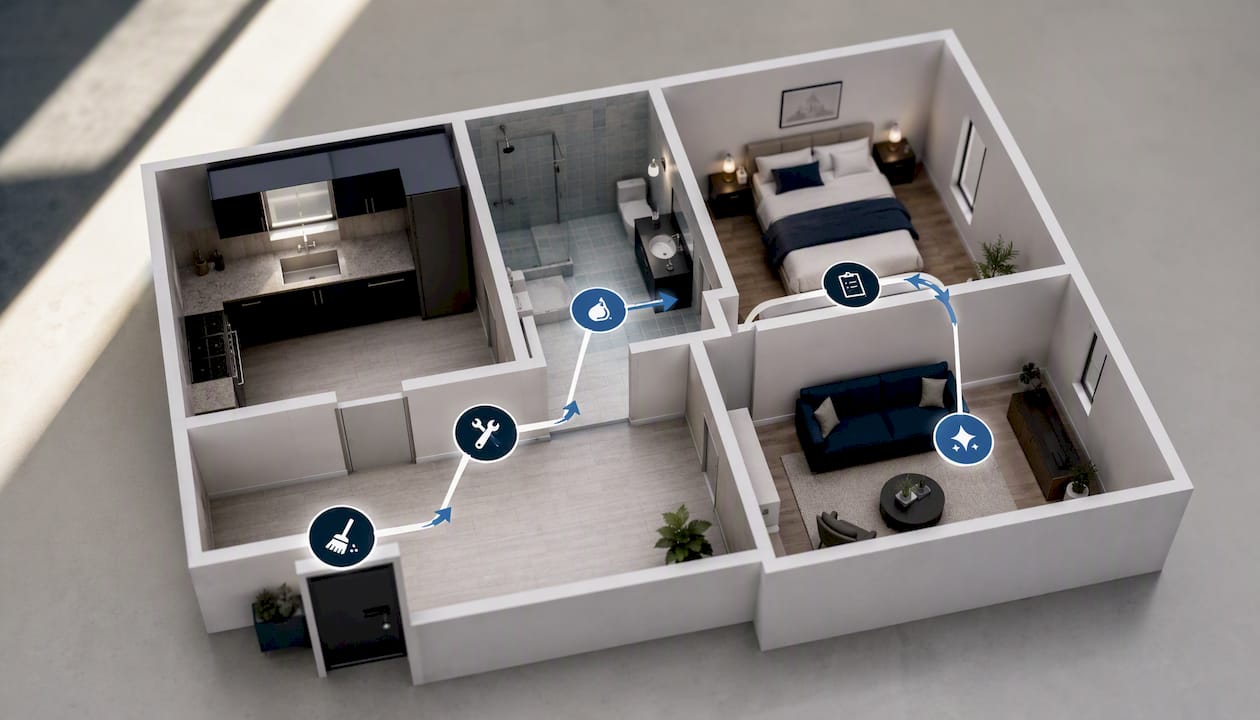
The workflow starts before the resident's boxes leave the parking lot. It follows a fixed sequence: Move-Out inspection, Tech Start, Cleaners, Carpet, Inspection, and Make-Ready, with each stage generating its own proof.
- Move-out inspection. Walk every room and log condition against the unit's baseline. Photograph flooring, walls, appliances, and fixtures, and capture the date, unit number, and inspector name with each item. A wide shot of each room plus close-ups of anything damaged is the minimum standard worth holding to.
- Scope and prioritize. Convert every flagged item into a punch-list task with a deadline and a named owner. Rank by what blocks move-in versus what's cosmetic. A cracked outlet cover waits; a broken lock does not.
- Verify and close. Run a mid-turn or post-work inspection before marking anything done. Attach a dated after photo to the same task as the before photo, so the pair lives together instead of scattered across texts and email threads.
That sequencing, not just the inspection itself, is what reduces missed items and shaves vacancy days off the calendar. Skipping the verification step is the most common failure point. It's easy to trust a vendor's word that a repair is finished; it's much harder to defend that trust later when an owner or resident asks for proof.
Pro Tip: Build your move-out checklist by room, not by trade. Techs and vendors think in rooms ("the kitchen," "the bathroom"), so a room-by-room punch list gets worked faster than one organized by job type.
What Belongs in a Property Standards Library?
Two techs looking at the same scuffed wall will make two different calls unless they're working from the same rulebook. A Property Standards Library fixes that by giving every tech and vendor one shared reference, no separate login required.
A useful library includes:
- The exact paint specification for each unit type (brand, sheen, color code) so a repaint never guesses at "close enough white."
- HVAC filter sizes, faucet models, and appliance specs so replacements match without a supply-run detour.
- Written decision rules: when a wall gets touched up versus repainted wall to wall, when a stained countertop gets repaired versus replaced, and how many years of use trigger an appliance swap regardless of current condition.
- Preferred vendor contacts and rates for each trade, so scheduling doesn't start with a phone search.
Publishing these specs where any invited vendor can see them, without requiring them to create an account, cuts the back and forth of "what color goes on these walls?" down to zero. That consistency does double duty: it speeds up vendor starts because nobody's waiting on an answer, and it kills the scope disputes that come from one tech's judgment call conflicting with another's on the same property.
What Photo Documentation Holds Up for Disputes and Insurance?
Loose photos texted to a group chat rarely survive a deposit dispute. Insurers and courts want original files with EXIF metadata intact, a timestamp, and a clear link between the photo and the specific checklist item it documents.
Build documentation around these rules:
- Never re-export or screenshot a photo before storing it. That process strips the EXIF data that proves when and where it was taken.
- Attach every photo directly to its task, not to a separate album, so the before and after pair travels with the work item permanently.
- Take at least one wide shot per room plus close-ups of high-risk zones: under-sink plumbing, kitchen appliances, and HVAC access panels.
- For safety devices like smoke detectors, capture a close-up with the date visible, along with the model and serial number when the property requires it.
Insurers and courts treat metadata and an immutable audit trail as materially stronger evidence than a piecemeal photo archive. That combination is the single most effective package for defending a habitability complaint or deposit dispute: an unaltered image, a timestamp proving when it was uploaded, and a direct tie to the checklist item it backs. A folder of undated phone photos, even genuine ones, rarely wins that argument on its own.
How Do You Eliminate Dead Time Between Vendors?
Most turns lose days not to any single repair but to the gap between one crew finishing and the next one showing up. Case study data pinpoints the inspection-to-vendor-start lag as the single largest source of excess vacancy days in a large portfolio audit.
- Map what actually has to happen in sequence. Carpet can't go down before paint dries, but a plumber and an electrician can often work the same unit on the same day. Run those in parallel instead of stacking them end to end.
- Set short confirmation windows. A same-day SMS confirmation from a vendor, backed by a scoped photo of the work needed, moves faster than a phone call that goes to voicemail.
- Pre-schedule from inspection data, not after it. The moment the move-out inspection flags a repair, the vendor should already have a tentative slot, so nobody's waiting two or three days for a callback before work even starts.
Automating that triggered handoff, combined with photo-required checklists at each stage, is what drove one firm's average turn time from roughly two weeks down to about five days. The vendor management approach matters as much as the repair work itself.
How Does Turnover Data Improve Long-Term Maintenance Planning?
Every turn you document is a data point, and a portfolio's worth of them tells you things a single unit never could. Track repeat failures by asset and model, not just by unit, and patterns surface fast: the water heater brand that fails at year seven across a dozen units, or the flooring vendor whose work keeps needing rework within six months.
That history feeds directly into planning:
- Repeat failure data supports replacing an appliance model portfolio-wide before it fails on your schedule instead of the resident's.
- Preventive tasks logged from past turns, on weekly, monthly, quarterly, and annual cycles, reduce the repair load that shows up at the next turn.
- A searchable per-unit history lets you benchmark vendors against each other on rework rate, not just price, which changes who gets the next contract.
- Capital budgeting gets easier when you can point to documented failure counts instead of a hunch that "the HVAC units are getting old."
Systematized, digital turnover records are what convert a string of isolated inspections into usable portfolio intelligence, the kind that justifies a capital plan to an owner instead of just asking them to trust your judgment.
Which KPIs Prove Evidence-Based Maintenance Is Working?
Six numbers tell an owner or insurer most of what they need to know: days to turn, days to lease, vendor on-time rate, rework rate, photo compliance rate, and emergency calls in the first 30 days after move-in.
- Days to turn is the headline metric, and it's the one that moves fastest once dead time between vendors gets cut. One documented case dropped from roughly 14.6 days to 5.2 days after tightening scheduling and photo-required checklists.
- Rework rate flags a vendor problem before it becomes a pattern. One redo is normal; three in a quarter from the same crew is a standards conversation.
- Photo compliance (the share of tasks with proof attached where required) is the number an insurer will ask for first during a claim.
- Emergency calls post move-in measures whether "done" actually meant done, or just meant "looked fine at inspection."
Translate days to turn into a vacancy cost per turn for owner reports; that's the figure that actually lands in a budget conversation. When rework rate or emergency calls trend upward two months running, that's the trigger to audit the process itself rather than blame the crew.
What Do Service Managers Learn Rolling This Out?
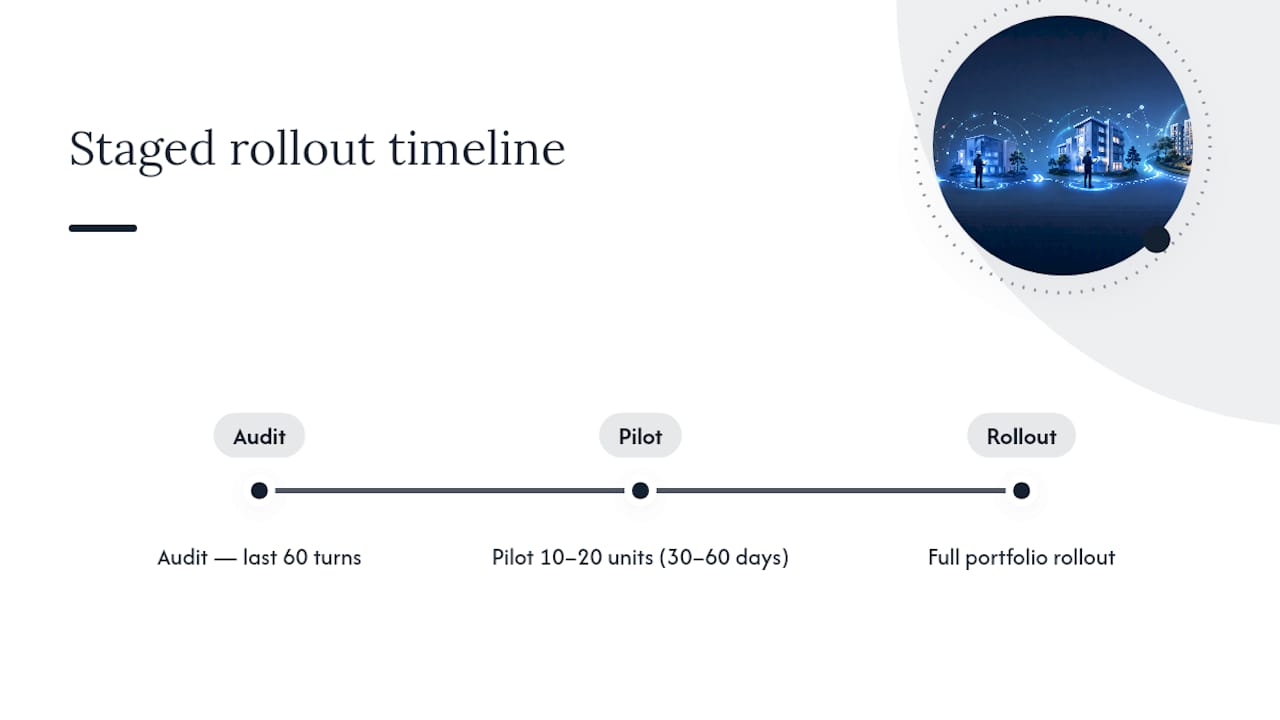
A full portfolio rollout on day one usually backfires. Pilot on 10 to 20 units for 30 to 60 days first. Audit your last 60 turns to find where the real delays sit before you change anything.
Vendor buy-in comes down to fairness, not persuasion: clear scopes so nobody's guessing at the job, timely pay so they keep showing up, and photo evidence that protects them from blame for someone else's mistake just as much as it protects you.
Tie staff incentives to the numbers that matter: photo compliance and days to turn, not just units completed, by using effective maintenance task tracking for small property portfolios. A tech who documents thoroughly but works slightly slower is worth more than one who rushes and leaves you with no proof when a dispute lands on your desk.
Turning the Practice Into Standard Operating Procedure
TurnTrack was built around this exact workflow: a unit turn record that shows Ready, On Track, At Risk, or Overdue status at a glance, a schedule timeline running Move-Out through Tech Start, Cleaners, Carpet, Inspection, and Make-Ready, and an activity feed that logs updates as the work happens.

The Property Standards Library lives inside the app, shareable with any vendor or tech without making them create an account, so the "what shade of white?" question gets answered on the spot. Photos attach directly to to inspection items and activity updates when the property calls for them; nothing forces a photo onto a task that doesn't need one. Vendor contacts sit right inside the turn record instead of buried in a separate contacts app or a text thread from three months ago.
TurnTrack runs on a workspace-level subscription at $14.99 per month with a free trial, available now on iOS through the App Store, with Android coming soon. It's not a property management system, so it won't touch rent, leases, or accounting. It exists to manage the make-ready workflow itself, the part where evidence actually gets built. If your team is still tracking turns across texts, spreadsheets, and memory, start a free trial of TurnTrack and see what a shared, documented turn record does to your days-to-turn number.
Sources
- Apartment Turnover 2025 (NAAHQ)
- Apartment turnover maintenance checklist (Matterport)
- How a 340-Unit Firm Cut Turns to 5 Days (Case study, USTech Automations)