Live status, timeline, activity feed, and optional photo documentation on every active unit turn: that is what real-time turn updates deliver. For a service manager running 8–12 turns at once, same-day visibility means fewer missed vendors, fewer units shown before they are ready, and a documented audit trail that does not depend on anyone's memory. Industry data shows turnover automation can cut average turn time from 12–18 days down to 5–7 days and save roughly $1,200–$2,400 per unit in vacancy costs. You can have a working pilot running this week.
Key Takeaways
Live make-ready tracking cuts vacancy days and missed vendors when you combine status flags, a sequenced timeline, and vendor coordination inside a single shared record.
| Point | Details |
|---|---|
| Start with a pilot | Run three to five turns with one vendor trade before expanding to the full property. |
| Track vacancy loss dollars | Use (monthly rent ÷ 30) × days saved to measure ROI from the first week. |
| Limit required photos | Require photo proof only at checkpoint items; optional elsewhere keeps crews fast. |
| Set acknowledgment SLAs | Vendors confirm dispatch within two hours; escalate to a backup at four hours. |
| TurnTrack pricing | $14.99/month per workspace with a free trial; iOS now, Android coming soon. |
Table of Contents
- What do real-time turn updates actually include?
- Why live updates reduce vacancy days and missed vendors
- How to implement live updates in days, not months
- What to update at each stage on turn day
- Which KPIs prove the system is working?
- Common pitfalls and how to fix them fast
- How TurnTrack delivers live make-ready tracking
- How to run your first TurnTrack pilot
- What actually changes when you go live
- TurnTrack is built for this exact problem
- Sources
What do real-time turn updates actually include?
The term "real-time turn updates" is informal shorthand for what the industry calls live make-ready tracking or unit turnover management. In practice, it means every active turn carries a shared record with four layers of live data:
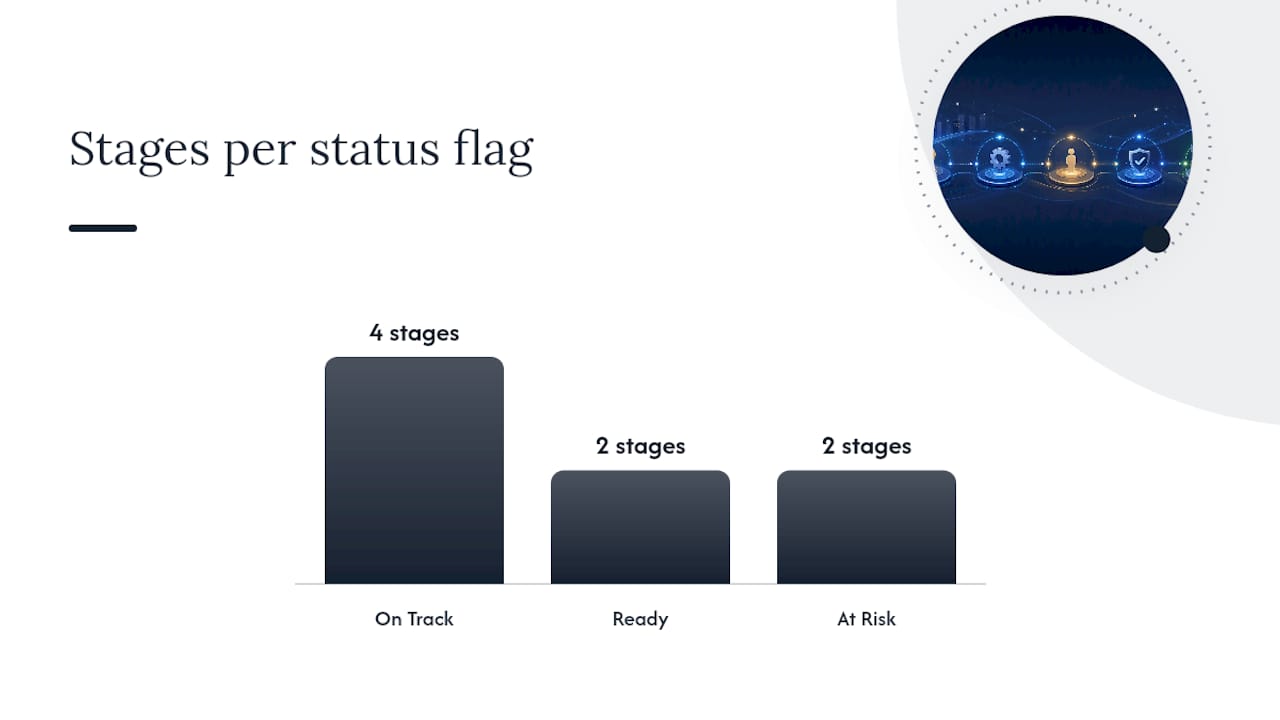
- Status flags: Ready, On Track, At Risk, or Overdue. At a glance, you know which units need attention without calling anyone.
- Schedule timeline: a sequenced set of milestones — Move-Out → Tech Start → Cleaners → Carpet → Inspection → Make-Ready — each with a target date and a completion timestamp.
- Activity feed: time-stamped notes, vendor assignments, optional photo attachments, and inspection records tied to each stage. Documentation happens as a byproduct of the work, not as a separate task.
- Vendor coordination metadata: assigned vendor, contact info, estimated arrival, and acknowledgment timestamps. No digging through texts to find the carpet crew's number.
- Property Standards Library and punch list: unit-specific specs (paint color, filter size, faucet model) tied to acceptance criteria so a tech knows exactly what "done" looks like before the inspection.
Why live updates reduce vacancy days and missed vendors
Every day a unit sits vacant costs money. A properly sequenced make-ready can finish in three to five days; most turns run longer because work gets sequenced backwards or vendors show up to a unit that is not ready for them. Live updates fix the sequencing problem by making the current state visible to everyone at once.
The operational gains are direct. When a cleaner marks their stage complete, the carpet crew gets notified immediately instead of waiting for a phone call that may not come until tomorrow morning. Fewer handoffs fall through. Automating the conversion of inspection findings into vendor work orders can cut coordination time from roughly 4.2 hours per turn to under 30 minutes.
A unit that takes 14 days instead of 7 at $1,500/month in rent costs roughly $350 in pure vacancy loss. Multiply that across 10 turns and the math gets uncomfortable fast.
Automated maintenance communication reclaims 40–60% of the time teams spend on maintenance-related follow-ups. That time goes back to the work.
How to implement live updates in days, not months
A working system does not require a six-month rollout. Start small, prove it works, then expand.
- Define your pilot scope. Pick one building or one vendor trade (HVAC, cleaning, carpet) and three to five active turns. Set one success measure: average turn days before vs. after.
- Build a single turn template. Include the six timeline milestones, required status flags, inspection checklist items, and the two or three photo checkpoints that actually matter (smoke detectors, damage documentation, final clean).
- Assign roles and SLAs. Decide who updates each milestone and set acknowledgment windows: vendors confirm dispatch within two hours, techs log stage completion same day.
- Connect your PMS minimally. Most major platforms (AppFolio, Buildium, Yardi, Rent Manager) expose APIs or webhooks. An orchestration layer can listen for lease/notice events and trigger turn records automatically without replacing your PMS.
- Train in one session. Walk vendors through the update flow on a live unit. One shadowing session beats a written manual every time.
Pro Tip: Pre-schedule trash-out and junk removal before move-out day. It is consistently the longest single delay in a make-ready, and booking it early costs nothing.
What to update at each stage on turn day
| Stage | What to record | Status flag |
|---|---|---|
| Move-Out | Inspection notes, damage photos, initial condition | On Track or At Risk |
| Tech Start | Access confirmed, start timestamp, preliminary repair notes | On Track |
| Cleaners | Start and finish timestamps, photo if required by property standards | On Track |
| Carpet | Start and finish timestamps, before/after photo where required | On Track |
| Inspection | Pass/fail by area, required photo evidence, standards verified | Ready (pass) or At Risk (fail) |
| Make-Ready | Final status set to Ready, unit cleared for showing | Ready |
An At Risk flag triggers when a milestone misses its target date or an inspection fails. The assigned manager gets an alert and a backup vendor or escalation path should already be defined in the template.
Which KPIs prove the system is working?
For a unit renting at $1,400/month, each day saved is worth $46.67. Recovering two days across ten turns in a month is roughly $930 back in your pocket, and that is a conservative estimate against the industry savings range of $1,200–$2,400 per unit.
Common pitfalls and how to fix them fast
- Missed vendor dispatches: manual handoffs fail. Fix it with event-triggered work orders and a two-hour acknowledgment window. If the vendor does not confirm, the system escalates to a backup.
- Over-documentation slowing crews: requiring a photo at every task kills adoption. Limit required photos to checkpoint items (smoke detectors, damage, final clean) and make everything else optional.
- Mobile/connectivity issues: plan for offline-capable entry or a lightweight SMS acknowledgment as a fallback. Crews in basements or older buildings lose signal; the workflow should not stop.
- SLA drift: without escalation rules, At Risk turns stay At Risk. Set a defined escalation path (manager alert at 4 hours, backup vendor at 8 hours) and review it weekly during the pilot.
Pro Tip: Keep your Property Standards Library updated before peak season. A tech who can pull the exact paint color from the app does not need to call you.
How TurnTrack delivers live make-ready tracking
TurnTrack is make-ready and unit turn software built specifically for multifamily property teams. It is not a PMS — it does not handle rent, leases, or tenant communications. It manages the turn workflow only, which is exactly the scope a service manager needs.
| Requirement | TurnTrack feature |
|---|---|
| Status visibility | Ready / On Track / At Risk / Overdue per unit turn |
| Schedule timeline | Move-Out → Tech Start → Cleaners → Carpet → Inspection → Make-Ready |
| Activity feed | Time-stamped notes, vendor assignments, optional photo attachments |
| Vendor coordination | Vendor contact lives inside the turn record, no separate lookup |
| Inspection records | Move-Out, Mid-Turn, and Move-In inspections walked area by area |
| Property standards | Property Standards Library with specs shared to techs without requiring a TurnTrack account |
Workspace subscription: $14.99/month with a free trial. One subscription covers the workspace and the team the manager invites. Available now on iOS via the App Store; Android is coming soon to Google Play.
The workspace invite flow is straightforward: the manager creates the workspace, invites team members by email, and vendors receive access to the turns they are assigned. Photo attachments are optional and tied to specific inspection items or activity updates, not required on every task.
How to run your first TurnTrack pilot
- Sign up and start the free trial at Turntrack.
- Create your workspace and invite your core team (service manager, lead tech, one vendor trade).
- Build one turn template with the six milestones, your standard inspection checklist, and two or three required photo checkpoints.
- Add your property specs to the Property Standards Library: paint colors, filter sizes, preferred vendors.
- Run three live turns as the pilot. Track average turn days and vendor acknowledgment time from day one.
- At the end of seven days, compare your KPIs to baseline. If you recovered even one vacancy day per turn, the math justifies a full-property rollout.
Expanding to portfolio visibility for turns across multiple properties follows the same pattern: replicate the template, adjust the Property Standards Library per property, and add the relevant vendors.
What actually changes when you go live
Running turns without a shared record means the service manager carries the whole picture in their head. When that person is out sick or on another property, the picture disappears. Live updates do not just save time; they make the operation transferable.
Vendor adoption is the real friction point, not the software. A one-week shadowing period where the manager walks vendors through the update flow on actual turns resolves most resistance. After that, vendors appreciate knowing exactly when their stage starts and what the acceptance criteria are. They stop getting called back for rework.
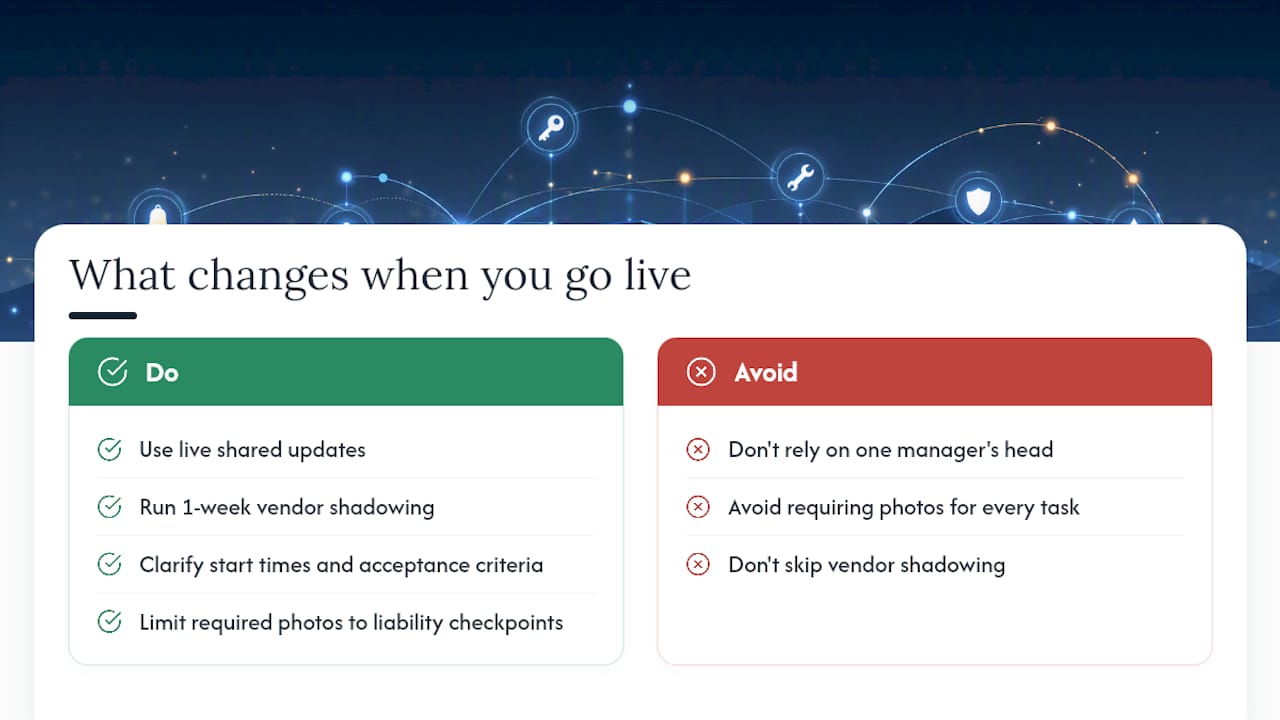
Photos are worth keeping optional. Requiring photo proof on every task adds minutes per task across dozens of tasks per turn. Limit required evidence to the checkpoints that matter for liability or standards verification, and let crews move fast everywhere else.
TurnTrack is built for this exact problem

If you are managing turns across texts, emails, and a spreadsheet that only you understand, TurnTrack gives your whole team a shared record for every active unit. Status flags, a sequenced timeline, vendor contacts inside each turn, optional photo proof where it counts, and a Property Standards Library that answers the "what paint goes here?" question before anyone has to ask it. Built by a service manager with 9+ years in the field, priced at $14.99/month per workspace, with a free trial so you can run your first three turns before committing. Turntrack and have a live pilot running by end of week.
Sources
- Apartment Make-Ready Checklist + Free Toolkit (2026) | Lula
- Apartment Make Ready Checklist: Unit Turn Guide 2026 | Dropcurb
- Unit Turnover Delays Cost Property Managers Thousands 2026 | US Tech Automations
- Automate Tenant Communication for Property Managers (2026)
Recommended next steps: download a make-ready checklist, run a metrics baseline on your last five turns, and schedule a 7-day pilot with TurnTrack.