For unit-turn and make-ready operations, TurnTrack is the cheapest practical fit at $14.99 per month for a workspace subscription. That price covers your invited team, not just a single user seat. It is not a full property management system (PMS), and it does not try to be. It manages the make-ready workflow: unit status, schedule timelines, vendor coordination, inspections, punch lists, and a Property Standards Library. If you need rent collection or lease management, you need a separate PMS. If you need turns to stop falling through the cracks, $14.99 gets you there.
Free trial available. iOS only via App Store.
Table of Contents
- What does "cheapest" actually cost you in unit-turn operations?
- What features actually cut turn time?
- How TurnTrack maps to those priorities
- How to vet any cheap tool in under a day
- Free tools plus manual time vs. a $14.99 workspace
- A 30-day trial plan that actually tells you something
- Key Takeaways
- The real cost of "free" in make-ready operations
- TurnTrack: a $14.99 workspace built for the work you actually do
What does "cheapest" actually cost you in unit-turn operations?
Subscription price is the easiest number to compare and the least useful one. The real cost of any low-cost property management tool includes what you pay the platform, what you pay in transaction fees, and what you pay in labor to work around the gaps.
Several platforms offer free base tiers that cover rent collection and maintenance tracking, then monetize through paid upgrades or payment-processing fees. Some free platforms advertise screening, leases, and rent collection at zero subscription cost. The FTC's guidance on fee disclosure is clear: operators should assess total cost, not headline price, because transaction and payment-processing fees can materially change what "free" actually costs.
Hidden costs to check before committing to any tool:
- Per-door fees: Does the price scale with your unit count? A $29/mo entry plan with no per-door fees is a different animal than a $10/mo plan that adds $2–$5 per unit.
- Payment-processing fees: ACH and credit card fees are often separate from subscription costs. Confirm who bears them, the tenant or you, and whether there are monthly minimums.
- Support SLAs: A free tool with a 72-hour support queue costs you real time when something breaks mid-turn.
- Integration and migration time: Moving data into or out of a platform takes hours. That is labor cost.
- Manual workarounds: A general PMS that does not support vendor coordination or punch lists forces someone to manage those in texts and spreadsheets. That time adds up fast.
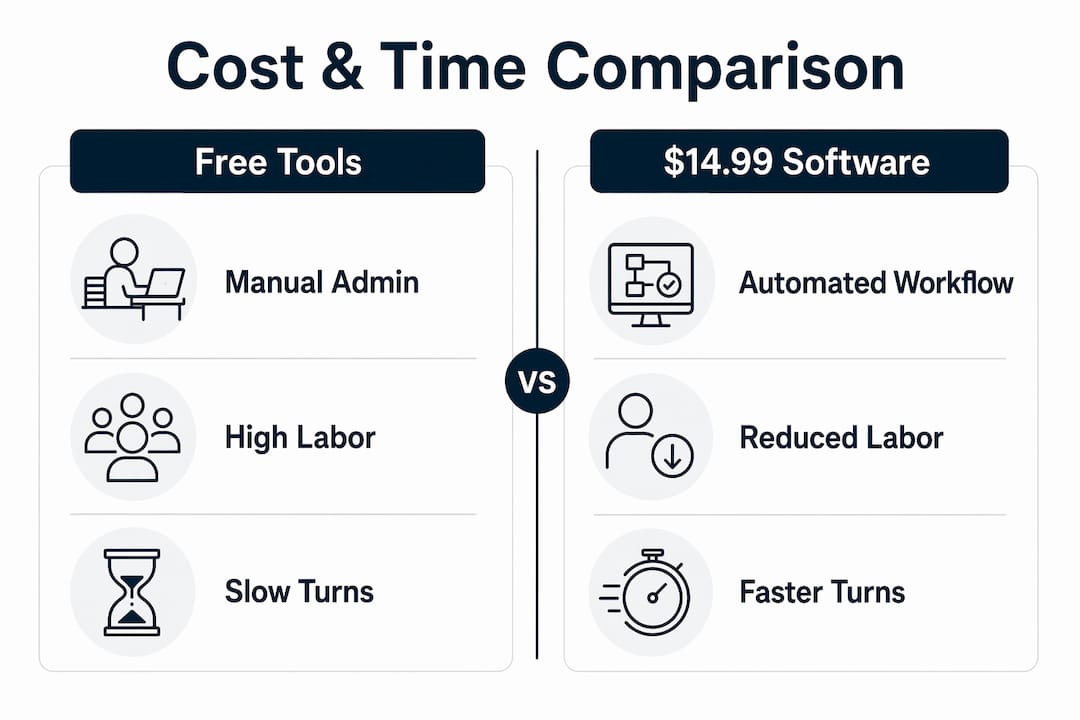
A conservative example: if a free tool requires significant admin time per week to manage turn coordination manually, that translates into substantial labor costs annually. A modestly priced workspace that reduces that admin time notably lowers the combined subscription and labor costs, resulting in meaningful savings. The break-even is not even close.
Pro Tip: Before you compare tools, pull two numbers from your ops: average technician hours per turn and average hourly rate. Those two figures let you put a dollar value on any time savings a tool claims, and they make the TCO comparison concrete instead of theoretical.
What features actually cut turn time?
Price matters less than whether the tool handles the five or six things that cause turns to run long. Most delays trace back to the same problems: nobody knows the current unit status, a vendor gets missed, an inspection item gets skipped, or a tech shows up not knowing what paint color goes on the walls.
The features that directly reduce make-ready time, in order of impact:
- Unit status and timeline tracking — a shared record showing Ready, On Track, At Risk, or Overdue, with a visible timeline from Move-Out through Make-Ready. This alone eliminates the "where are we on 204B?" phone call.
- Vendor coordination inside the turn — vendor contacts and assignments attached to the turn record, not in someone's phone. When the carpet crew needs to be reached, the number is in the turn, not in the service manager's contacts.
- Inspections with optional photo evidence — Move-Out, Mid-Turn, and Move-In inspections walked on a phone, area by area. Photos attached where the property requires documentation, such as a smoke detector swap with the date written on it.
- Punch list and Property Standards Library — unit-specific specs (paint color, HVAC filter size, faucet model) stored and shareable without requiring the recipient to have an account. A tech who asks "what white goes on these walls?" gets the answer from the spec sheet.
- Activity feed and audit trail — a timestamped log of every update, creating audit-ready documentation as a byproduct of the work rather than a separate task.
During any trial or demo, verify these five in order. If a tool cannot do the first two reliably, the rest does not matter.
Pro Tip: Skip any feature that requires a separate login for vendors or a separate app for techs. If the coordination tool adds friction for the people in the field, they will stop using it within two weeks and you are back to texts.

How TurnTrack maps to those priorities
TurnTrack covers all five feature categories above. Here is how the mapping looks:
| Feature area | TurnTrack coverage | Notes |
|---|---|---|
| Unit status and timeline | Full | Ready/On Track/At Risk/Overdue; Move-Out → Tech Start → Cleaners → Carpet → Inspection → Make-Ready |
| Vendor coordination | Full | Vendor contact lives inside the turn record; no separate lookup required |
| Inspections and photo evidence | Full | Move-Out, Mid-Turn, Move-In; photos are optional, attached to items where needed |
| Punch list and Property Standards Library | Full | Specs shareable without requiring a recipient account |
| Activity feed and audit trail | Full | Timestamped log of all updates; documentation built during the work |
| Rent, leases, accounting, tenant comms | Not included | TurnTrack is not a PMS |
Pricing facts:
- Workspace subscription: $14.99/mo
- Free trial available
- iOS only, available via App Store
- One subscription covers the invited team
Limitations to know upfront:
- TurnTrack does not handle rent collection, lease management, accounting, or tenant communications.
- Photos are optional. They attach to inspection items and activity updates where your team needs them, not forced on every task.
- iOS only. Android users on your team cannot access the app.
- This is an operations workspace, not a replacement for your PMS.
If you already run a PMS for the financial and leasing side, TurnTrack fills the gap that most PMS platforms leave open: the actual coordination of the turn.
How to vet any cheap tool in under a day
A one-day evaluation is enough to surface whether a low-cost tool will actually hold up in the field. Run this sequence:
- Set up a sample turn. Create a unit turn record, assign a move-out date, and build out the timeline stages. If this takes more than 10 minutes, the setup friction will slow your team down every time.
- Run a Move-Out → Make-Ready simulation. Walk through each stage, update statuses, add a vendor assignment, and log an activity update. Does the status change reflect immediately? Can a vendor be reached from inside the turn?
- Run an inspection with a photo. Walk an inspection on your phone, mark items, and attach one photo to a line item. Check whether the photo is tied to that specific item in the record or just dropped into a general gallery.
Questions to confirm before you commit:
- What is the support response time for paid accounts? (Email-only with a 48-hour SLA is a risk during active turns.)
- Can you export your data if you leave? (Lock-in is a real cost.)
- Is onboarding self-serve or does it require a sales call?
Success criteria after the trial period:
- Fewer vendor rework calls per turn
- Fewer missed inspection items
- Improved on-time make-ready percentage
- Reduced time spent on status-check calls and texts
Trial day checklist:
- Create a turn record with a full timeline
- Assign at least one vendor to a stage
- Run a simulated inspection with one photo attached
- Update a status and confirm the activity feed logs it
- Check whether the Property Standards Library can store and share a spec
Free tools plus manual time vs. a $14.99 workspace
Two scenarios, same small portfolio, annualized:
| Scenario | Monthly cost | Weekly admin hours | Hourly labor rate | Annual labor cost | Annual total |
|---|---|---|---|---|---|
| Free tool plus spreadsheets | $0 | 6 hrs | $20 | $6,240 | $6,240 |
| $14.99 workspace | $14.99 | 3 hrs | $20 | $3,120 | $3,300 |
The $14.99 workspace saves roughly $2,940 per year in that scenario, assuming a reduction from 6 hours to 3 hours of weekly admin time. If your service manager earns more than $20/hr, or if your portfolio runs more than 10 turns per month, the gap widens faster.
The break-even point shifts with two variables: technician hourly cost and turn volume. At a typical technician hourly cost and moderate turn volume, even a small reduction in turn time can cover the annual subscription cost quickly.
Some entry-level platforms advertise flat pricing from $29/mo with no per-door fees, which is a reasonable model for landlords who need full PMS features. For operators whose only gap is turn coordination, paying $29/mo for features you do not use is its own form of waste.
Pro Tip: During your pilot, log three numbers for every turn: total admin hours, vendor rework instances, and days from move-out to make-ready. Four weeks of that data gives you a TCO model you can defend to ownership.
A 30-day trial plan that actually tells you something
Week 0 (setup):
- Create your workspace and invite your team
- Build 3 sample unit turns with realistic timelines
- Load your Property Standards Library with at least one property's specs
- Assign vendors to at least two turn stages
Weeks 1–2 (live runs):
- Run active or simulated turns through the full timeline
- Log inspections with photos on at least two units
- Update statuses daily and confirm the activity feed captures everything
- Collect baseline metrics: admin hours per turn, vendor contacts made, rework calls
Week 3 (measure):
- Compare time-per-turn against your pre-trial baseline
- Count missed inspection items versus your previous process
- Note how many vendor coordination issues were resolved inside the tool versus outside it
Week 4 (decide):
- Plug your captured metrics into the TCO table above
- Evaluate against success criteria: on-time make-ready rate, rework rate, admin hours
- Decision: keep at $14.99/mo, upgrade if you need more, or replace if the tool did not deliver
Decision checklist:
- Did turn status stay current without manual follow-up?
- Did vendors get coordinated from inside the turn record?
- Did inspections produce usable documentation?
- Did the make-ready process run faster than your baseline?
Key Takeaways
For unit-turn operations, the cheapest property management software is the one that costs the least when you add subscription fees, transaction fees, and the labor hours your team spends working around its gaps.
| Point | Details |
|---|---|
| Workflow fit beats subscription price | A free tool requiring 3 hrs/week of manual workarounds costs more in labor than a $14.99 workspace. |
| Hidden fees change the real cost | Check per-door fees, payment-processing charges, and support SLAs before committing to any platform. |
| Five features drive turn-time savings | Unit status, vendor coordination, inspections, punch lists, and an activity feed are the only features that materially cut make-ready time. |
| Run the 30-day trial plan | Four weeks of tracked metrics gives you a defensible TCO comparison and a clear keep-or-replace decision. |
| TurnTrack at $14.99/mo | Purpose-built for unit-turn coordination; covers all five feature priorities; not a PMS replacement. |
The real cost of "free" in make-ready operations
The conventional wisdom in property management software is that free is always worth trying first. That logic works fine for rent collection tools, where the workflow is simple and the software mostly gets out of the way. It breaks down for unit-turn coordination, where the job is inherently multi-party: service managers, techs, cleaners, carpet crews, inspectors, and sometimes ownership all need to know where a unit stands at any given moment.
A general PMS or a free spreadsheet-based system can track that in theory. In practice, it means someone is manually updating a shared sheet, someone else is texting the carpet crew separately, and the inspection notes live in a phone photo album that nobody else can access. That is not a free system. That is a system where the service manager is the integration layer, and their time is the hidden cost.
The tools that actually save time on turns are the ones built around the turn record itself, not bolted onto a rent-collection platform as an afterthought. Vendor coordination that lives inside the turn, property specs that are shareable without requiring a vendor account, and inspections that build documentation as a byproduct of the walk rather than as a separate task afterward. Those are the capabilities worth paying for. At $14.99/mo, the math is not complicated.
For teams evaluating software alternatives for property managers, the question worth asking is not "what is the cheapest subscription?" It is "what is the cheapest way to run turns without losing track of a unit?"
TurnTrack: a $14.99 workspace built for the work you actually do
Running 5–15 active turns at once means 5–15 sets of vendors, deadlines, and unit-specific conditions. TurnTrack keeps all of it in one place: unit turn records with live status (Ready, On Track, At Risk, Overdue), a schedule timeline from Move-Out through Make-Ready, vendor coordination inside each turn, Move-Out/Mid-Turn/Move-In inspections on your phone, a punch list, and a Property Standards Library that shares specs to techs and vendors without requiring them to have an account.

One workspace subscription covers your invited team at $14.99/mo, with a free trial to start. Available on iOS via the App Store. TurnTrack does not handle rent, leases, accounting, or tenant communications. It handles the part most PMS platforms leave unmanaged: the actual coordination of the turn.
If your turns are running long, vendors are getting missed, or your service manager is the only person who knows where any unit stands, start your free trial and run the 30-day plan above.