
Property management software costs vary widely per month in 2026, depending on portfolio size, features, and pricing model. That range is wide enough to matter: a landlord with 20 units and a service manager running 300 units are shopping in completely different markets, even if they search the same phrase.
Before you commit to any platform, you need to understand what drives that number up, what gets buried in the fine print, and how to calculate what you'll actually spend over a full year. The base subscription is rarely the whole story.
How much does property management software cost in 2026?
The clearest way to frame property management software pricing is by portfolio size. Here's where most US operators land:
- Small portfolios (1–50 units): $50–$150 per month. Covers rent collection, basic maintenance tracking, and tenant communication.
- Medium portfolios (50–200 units): $150–$600 per month. Adds accounting, reporting, automation, and payment processing.
- Large portfolios (200+ units): $600–$1,500+ per month. Enterprise features, custom integrations, and dedicated support.
Per-unit pricing generally charges a small rate per unit monthly, but minimum monthly fees often create a price floor around typical entry-level plan costs. Beyond the base subscription, payment processing, onboarding, and add-ons can add 30–50% to what you actually pay each month.
One number worth anchoring to: 43% of property management software buyers budget more than $120 per month per user, while 27% budget $40–$80 per month per user. That spread reflects how differently operators prioritize features and automation.

What pricing models do property management software providers use?
Three structures dominate the market, and each behaves differently as your portfolio grows.
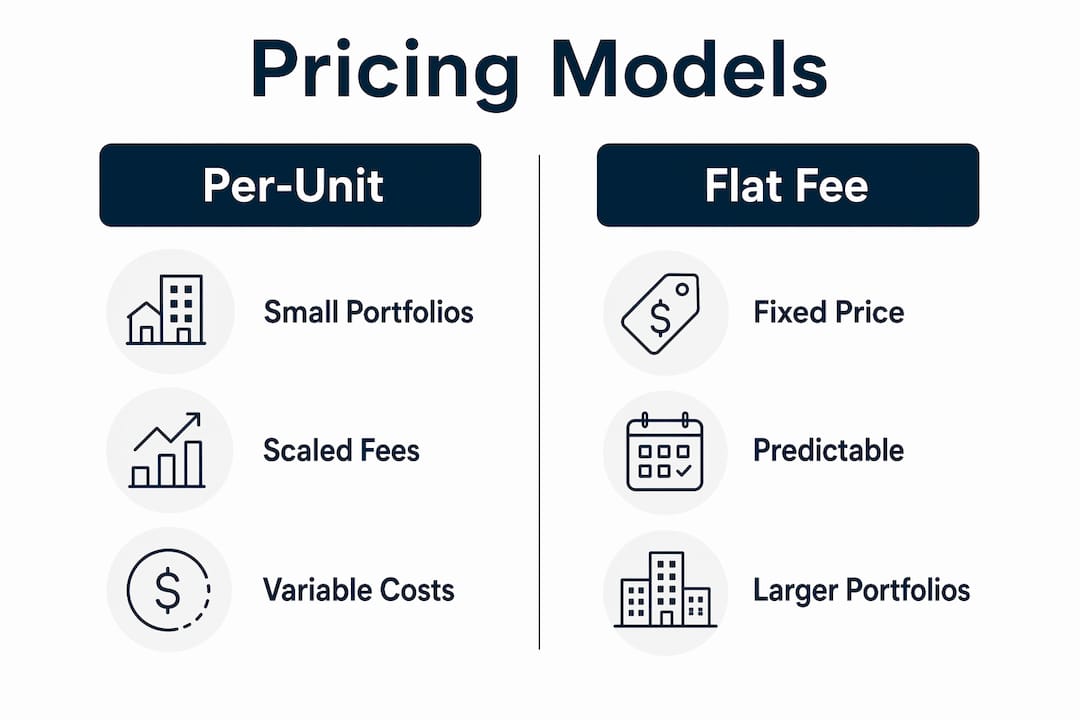
- Per-unit pricing: A flat rate per door per month, typically $1–$5 per unit. Costs scale directly with portfolio size, which is predictable but can get expensive fast above 200 units.
- Tiered feature bundles: Fixed plans with a base unit allowance. You pay for a feature tier, not just a headcount. Smaller landlords often overpay here if they choose a tier with features they never use.
- Per-square-foot pricing: Common in commercial portfolios. Charges are based on total managed square footage rather than unit count, which suits office or retail managers better than residential operators.
- Freemium models: Free core access with paid upgrades for automation, reporting, or screening. Useful for individual landlords testing the water, but premium features add up quickly.
- Custom or quote-based pricing: Used by enterprise platforms for large portfolios with specific integration requirements. Expect a sales call before you see a number.
Pro Tip: If your portfolio sits near a tier boundary, ask the vendor what happens when you cross it. Some platforms jump price significantly at 50 or 100 units, and knowing that in advance changes your budgeting math.
Matching the model to your operation matters more than chasing the lowest headline rate. A per-unit model works well for a growing portfolio because costs scale with revenue. A flat-tier model works better when you want predictable monthly expenses and your unit count is stable. For a broader look at how pricing structures vary across property management tech in 2026, the differences between cloud and legacy platforms are worth understanding before you commit.
How does portfolio size affect what you pay?
Portfolio size is the single biggest lever on your monthly bill, but the relationship isn't always linear.
- Under 50 units: Budget $50–$150 per month for software. The catch is minimum fees. Many vendors set minimums around $100–$300 per month, so a 10-unit landlord on a per-unit model may pay the same as a 50-unit operator. That's a real cost-per-door difference.
- 50–200 units: This is where tiered pricing starts to pay off. You're large enough to use accounting, reporting, and automation features, and the per-unit math typically works in your favor.
- 200+ units: Enterprise platforms are prevalent, with starting fees typically in a higher range, increasing for customizations and support.
- 500+ units or commercial portfolios: First-year costs for software and related services can be substantial due to scale and complexity.
Property type adds another layer. Residential portfolios generally pay per unit. Commercial portfolios often use per-square-foot models, with rates that reflect the complexity of lease structures and maintenance coordination. Mixed-use portfolios sometimes fall into custom pricing territory because standard tiers don't fit cleanly.
Smaller operators often get the worst deal per door because minimum fees don't scale down. A 15-unit landlord paying a $150 monthly minimum is effectively paying $10 per unit, well above the $1–$5 market rate. That's worth knowing before you sign.

What additional fees push the real cost higher?
The advertised subscription price is where the conversation starts, not where it ends. Here's what typically adds to your actual monthly spend:
- Onboarding and setup fees: These vary widely from no cost on self-service platforms to higher amounts for guided setups and extensive migrations often seen with enterprise vendors.
- Payment processing fees: Common charges include a small per ACH transfer fee and a percentage-based credit card fee which, at high rent volumes, can exceed the software subscription cost.
- Tenant screening: Fees per applicant for credit and background checks often apply and can accumulate quickly for high-volume landlords.
- E-signature fees: Some platforms charge per document unless included in the base subscription.
- Premium support and training: Optional services may incur additional fees beyond basic included support.
- Data migration: May be free on some platforms or come with variable fees for assisted transfer depending on complexity.
- Custom integrations: Usually involve additional costs and should be clarified prior to contract agreement.
Always request a full fee schedule before committing to any platform. The base subscription is the number vendors advertise; the fee schedule is the number you'll actually pay.
What features come with each pricing tier?
Feature access is where the real value calculation happens. Here's how the tiers typically break down:
- Entry-level ($15–$100/month): Rent collection, basic maintenance tracking, listing management, tenant communication, and e-signing. Suited to individual landlords and small portfolios that don't need accounting or automation.
- Mid-tier ($100–$600/month): Adds integrated payment processing, tenant screening, custom reporting, mobile apps, and basic accounting. This is where most independent property managers operate.
- Enterprise ($600+/month): Custom integrations, advanced analytics, API access, dedicated support, and AI-driven tools for leasing automation, maintenance workflows, and predictive analytics. AI-driven features typically appear only at enterprise pricing levels, starting around $600 per month.
The honest question to ask before upgrading a tier: how many of those additional features will your team actually use in the first six months? Paying for advanced analytics when your operation runs on spreadsheets and gut instinct is a waste of budget. Consulting your full management team before selecting a tier consistently produces better ROI because the people doing the daily work know which features matter and which ones won't get touched.
One area that often gets undervalued in standard PMS tiers: unit turn and make-ready workflow. Most platforms treat it as a maintenance ticket, not a coordinated multi-vendor process. If you're running 5–15 active turns at once, that gap shows up fast. Understanding make-ready workflow as a distinct operational need helps clarify which software features you actually need versus which ones just look good in a demo.
How do you calculate total cost of ownership?
Total cost of ownership (TCO) is a better metric than monthly subscription price alone. It encompasses every dollar you spend to run the software over a full year, not just the line item on your credit card statement.
A complete TCO calculation includes:
- Base subscription fees (monthly or annual)
- Payment processing fees on rent collected
- Onboarding and setup costs (one-time, but they affect your first-year break-even)
- Tenant screening charges
- Premium support or training costs
- Add-on features you need but aren't bundled
- Data migration if switching from another platform
The most common budgeting mistake in property management software is treating the subscription fee as the total cost. Transaction fees alone can exceed the subscription on a mid-size portfolio. A platform charging $150 per month with 2.75% credit card processing on $80,000 in monthly rent adds $2,200 in transaction fees. The "affordable" platform just became the expensive one. Always model your expected transaction volume before comparing platforms on price.
For portfolios under 100 units, budget $1,800–$7,200 for the first year including subscription, onboarding, and additional fees. For 100–300 units, budget $1,800–$7,200. For 500+ units or commercial portfolios, first-year costs routinely exceed $7,200.
The practical fix: build a simple spreadsheet before you demo anything. List your unit count, expected monthly rent volume, likely transaction mix (ACH vs. credit card), and the features you actually need. Run each vendor's pricing through that model. The number that comes out is your real cost, not the one on the pricing page.
How do pricing structures compare across the market?
The US property management software market in 2026 spans a wide range, from free tools for individual landlords to enterprise platforms with custom pricing. Here's how the major tiers look in practice:
Entry-level platforms typically start around $50–$150 per month. These suit landlords managing fewer than 20 units who need rent collection and basic communication tools. Some offer free core access with paid add-ons for screening and reporting.
Mid-market platforms run $150–$600 per month and cover the majority of independent property managers. Buildium, for example, offers three tiers with minimums starting at $58 per month for its Essential plan, $183 for Growth, and $375 for Premium. Yardi Breeze starts at $100 per month minimum for residential properties at $1 per unit per month, scaling to $2 per unit for commercial. These figures reflect publicly listed pricing and are subject to change.
Enterprise platforms like Yardi and MRI Software use custom pricing for large portfolios. AppFolio, which leads the G2 Grid Report for Property Management in Fall 2025, starts at approximately $1.40 per unit per month with a $280 minimum and includes native AI tools.
The key comparison point isn't the base rate. It's what the platform charges for the three or four features your operation actually depends on daily. Two platforms at the same monthly subscription can produce very different annual bills once you add screening, e-signatures, and payment processing. For a structured look at software alternatives across different operational needs, comparing by feature category rather than headline price produces clearer decisions.
What contract terms and cancellation fees should you watch for?
Contract flexibility varies significantly across the market, and the terms matter as much as the price.
Most platforms offer both monthly and annual billing. Annual plans typically cost less per month but require a 12-month commitment. Monthly plans cost more but let you exit without penalty. For operators testing a new platform or managing a transitional portfolio, the flexibility of monthly billing is often worth the premium.
Cancellation fees are common but not universal. Some platforms charge an early termination fee equivalent to one to three months of subscription fees if you exit an annual contract early. Others include declining termination fees that decrease the longer you stay. A few enterprise contracts include breach-of-contract clauses that can expose you to larger liability. Read the termination section of any contract before you sign, not after you decide to leave.
Data portability is a related concern. When you cancel, can you export your tenant records, maintenance history, and financial data in a usable format? Some platforms make this easy; others make it painful. Ask specifically what data you can export and in what format before committing.
Annual billing discounts typically run 10–20% off the monthly rate. On a $400 per month platform, that's $480–$960 per year in savings. Whether that's worth the commitment depends on how confident you are in the platform after your trial period.
Cloud vs. on-premises: how deployment affects what you pay
Cloud-based software generally carries lower upfront costs than on-premises solutions, and that gap is significant. Cloud SaaS platforms dominate the US market in 2026 for exactly this reason.
With a cloud platform, you pay a monthly or annual subscription and the vendor handles infrastructure, updates, and security. There's no server to buy, no IT staff to maintain it, and no version upgrade cycle to manage. For most property managers, this is the right model.
On-premises software requires you to purchase or lease server infrastructure, manage your own backups and security, and pay for version upgrades separately. The upfront investment can run tens of thousands of dollars before you process a single rent payment. Ongoing IT maintenance adds to that annually. The total cost of ownership for on-premises solutions is almost always higher over a three-to-five year horizon, even when the per-seat licensing looks cheaper on paper.
The practical case for on-premises is narrow: organizations with strict data sovereignty requirements, proprietary workflow integrations that can't run in a cloud environment, or existing IT infrastructure that makes the economics work. For the vast majority of US property managers, cloud SaaS is the default and the right one. Pricing transparency, faster onboarding, and the ability to cancel without stranded hardware costs all favor the subscription model.
One nuance worth noting: some vendors market "private cloud" or "hosted" solutions that sit between true SaaS and on-premises. These often carry higher fees than standard cloud plans because the vendor is managing dedicated infrastructure for your account. Ask specifically whether you're on shared or dedicated infrastructure, and what that means for your pricing.
Where TurnTrack fits in this picture
TurnTrack is not a property management system. It doesn't handle rent, leases, accounting, or tenant communications. What it does is manage the unit turn and make-ready workflow, the part of operations that most PMS platforms treat as an afterthought.
At a mid-size community, a service manager might run 5–15 active turns at once, each with its own move-out date, deadlines, techs, vendors, and unit-specific conditions. Without a shared tool, that coordination lives across texts, emails, spreadsheets, and people's memory. Vendors get missed. Units get shown before they're ready. Disputes can't be settled because there's no record.
TurnTrack gives every turn a shared record with a status (Ready, On Track, At Risk, Overdue) and a timeline the whole team can see: Move-Out, Tech Start, Cleaners, Carpet, Inspection, Make-Ready. Vendor contacts live inside the turn, not in someone's phone. The Property Standards Library keeps property-specific specs, the exact Sherwin-Williams paint color, the HVAC filter size, the preferred vendor, in one place and shares them to a tech or vendor without requiring them to have a TurnTrack account.
The subscription is $14.99 per month at the workspace level, covering the owner's invited team; see the Pricing – TimeTamer | Team Scheduling Software for detailed pricing models. There's a free trial, and the app runs on iOS.

If your PMS handles the financials but your turns still run on group texts and gut instinct, TurnTrack fills that gap without adding enterprise-level complexity or cost.
Key Takeaways
Property management software cost ranges from $50 to over $1,500 per month, but total cost of ownership including transaction fees, onboarding, and add-ons routinely runs 30–50% above the advertised subscription price.
| Point | Details |
|---|---|
| Cost by portfolio size | Small (1–50 units): $50–$150/mo; medium (50–200 units): $150–$600/mo; large (200+ units): $600–$1,500+/mo. |
| Watch transaction fees | A 2.75% credit card processing fee on monthly rent can add significantly to costs, often exceeding the subscription cost. |
| Minimum fees hurt small portfolios | Many vendors set minimums of $100–$300/mo, meaning small landlords pay a higher effective cost per unit than larger operators. |
| TCO beats base price | Add-ons and transaction fees can increase effective monthly cost by 30–50% beyond the advertised rate. |
| Cloud dominates for good reason | Cloud SaaS carries lower upfront costs and no infrastructure overhead, making it the right default for most US property managers. |