
A unit turn calendar is the milestone schedule that runs from move-out to move-in readiness, tracking every stage a vacant apartment passes through before it's rentable again. Aim for a 3 to 7 day turnaround on a standard turn, and when several units turn at once, work pre-leased units first. Your first move today: enter the next move-out date and target move-in date, then lock in an inspection within 24 hours of the keys coming back.
- Define the milestone stages: Move-Out, Tech Start, Cleaners, Carpet, Inspection, Make-Ready
- Set the SLA target: 3–7 days for a standard turn
- Prioritize pre-leased units first, then rank the rest by vacancy cost
- Schedule the move-out inspection within 24 hours, no exceptions
Key Takeaways
A unit turn calendar works when it combines a fixed milestone sequence, a 24-hour inspection rule, and shared status flags that force ownership instead of guesswork.
| Point | Details |
|---|---|
| Target the SLA | Aim for 3 to 7 days on a standard turn, adjusting up for heavy turns with flooring or appliance work. |
| Inspect within 24 hours | Walk the unit within a day of move-out to catch damage early and build an accurate punch list. |
| Sequence to avoid rework | Follow repairs, then paint, then flooring, then deep clean, then a final QA gate before listing. |
| Prioritize by lease and cost | Pre-leased units go first; rank the rest by vacancy cost, not by convenience. |
| Centralize the workflow | TurnTrack keeps the timeline, vendor contacts, and property specs on one shared turn record instead of scattered texts. |
Table of Contents
- Why a Turnover Calendar Matters More Than It Looks
- What Does a Standard Unit Turn Sequence Look Like?
- How Do You Build the Calendar So It Actually Holds Up?
- What Should a Turn Calendar Tool Actually Do?
- A Copy-Ready Checklist and Template for Your Next Turn
- What a Service Manager Would Tell You Off the Record
- TurnTrack: Where the Calendar Actually Lives
- Frequently Asked Questions
- Sources
Why a Turnover Calendar Matters More Than It Looks
Every day a unit sits empty costs real money, and a scattered system hides how much. An apartment make-ready commonly runs $1,000 to $5,000 and takes 5 to 10 days when nothing is tracked closely, with trash-out routinely eating multiple days off that window on its own.
Late turns don't just cost money. They generate rework when a unit gets shown before it's actually ready, and they trigger move-in complaints when a resident walks into wet paint or a missing appliance. A shared calendar with clear milestones stops the most common failure mode in make-ready work: a vendor who never got the handoff, because nobody outside one person's inbox knew the schedule existed.
What Does a Standard Unit Turn Sequence Look Like?
Turns aren't one-size-fits-all, and treating them that way is how schedules slip. Break them into three tiers:
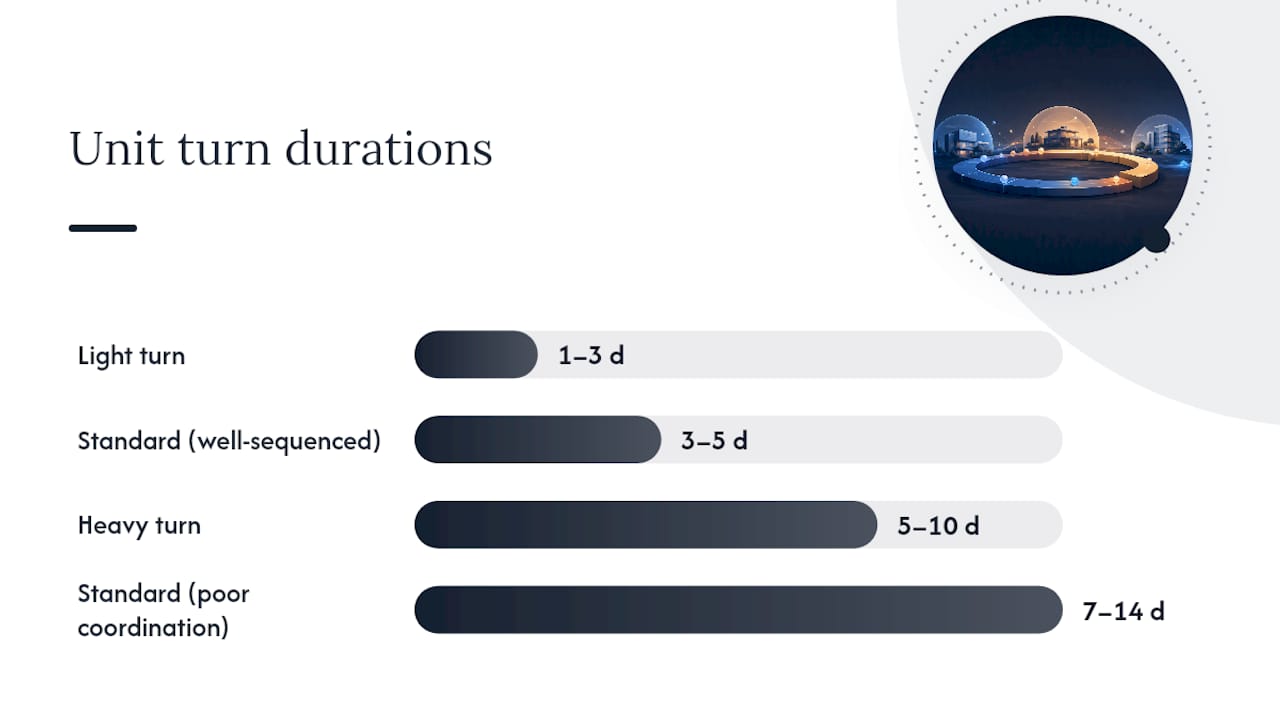
- Light turn (paint touch-up, standard clean): 1 to 3 days. Move-out inspection, minor patch and paint, deep clean, final QA.
- Standard turn (full paint, carpet clean, minor repairs): 3 to 5 days. Move-out inspection within 24 hours, punch list generated, repairs, paint, flooring, deep clean, final inspection.
- Heavy turn (flooring replacement, appliance swap, major repairs): 5 to 10 days, sometimes longer if parts are backordered.
The sequence matters as much as the timeline. Industry guidance is consistent on the order: repairs before paint, paint before flooring, flooring before the final deep clean, and a QA walk before the unit ever gets listed. Reverse that order, even once, and you're repainting a wall the flooring crew just scuffed.
A well-sequenced standard turn typically closes in 3 to 5 days, but poor vendor coordination stretches the same scope of work to 7 to 14 days. That gap is almost entirely a scheduling problem, not a labor problem.
Pro Tip: Never let the unit go on the market before the final QA walk clears it. Skipping that gate to save half a day is how you end up with a resident complaint and a redo, which costs you three days instead.
How Do You Build the Calendar So It Actually Holds Up?
Work backward from the confirmed move-in date, not forward from move-out. If a resident signs a lease with a move-in date, count backward through inspection, cleaning, carpet, and tech work to find your real start deadline, and add a buffer for vendor lead time on top of it.
Priority order matters when several units turn in the same week:
- Pre-leased units go first, every time, because a confirmed move-in date is a hard deadline
- Rank the rest by vacancy cost: the longer a unit has already sat empty, the higher it climbs
- Renovation or capital-project units go last unless they're blocking a lease
Use status flags so anyone glancing at the calendar knows what needs attention without a phone call: Ready, On Track, At Risk, and Overdue. An At Risk unit needs an owner to name the blocker and a new date within the hour, not a vague promise to "check on it." Overdue units need escalation, not another status update.
Parallelize where you can. Cleaners and carpet crews often can't be in the unit at the same time, so stagger them instead of double-booking and hoping it works out.

What Should a Turn Calendar Tool Actually Do?
A calendar is only as good as the system holding it together. At minimum, the tool needs a per-turn timeline, vendor contact info attached to the turn itself, a way to standardize property specs, inspection forms, and a running log of what happened and when.
Here's what each piece actually buys you in the field:
- Per-turn timeline — everyone sees the same Move-Out → Tech Start → Cleaners → Carpet → Inspection → Make-Ready stages, so nobody's guessing what's next
- Vendor coordination inside the turn — the carpet crew's number lives on the turn record itself, not buried in a separate contact list
- Standardized property specs — one place holding the exact paint shade, filter size, and preferred vendor, so a tech isn't texting you at 4 p.m. asking what white goes on the walls
- Inspection flows — Move-Out, Mid-Turn, and Move-In walks recorded stage by stage, building a condition record as a byproduct of the work
- Activity feed with optional photos — a running log, with photo proof attached only where the property actually requires it
This is the exact gap TurnTrack was built to close. It's a field-built iOS app made by a service manager, not a general-purpose PMS, and it doesn't touch rent, leases, or tenant communications. It manages the turn workflow: the timeline, the vendor contacts, a Property Standards Library, inspections, and an activity feed, all tied to a workspace subscription at $14.99 a month with a free trial. Android is coming, but for now it's iOS only.
Getting a team onto a tool like this takes four steps: build your milestone templates once, invite the team, make the 24-hour inspection non-negotiable, and use photo documentation only where the property has a real reason to require it, like smoke detector swaps.
A Copy-Ready Checklist and Template for Your Next Turn
Set up any new turn with the same six steps, whether you're running it in an app or a shared calendar.
- Enter the move-out date and the confirmed or target move-in date
- Assign an owner to each stage, not just to the turn as a whole
- Schedule the move-out inspection for within 24 hours
- Attach the property specs the vendor will need (paint code, filter size, fixture model)
- Set the SLA (light, standard, or heavy) and the escalation trigger for At Risk status
- Confirm the QA walk date before the unit goes on the market
Default day offsets from move-out, adjustable to your property's actual vendor lead times:
For pre-leased units, treat the move-in date as fixed and compress every stage above it if the SLA is tight. For market-ready units with no lease signed yet, you have more room to shift dates around other turns competing for the same vendor.
What a Service Manager Would Tell You Off the Record
Trash-out is where calendars quietly die. It's rarely the biggest job, but it's the one most likely to stall everything behind it while you wait on a hauler's estimate. Stage it curbside or use an internal crew when you can, and you'll usually save more time than any other single change to your sequence.
A Property Standards Library also earns its keep faster than people expect. Half the delay on a vendor job isn't the labor, it's the back and forth over which paint or which filter size. And resist the urge to require photos on every task. Use them where the property genuinely needs proof, like a smoke detector swap with a date on it, and skip them everywhere else. Mandatory photos on routine work just slow techs down for no real benefit.
TurnTrack: Where the Calendar Actually Lives
Most of what breaks a unit turn calendar isn't the schedule itself, it's that the schedule lives somewhere nobody else can see. TurnTrack puts the timeline, the vendor contacts, and the property specs on the same record everyone's already looking at, so a status change shows up once instead of getting retyped into three different group texts.

It's not a PMS and never tries to be. There's no rent module, no lease tracking, no resident messaging. What it does handle: the Move-Out → Tech Start → Cleaners → Carpet → Inspection → Make-Ready timeline, vendor contacts attached directly inside each turn, a Property Standards Library your vendors can see without needing their own account, inspection flows for Move-Out, Mid-Turn, and Move-In, optional photo attachments, and an activity feed that builds documentation as the work happens.
It runs on iOS through the App Store, with Android on the way. Pricing is a flat $14.99 a month per workspace, covering the whole invited team, with a free trial to test it against your next batch of turns. If you're juggling five to fifteen active turns off memory and group texts right now, visit the TurnTrack workspace page and start the trial on your next move-out.
Frequently Asked Questions
What is a good target turnaround time for a standard unit turn? Three to five days is typical for a well-sequenced standard turn. Give yourself up to seven days as a working ceiling before a delay counts as At Risk.
How far in advance should I build the turn calendar? As soon as a move-out notice comes in. During peak leasing months, planning roughly 60 days ahead for expected move-outs helps you pre-book vendors before every property in the area is competing for the same crews.
What's the single biggest thing that delays a unit turn calendar? Trash-out and junk removal cause more schedule slippage than any other single step, mostly from waiting on hauler estimates instead of staging removal in advance.
Does TurnTrack replace my property management software? No. TurnTrack handles the make-ready and unit turn workflow only, not rent, leases, or resident communication. It's built to sit alongside your PMS, not replace it.
How many active turns can one calendar realistically track? A mid-size community running five to fifteen active turns at once is exactly the load a shared calendar and status flags are built to handle. Past that, the memory-and-text-thread approach usually breaks down first.
Sources
For deeper checklists and inspection form examples, see TurnTrack's execution guide and move-in inspection field guide.
- Apartment Make Ready Checklist: Unit Turn Guide 2026 | Dropcurb
- What Is a Make Ready? Definition, Checklist & Cost (2026) | Lula