
A standard materials list is the property-specific inventory of approved parts, part numbers, and specs your team uses on every unit turn, from the exact paint code on the walls to the HVAC filter size. The single best practice: stop keeping it on paper or in someone's memory. Keep it digital and linked directly to the turn workflow so anyone on-site can pull the exact spec at the moment they need it.
TL;DR:
- Keep the materials list digital and linked directly to the turn workflow to avoid guesswork and ensure that specifications are always accessible on-site.
- Standardize the list with consistent fields such as name, manufacturer SKU, photo, size, color, room location, approved alternates, par level, and critical notes because inconsistent entries hinder searchability and accuracy.
- Attach specs and photos directly within each task and share vendor-specific links to cut down on back-and-forth, ensuring quick access and reducing errors during active turns.
- Set par levels based on the property's typical monthly turnover volume to prevent delays, and bulk-buy common parts like bulbs and door hardware to cut costs and turnaround times.
- Regularly review and update the list with version control, linked to inspection records, and assign ownership for ongoing maintenance to keep specifications accurate and audit-ready.
Table of Contents
- What Belongs on a Standard Materials List?
- How Do You Standardize the Records So Nothing Gets Lost in Translation?
- Where Should Specs Live So Techs Can Actually Use Them?
- Using the List During an Active Turn
- Stocking Rules That Actually Cut Turnaround Time
- Keeping the List Audit-Ready Over Time
- An Operator's Take on Keeping This List Simple
- Put Your Materials List Where the Work Happens
- Templates Worth Downloading
- Sources
What Belongs on a Standard Materials List?
Every unit turn touches the same rooms in roughly the same order, and your list should mirror that. Room-by-room checklists are the accepted baseline across the industry, and for good reason: they force you to think through every surface a resident will notice before the next move-in walk-through, according to Matterport's breakdown of apartment turnover maintenance.
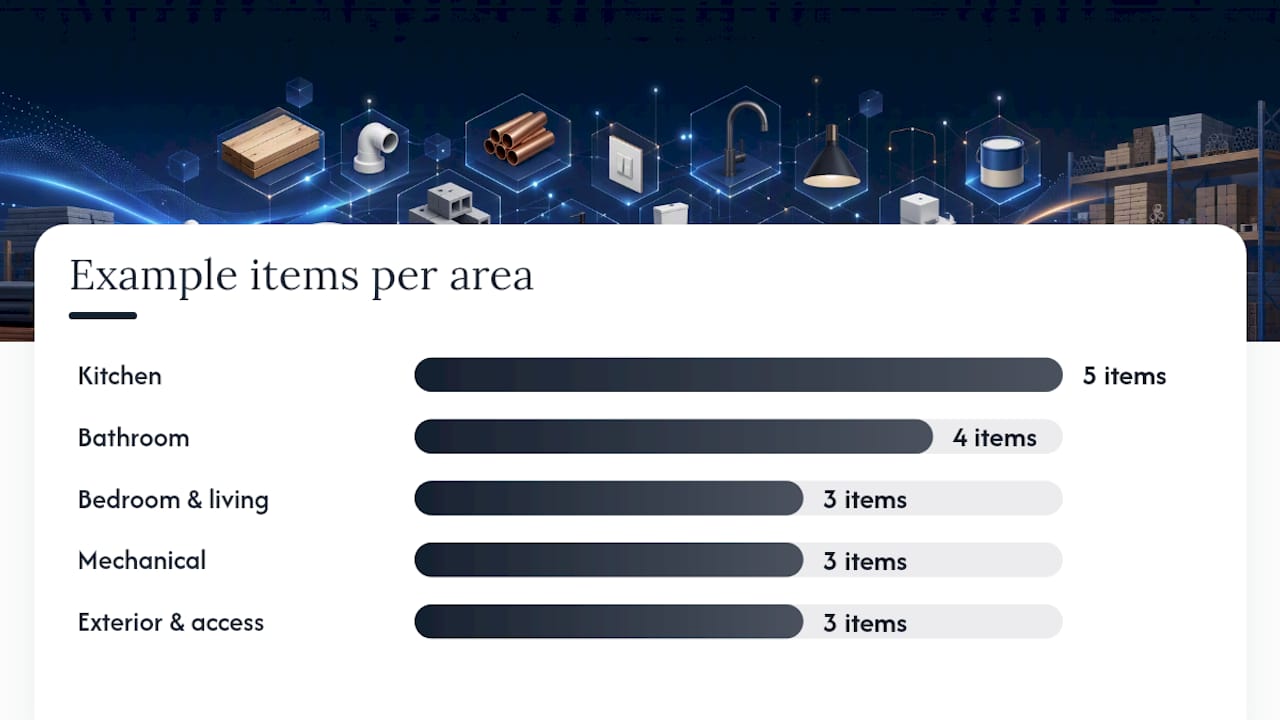
Break the list into these working categories:
- Kitchen: faucet model and finish, disposal unit, appliance model numbers, cabinet hardware, countertop sealant type.
- Bathroom: toilet model, shower valve cartridge part number, grout color code, exhaust fan CFM rating.
- Bedroom and living areas: paint sheen and code (interior brand and formula number, not just "eggshell white"), blind size and mount type, outlet and switch cover style.
- Mechanical: HVAC filter size and MERV rating, water heater specs, smoke and carbon monoxide detector model.
- Exterior and common access: lockset brand and keyway, door sweep size, light fixture bulb type and lumen output.
Supplier property-turn checklists back this up with granular detail. HD Supply's property-turns checklist tracks switch plates, GFCIs, trim profiles, and flooring transitions as discrete line items, not vague categories. That level of specificity is what separates a real materials list from a shopping list.
For each item, capture four things: the SKU or part number, the exact measurement (door width, filter dimensions, faucet reach), the finish or color code, and a photo. Skip any of those four and you're back to guessing, which is how a tech ends up installing the wrong lockset because "brushed nickel" meant something different to the last three people who ordered one.
How Do You Standardize the Records So Nothing Gets Lost in Translation?
A materials list only works if every entry follows the same structure. Otherwise you get one property calling it "hall light" and another calling it "corridor fixture," and nobody can search for either one fast.
Use a minimal field set for every item:
- Name — plain-language description a tech would search for.
- Manufacturer and SKU — the exact order number, not a description.
- Photo — one clear image, ideally installed and in-package.
- Size or dimension — width, depth, filter size, whatever applies.
- Color or finish code — the manufacturer's actual code, not "gray."
- Room or zone — where it's used, so techs can filter by area.
- Approved alternate — a backup SKU if the primary is backordered.
- Par level — minimum on-hand quantity before reordering.
- Critical notes — anything that trips people up, like "left-hand swing only."
Short-form naming helps here. Instead of "kitchen faucet," write "FAU-KIT-Moen87" so it's searchable and sortable. Set par levels based on how many turns you run monthly. If you average ten turns and each uses one HVAC filter, keep at least fifteen on hand and set the reorder trigger at ten. Record approved alternates up front, not mid-turn, so a tech never has to guess whether a substitute is acceptable.
Pro Tip: Build the alternate field before you need it. The worst time to decide whether a Kwikset substitute is acceptable for a Schlage lockset is while a vendor is standing in the unit waiting for an answer.
Where Should Specs Live So Techs Can Actually Use Them?
A binder in the leasing office solves nothing when the tech is standing in Unit 214 asking what shade of white goes on the walls. Specs need to live where the work happens, not where the paperwork happens.
A single Property Standards Library, shared digitally and tied directly into the turn record, cuts the back-and-forth that eats into a service manager's day. Industry guidance now treats embedding specs directly into the digital turnover workflow as one of the highest-impact changes an operator can make, according to Moved's multifamily move-in and move-out SOP.
In practice, that means:
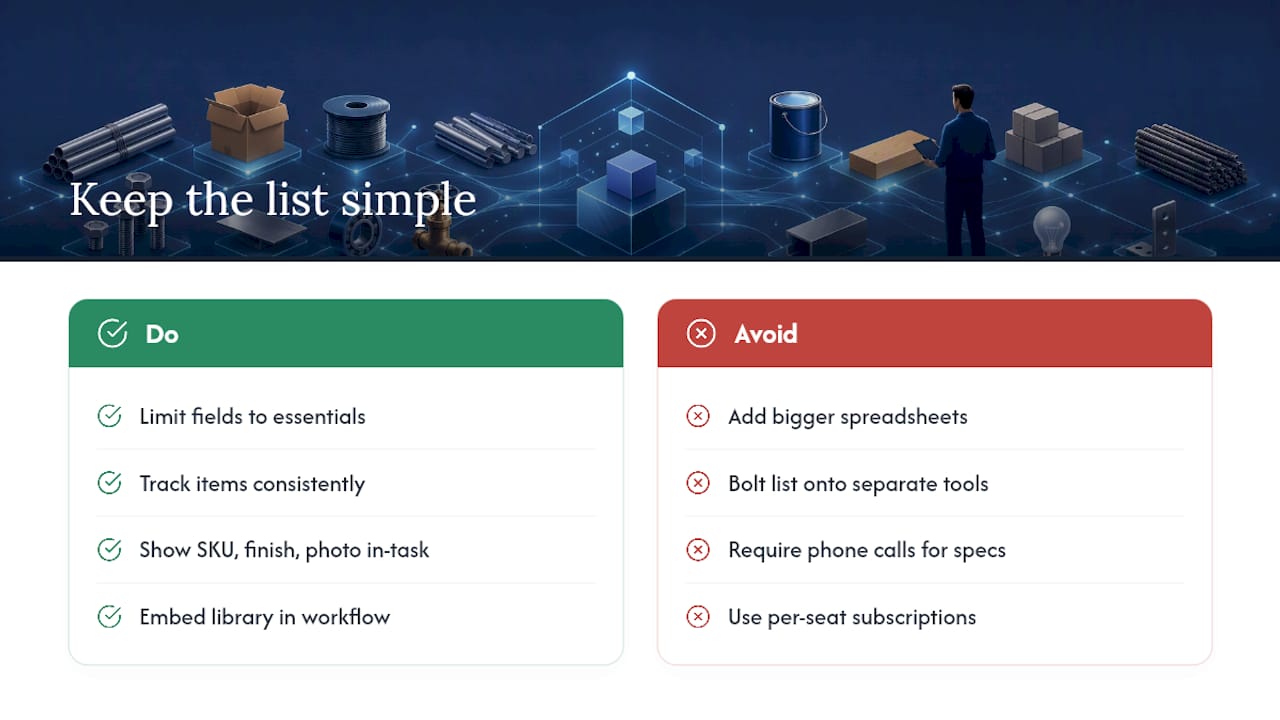
- Read-only spec sheets attached to the specific task, not a separate document a tech has to hunt down.
- Vendor-specific packets sent as a link, so a carpet crew or plumber gets the exact spec without needing a login or app account.
- Photo proof required only where it matters (smoke detector replacement dates, carpet condition at move-out) and optional everywhere else, so documentation doesn't become busywork.
Using the List During an Active Turn
The materials list only earns its keep when it's consulted at every stage of the turn, not just at kickoff. Map it to your existing timeline: pre-move-out estimate, move-out inspection, mid-turn check, and final inspection before make-ready.
At each inspection point, every flagged defect needs one of three outcomes:
- Replace with the exact SKU from the materials list, no substitutions.
- Use a pre-approved alternate already logged in the alt-options field.
- Escalate with notes and a photo when neither option applies, so a manager decides instead of a tech guessing.
That third option matters more than people think. A digital-first inspection process that captures photo evidence and timestamped notes at Move-Out, Mid-Turn, and Move-In builds an auditable record you can actually use later, whether that's for a security deposit dispute or a warranty claim, according to Moved's turnover SOP. Attach the photo directly to the inspection item, not to a separate folder, and the timestamp does the rest of the work automatically.
Room-by-room inspection templates also help separate routine wear-and-tear repairs from capital expenditure work, a distinction Buildium's tenant turnover checklist flags as one of the most commonly missed steps in a rushed turn.
Stocking Rules That Actually Cut Turnaround Time
Par levels aren't just an inventory exercise. Get them wrong and a $12 filter delay turns into a three-day vacancy extension.
- Set par levels on consumables (filters, bulbs, caulk, smoke detector batteries) based on your typical monthly turnover volume, not an unverified estimate.
- Buy small repair parts in bulk. Door knobs, outlet covers, and light bulbs bought in bulk can save 30 to 50 percent over single-item purchases, according to Dropcurb's make-ready checklist.
- Pre-book key vendors the moment you receive notice to vacate, not after trash-out. Waiting until the unit is empty to call a carpet crew can cause standard turnaround times to extend significantly.
Pro Tip: Standardize your paint color across every unit type you manage. One SKU means one supplier relationship, one bulk order, and zero mid-turn scrambles to match a discontinued shade.
Keeping the List Audit-Ready Over Time
A materials list that never changes is either perfectly maintained or quietly ignored, and it's usually the second one. Specs shift as manufacturers discontinue products, so build version control in from day one.
- Log every change with who made it, when, and why, not just the new SKU.
- Tie any spec update to the inspection or photo record that triggered it, so the unit's history stays intact.
- Assign one owner (usually the service manager) responsible for reviewing the list quarterly, not "whenever someone remembers."
Tying every spec change to a signed approval and a photo record means a security-deposit dispute months later can be settled with an unbroken trail instead of a memory contest, per Buildium's guidance on turnover documentation. If you're unsure how long to keep that trail, most operators hold onto full turn records well beyond the typical dispute window.
An Operator's Take on Keeping This List Simple
Most service managers don't fail at building a materials list. They fail at keeping it alive past month three. The binder gets updated once, then the vendor switches a lockset brand, and six months later half your units have one keyway and half have another.
The fix isn't a bigger spreadsheet. It's fewer fields, tracked consistently, and visible exactly where the work happens. When a tech can open the task in front of them and see the SKU, the finish code, and a photo without a phone call, you've eliminated the single biggest source of rework on a turn crew. That's the whole point of a Property Standards Library built into your workflow instead of bolted onto it: specs travel with the task, photo evidence attaches only where you actually need it, and the workspace runs on one flat subscription instead of a per-seat headache.
— TurnTrack Team
Put Your Materials List Where the Work Happens
TurnTrack is built around one idea: the spec should live inside the task, not in a separate document nobody opens mid-turn. The Property Standards Library stores your paint codes, filter sizes, and part numbers property by property, and links them directly into each unit's turn record so a tech pulls up the exact spec without leaving the app.

Photos stay optional and attach right to the inspection item or activity update where they matter, whether that's a smoke detector swap or a countertop repair, not forced onto every single task. Vendors get a shareable link to the spec they need without creating an account. This software runs on a workspace-level subscription with a free trial, covering the whole team you invite, currently available on iOS through the App Store. If your list still lives in a shared drive nobody checks before a walk-through, start a trial and see what changes when specs move with the work.
Templates Worth Downloading
Build your own list faster with published, room-by-room templates instead of starting from a blank sheet. Moved's multifamily move-in and move-out SOP, HD Supply's property-turns checklist PDF, and Matterport's turnover checklist guide all give practical starting points worth adapting to your own unit types.
Sources
- Property turns checklist (HD Supply / Chadwell-style PDF)
- Apartment Turnover Checklist for Maintenance Teams | Matterport