
A property standards rollout means building a Property Standards Library, a single source of truth for paint codes, filter sizes, fixture models, and vendor contacts, getting it in front of your make-ready team. The immediate first action is narrow: pick your most common unit type, write one prioritized spec sheet for it, and run a pilot turn against it this week. A tool like TurnTrack can hold and share that library once it exists.
TL;DR:
- Most rollout failures stem from ambiguous specs like vague paint descriptions or unspecified fixture standards, causing rework disputes.
- Pilots should focus on one or two property types with clear milestones, roles, and approval rules, rather than full-scale mandates.
- Share the standards through simple, accessible links, QR codes, or embedded attachments, with a single page per spec to enable instant field access.
- Verification relies on structured inspections with photo evidence tied to each task, helping prevent repeat trips and speeding up deposit disputes.
- Key metrics for success include cycle time, repeat work, vendor punctuality, and quality pass rates, with focus on clarifying specs if issues arise.
Table of Contents
- What belongs in a Property Standards Library
- How do you roll out property standards step by step?
- How do you share standards with vendors and techs without extra logins?
- How do you verify and document compliance?
- Which metrics actually prove the rollout is working?
- Running a pilot turn with a Property Standards Library in TurnTrack
- What operators get wrong on their first rollout
- Start a pilot with your own Property Standards Library
- Sources
What belongs in a Property Standards Library
Most rollouts stall because "paint" or "flooring" means five different things to five different techs. The fix is an acceptance criteria line on every item, a plain statement of what passes and what triggers rework, so a tech never has to guess.
Build the library around the categories that generate the most rework disputes:
- Paint and finish: exact brand and shade, plus a rule for coats and sheen changes.
- HVAC filters: size, rating, and replacement schedule to avoid callbacks.
- Appliances and fixtures: specified model numbers per property standards.
- Flooring finish: clear guidelines on replacement versus spot-cleaning.
- Locks and keys: defined rekey standards and verification process.
- Safety checks: documented detector testing and battery dates.
- Approved vendors: contact details linked with each category for easy access.
Add optional fields where helpful, like reference photos, part numbers for ordering, cost tiers, or warranty notes. These speed up work without being mandatory.
How do you roll out property standards step by step?
Run the rollout as a pilot, not a mandate. Pick one or two properties, give yourself a four to six week window, and treat the first cycle as a feedback loop rather than a finished product.
- Assign roles before writing specs, including rollout owner, standards editor, site lead, vendor liaison, and QA verifier.
- Start turnover scheduling when notice is given, not at key return, to gain lead time.
- Set milestone dates counting backward from target move-in for clear critical path visibility.
- Define clear approval rules: auto-approve routine items; require manager approval for mid-level scope; escalate major expenditures.
- Train staff on specs before pilot, keeping it brief and clear.
Tip: Run pilots on real units to uncover spec gaps quickly.
A centralized workflow that converts inspection findings straight into assigned work orders is what keeps this pilot from becoming another spreadsheet nobody updates.
How do you share standards with vendors and techs without extra logins?
The library is worthless if only the office staff can see it. Field crews need the spec at the exact moment they need it, not after a phone call to the office.
- Read-only links: send a spec sheet URL that opens on any phone, no account creation required.
- QR codes on work orders: a tech scans a code taped to the work order and lands directly on the relevant spec.
- Attachments inside the unit-turn record: keep the spec tied to the specific turn so nobody's referencing last year's version.
- Vendor contact embedded in the turn itself: if the carpet crew is needed, their number sits right there instead of buried in a separate contact list.
Keep every spec sheet to a single scannable page. If a vendor genuinely can't meet a spec, for example a discontinued paint shade, give them one clear line to follow: "flag it in the activity feed and hold for manager approval," not a phone tree. Where vendor accounts aren't practical, a simple acknowledgment, a signed or timestamped confirmation that they viewed the spec, gives you an audit trail without forcing anyone through a login screen.
How do you verify and document compliance?
Verification has to be a barrier, not a suggestion. A structured move-out inspection that gets converted into scoped work orders, then closed out with a final check against that same list, is what actually prevents repeat trips.
Run three checkpoints on every turn:
- Move-out inspection: document unit condition before any work starts.
- Mid-turn check: catch scope creep or missed items while there's still time to fix them cheaply.
- Final verification: walk the same checklist used at move-out, and don't sign off until it matches.
Photos should be date-stamped and tied to the specific task, wide shot plus a close-up, and required only where a property genuinely needs proof, like a smoke detector swap with the date written on the unit. A status of "Ready" should require passing that final verification step first; "Assigned," "In progress," and "Blocked" all sit before it. Photo and receipt records also resolve deposit disputes faster, since nobody's relying on memory six weeks later.
Which metrics actually prove the rollout is working?
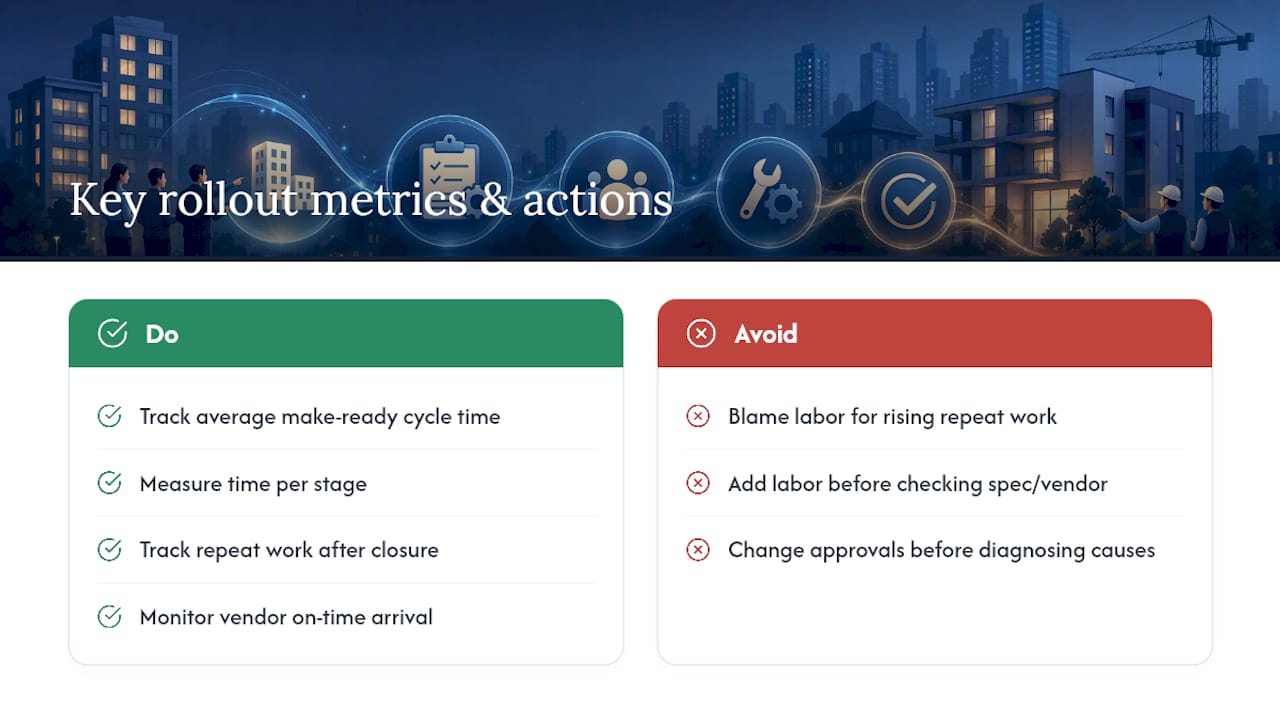
Key metrics to track are average make-ready cycle time, time per stage, and repeat work after closure, with rising repeat work indicating spec ambiguity rather than labor issues. Monitor vendor on-time arrival, quality inspection pass rate, and no-show rate with clear data. If cycle time worsens in any stage, first verify spec clarity and vendor assignment before adding labor or adjusting approvals.
Running a pilot turn with a Property Standards Library in TurnTrack
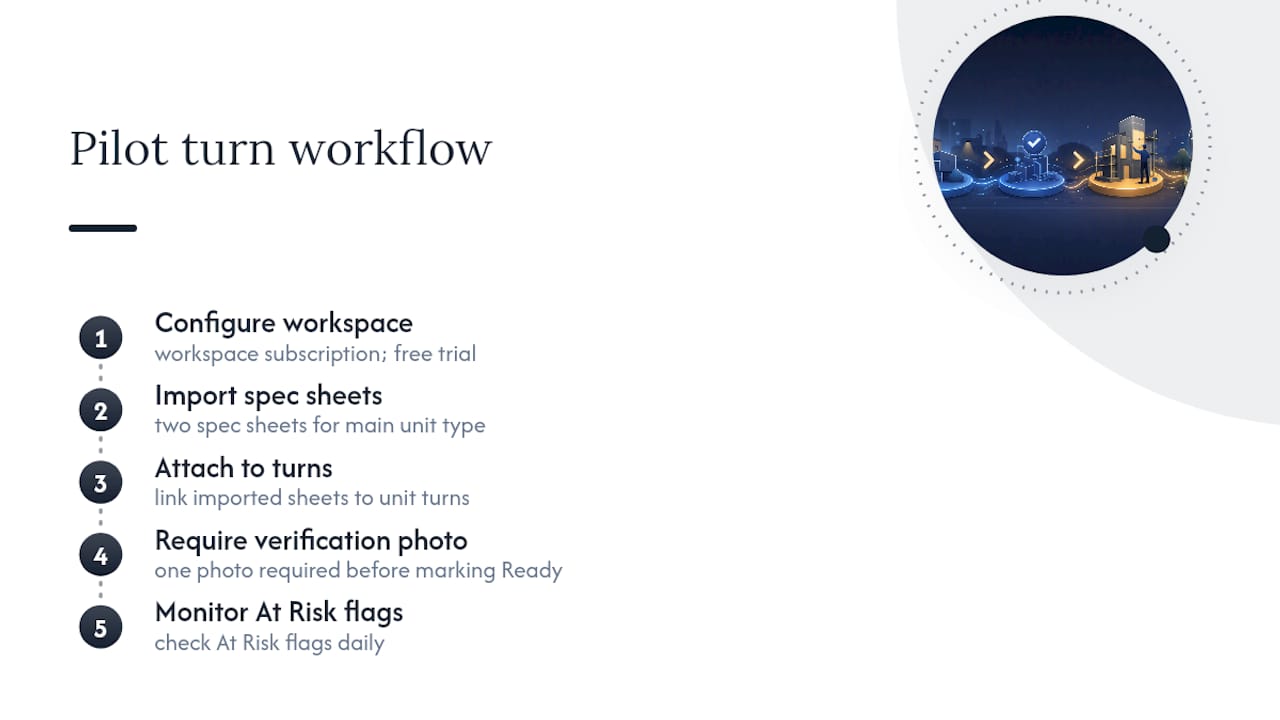
Here's how the pieces map onto an actual tool. TurnTrack stores spec sheets and tracks unit turn timeline status with coded stages. Vendor contacts are embedded per turn; updates and photos log in the activity feed. A recommended pilot imports two spec sheets for your main unit type, attaches them to turns, requires one verification photo before marking Ready, and monitors At Risk flags daily. TurnTrack focuses on make-ready workflows and unit turns, operating independently from lease or rent management. The software subscription is workspace-based with a free trial, presently on iOS, with Android coming soon.
What operators get wrong on their first rollout
Most first attempts fail on ambiguous scope, not lazy execution. Techs guess when a spec sheet says "standard paint" instead of naming the shade. Skipping the pilot and rolling out to every property at once means you scale a flawed spec sheet fast. Fix it by giving every item one acceptance criterion, requiring one verification step before "Ready," and keeping specs to a single scannable page. Train on real turns, not mock ones.
— TurnTrack Team
Start a pilot with your own Property Standards Library
TurnTrack provides multifamily operators with coordination support similar to that of larger platforms, aiming to simplify the unit turnover process. You get a Property Standards Library your team can actually reach in the field, vendor contacts sitting inside the turn instead of a separate contact list, and photo proof that's optional where it makes sense rather than forced on every single task.

Starting a pilot takes less time than writing the spec sheet itself. Open a free trial, set up one pilot property, load two spec sheets for your most common unit type, and run it against a real turn already on your schedule. The subscription is workspace-level with monthly billing, covering invited team members, and the app is available on iOS through the App Store. If you want a fuller walkthrough of what the app tracks stage by stage, the make-ready execution guide covers the workflow in more depth.
Sources
- Article excerpt on maintenance management and scope ambiguity
- Make-Ready Maintenance Workflow for Property Managers | TaskEstate
- The Rental Turnover Playbook: Turn a Unit Between Tenants Without Losing a Month (2026) · DiscoveryMark