
Keep routine turn documents for 1 to 7 years depending on type, hold deposit and photo evidence at least 4 years where laws like California's AB 2801 apply, and retain anything tied to habitability or structural work indefinitely. That's the whole rule in one line. The part operators get wrong isn't the timeline. It's applying it inconsistently across units, techs, and software.
- Routine work orders and cleaning notes: 1 to 3 years
- Move-in/move-out inspections, photos, deposit records: 4 to 7 years
- Habitability, structural, or warranty-related evidence: indefinitely, until resolved
Assign one retention owner, and apply the longest applicable rule. If a file touches two retention categories, it lives under whichever period is longer, and one person on your team decides when it's actually safe to delete. Skip that step and you get inconsistent deletion, which looks a lot like tampering to an attorney, an auditor, or a judge, even when nothing shady happened.
Key Takeaways
Retention length matters less than consistency: apply the longest applicable rule, assign one owner, and document deletions the same way every time.
| Point | Details |
|---|---|
| Default retention windows | Keep routine files 1 to 3 years, inspections and deposit photos 4 to 7 years, and habitability or structural evidence indefinitely. |
| Follow the longest rule | When a file fits two categories, retain it for whichever period is longer, not the shorter default. |
| Start the clock correctly | Use the move-out, invoice, or completion date, not the file's creation date, to trigger retention. |
| Build an audit packet | Pair the lease, inspections, deposit statement, invoices, and activity timeline into one exportable file per closed turn. |
| Automate the trail | TurnTrack's timeline, inspections, and Property Standards Library generate timestamped records as a byproduct of daily turn work. |
Table of Contents
- Maintenance Records Retention Schedule by Document Type
- How Do You Turn a Schedule Into an Enforceable Policy?
- What Makes a Maintenance Record Actually Audit-Ready?
- How TurnTrack Supports Retention Without Extra Admin Work
- What Operators Get Wrong About Retention
- Put Your Retention Policy Into an App, Not a Spreadsheet
- Where to Go for Legal and Operational Specifics
- Frequently Asked Questions
- Sources
Maintenance Records Retention Schedule by Document Type
There's no single answer to how long to keep records because not every document carries the same risk. A cleaning checklist and a foundation repair invoice don't belong in the same bucket, and treating them the same is how operators end up either drowning in old paperwork or missing the one file they actually needed.
Move-in and move-out inspections, plus deposit photos, need 4 to 7 years on the shelf. California's AB 2801 sets a hard floor here: it requires a three-point photo chain (pre-move-in, post-move-out before repairs, post-repair) and a 4-year retention period for that documentation. Even outside California, treat 4 years as the practical minimum, because deposit disputes and small-claims filings routinely surface well after move-out.
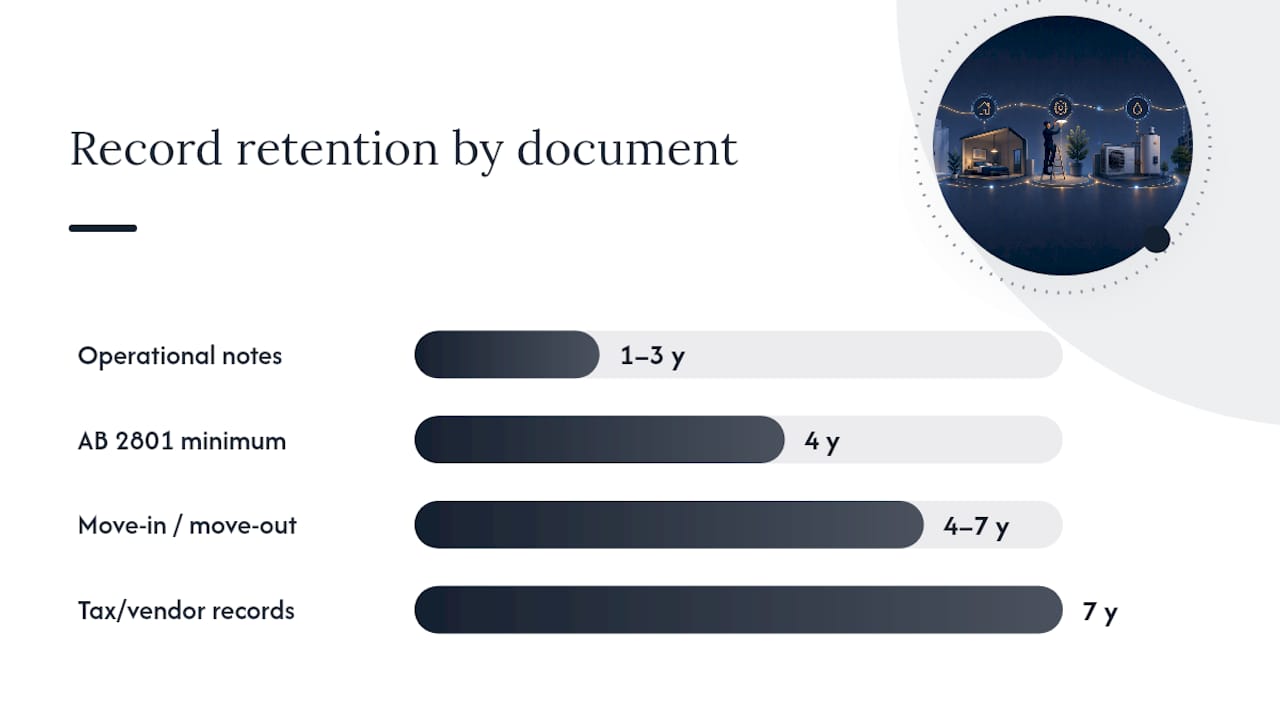
Vendor invoices, maintenance receipts, and anything tax-relevant should sit in your files for several years. That number isn't arbitrary. It matches the IRS audit window and covers the extended statute-of-limitations scenarios that come up with rental property record keeping. If a repair invoice also counts as a capital improvement for tax purposes, that 7-year clock protects you on two fronts at once.
Warranties and anything touching structural or habitability issues don't get a fixed end date at all.
- Manufacturer warranties: keep until expiration, then archive rather than delete
- Structural repairs, major system replacements, engineering reports: retain permanently
- Habitability complaints and their resolution documentation: keep until the issue is fully closed, then treat as permanent if litigation risk existed
Short-lived operational notes, like a tech's daily punch list update or a routine filter swap with no incident attached, only need 1 to 3 years unless a dispute or insurance claim pulls that file into a longer category. And any open dispute, insurance claim, or warranty issue puts a legal hold on deletion for every related document, no matter what the calendar says.
How Do You Turn a Schedule Into an Enforceable Policy?
A retention schedule on paper doesn't help you if nobody applies it the same way twice. Turning the schedule above into an actual policy means assigning categories, owners, and triggers before you assign a single delete button to anyone.
- Sort documents into five categories: routine turn items, tax and finance, habitability/structural, warranties, and vendor files. Each category gets its own retention owner, typically the service manager for routine and habitability files, and the property manager or bookkeeper for tax and finance.
- Set the trigger date for each category. Deposit and inspection files start their clock on the move-out date. Invoices start on the invoice date. Warranty files start on the completion or install date, not the purchase date. Getting this wrong is the single most common retention mistake: teams often start the clock when a file was created instead of when the underlying event actually happened.
- Build in deletion controls. That means read-only archives for closed tenancies, a required second approval before permanent deletion, and a documented deletion log that records what was removed, when, and by whom.
- Schedule a review cadence. Quarterly is enough for most portfolios. Annually is the outer limit before old files pile up unnoticed.
- Handle legacy records with a clean-forward approach. Rather than purging years of old files at once, pilot the new policy on one property, apply it going forward, and archive (don't immediately delete) anything predating the rollout.
Pro Tip: Don't try to retrofit retention rules onto five years of scattered spreadsheets in one weekend. Pick your newest property, apply the policy from today forward, and let older files age out naturally as their own retention windows close.
The categorization approach matters more than the specific years you choose. Records-management specialists generally recommend separating documents by risk profile instead of applying one universal timeline, because a single blanket rule either destroys evidence too early or buries your team in files nobody needs anymore.
What Makes a Maintenance Record Actually Audit-Ready?
Retention length only protects you if you can find the file when you need it. A 7-year-old invoice sitting in an unlabeled folder on a departed manager's laptop isn't a retained record. It's a liability with a due date.

Searchable digital storage beats physical filing on every front that matters. Name files by unit number, date, and tenant link at minimum, and prefer systems that generate immutable timestamps and an exportable audit log automatically, rather than relying on someone to manually note the date. Manual systems tend to break down once a portfolio crosses roughly 6 to 10 units, which is exactly when digitization stops being optional.
Photo chains need their own discipline. Label every image as move-in, pre-repair, or post-repair, attach it directly to the relevant inspection or work order, and keep the original file rather than a screenshot or a compressed copy pulled from a text thread.
A defensible audit packet for any closed unit turn should include:
- The signed lease
- Move-in inspection with photos
- Move-out inspection with photos
- Itemized deposit statement
- Repair invoices with vendor identity and certificate of insurance where relevant
- The full activity or timeline record for that turn
Back up every archive off-site or in the cloud, and make sure closed-tenancy packets export cleanly. If your attorney needs a file for a deposit dispute filed two years after move-out, "let me dig through old emails" is not an acceptable answer.
How TurnTrack Supports Retention Without Extra Admin Work
Most of the retention practices above only work if documentation happens automatically, as a byproduct of the turn itself, instead of as a separate paperwork chore someone has to remember to do.
- The turn timeline (Move-Out → Tech Start → Cleaners → Carpet → Inspection → Make-Ready) creates a timestamped activity trail without any extra data entry.
- Move-Out, Mid-Turn, and Move-In inspections with optional photos build the exact photo chain that AB 2801-style rules require.
- The Property Standards Library stores paint codes, filter sizes, and vendor specs in one place, which cuts down on the disputes that generate legal-hold files in the first place.
- Vendor coordination lives inside the same turn record, so an invoice and its related photos attach to one file instead of scattering across email and text.
The best retention policy is one that produces its own evidence as a side effect of normal work, not one that requires someone to remember to file something after the fact.
If you're rolling this out for the first time, pilot it on one property before pushing it portfolio-wide. It's not a property management system, and it won't touch your leases or accounting, but it will give you a clean, timestamped record of every turn from day one.
What Operators Get Wrong About Retention
The trap isn't picking the wrong number of years. It's inconsistent deletion and photos scattered across three techs' phones. The fix is boring: one retention owner, timestamped photos at every move-out, and a pilot property before you touch the rest of the portfolio.
Put Your Retention Policy Into an App, Not a Spreadsheet
A written retention policy is only as good as the documentation it's built on, and that's where most spreadsheets and shared drives quietly fail. TurnTrack gives every unit turn a shared timeline and activity feed that timestamps updates automatically, so the audit trail your policy requires gets built while the work happens instead of reconstructed later from memory and text messages.

Move-Out, Mid-Turn, and Move-In inspections walk area by area on a phone and attach optional photos directly to each stage, which is exactly the kind of photo chain that holds up during a deposit dispute or an owner audit. The Property Standards Library keeps your paint codes, filter sizes, and vendor specs in one place so techs stop guessing and stop generating the small disputes that turn into long retention headaches.
TurnTrack runs as a workspace-level subscription at $14.99 a month with a free trial, available now on iOS through the App Store, with Android arriving soon. It's not a replacement for your lease or accounting software. It's the piece that documents the turn itself. Start a free trial on TurnTrack's site and pilot it on one property before rolling it out across your portfolio.
Where to Go for Legal and Operational Specifics
Consult your state's tenant-deposit statutes and a qualified attorney for jurisdiction-specific rules. For tax audit risk, deposit documentation standards, and risk-based record categorization, see the sources cited throughout this article, including Property Aura and EisnerAmper.
Frequently Asked Questions
How long should I keep maintenance records for a rental unit? Keep routine maintenance notes 1 to 3 years, work orders and invoices tied to tax filings for 7 years, and anything involving habitability or structural repairs indefinitely until the matter is fully resolved.
What's the retention rule for move-out inspection photos? Retain move-out inspection photos at least 4 years to match standards like California's AB 2801, though many operators default to 7 years to align with tax-related recordkeeping.
Who should own maintenance records retention at a property? Assign one retention owner per document category, usually the service manager for turn and habitability files and the property manager or bookkeeper for tax-related files, so deletion decisions stay consistent.
Does an open dispute change how long I keep a record? Yes. Any open dispute, insurance claim, or warranty issue places a legal hold on the related file, which suspends normal deletion timelines until the matter closes.
Can I replace maintenance spreadsheets with dedicated software? Yes, and most operators managing more than a handful of units find spreadsheets break down as portfolios grow. A dedicated unit-turn workspace like TurnTrack builds the timestamped audit trail automatically instead of relying on manual entry.
Sources
- Rental Property Record Keeping: What Documents Landlords Must Keep (and for How Long) | Property Aura
- California AB 2801 + AB 414: Security Deposit Documentation Standard 2026 | Revoscape
- EisnerAmper insights: Real estate transactions guide